




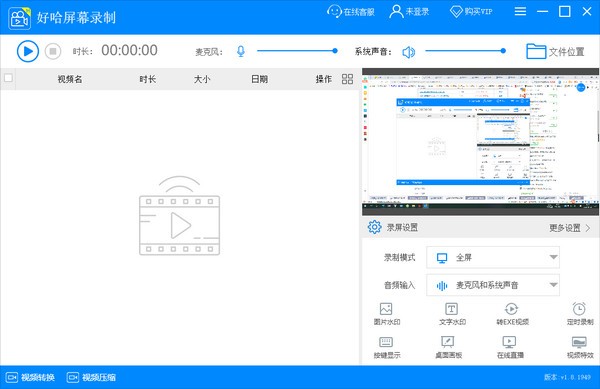
Haoha screen recordingSoftware Highlights
Education field
Record online courses and teaching demonstrations, support brush marking and area recording, and improve students' attention.
Games and entertainment
Capture exciting game moments and support picture-in-picture and high-definition recording to meet game commentary needs.
business meeting
Record meeting content and personal presentations, and support silent recording and background operation to ensure privacy and efficiency.
content creation
Produce software tutorials and product demonstrations, support video editing and format conversion, and simplify post-production processes.
Live streaming
Live broadcast while recording the screen, supports multi-platform push streaming, and is suitable for game anchors and online educators.
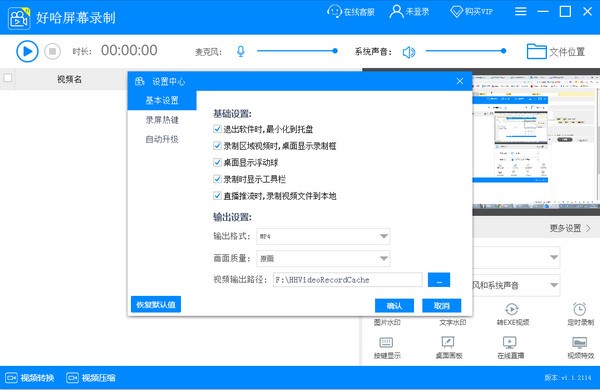
Haoha screen recordingSoftware function
Flexible recording mode
Full-screen recording: Capture the entire screen content with one click, suitable for online classes, meetings and other scenarios.
Area recording: Customize recording in any area, accurately control the picture range, and avoid unnecessary information interference.
Window recording: Lock a specific program window and continue to record the target content even if you switch interfaces.
Scheduled recording: Set the recording time and automatically start and end to avoid missing important moments.
Camera recording: Supports picture-in-picture mode, synchronously records camera images, suitable for game commentary and tutorial demonstrations.
Audio recording and optimization
Supports simultaneous recording of system sounds and microphones to meet commentary, narration and other needs.
Provides microphone noise reduction function to effectively filter environmental noise and improve sound quality and clarity.
Video editing and processing
Editing and merging: Supports cropping and splicing of video clips, making basic editing easy.
Compression and conversion: Built-in compression function reduces file size, supports MP4, AVI, EXE and other format conversions to meet the needs of different platforms.
Add watermark: Customize picture or text watermark to protect copyright or add personalized logo.
Live streaming function
LAN live broadcast: Generate an IP address or QR code under the same Wi-Fi, and viewers can scan the code to watch the live broadcast. It is suitable for desktop sharing and teaching demonstrations.
Platform push: Supports push to mainstream live broadcast platforms such as Xigua Video, Huya, and Douyu to meet professional live broadcast needs.
HD quality and smoothness
Supports high-definition recording, the picture is clear and smooth, and the audio and video are synchronized without delay.
Optimize the recording engine to reduce CPU usage and ensure long-term recording stability.
Haoha screen recordingSoftware features
Compatibility and stability
Adapted to Windows Vista to Windows 11 systems, covering mainstream devices.
Fix high DPI display issues to ensure the interface is clear and blur-free.
Ease of operation
The interface design is simple and intuitive, and recording parameters can be set with one click, making it easy for novices to get started quickly.
Supports shortcut key operations (such as F9 to start/end recording) to improve recording efficiency.
Green safety
No bundled installation, no advertising interference, pure use experience.
Free download, no function restrictions, meeting long-term use needs.
Haoha screen recording FAQ
No system or microphone sound
Cause: The audio device is not recognized correctly or is set incorrectly.
Solution:
Check your system sound settings to make sure the default recording/playback device is the microphone/speaker currently in use.
In Haoha Screen Recording, go to "Settings - General Settings" and select the correct "Sound Source" (such as microphone, system sound or mix).
Update the sound card driver to resolve compatibility issues.
Haoha screen recording update log
1. The pace of optimization never stops!
2. More little surprises are waiting for you to discover~
Huajun editor recommends:
Haoha screen recording software takes up little memory, has stable performance, is free of any bundles, is green and safe, and is truly a conscientious software! This site also hasZhuanzhuan Master screen recording software (video recording),Minimal screenshot tool (FastStone Capture),Screen recording software,B station recorder,zh-u1led display control software, available for you to download!




















Useful
Useful
Useful