

If you are looking for software to use, go to Huajun Software Park! software release AI product list

Hello, if there is a need for software inclusion, please package the software and attach the software name, software introduction, software-related screenshots, software icon, soft copy, business license (if you do not have a business license, please provide the front and back of the corresponding developer ID card and a photo of yourself holding the ID card), and send it to email http://softwaredownload4.com/sbdm/user/login

Close >>

Send to email:news@onlinedown.net

Close >>

Location: Home pagePC softwaremedia toolsVideo recording software SPCAM (simplified screen recording software)
SPCAM (simplified screen recording software)

SPCAM (simplified screen recording software) v1.0 free version

QR code
  • Software licensing: shareware
  • Software size: 8.0MB
  • Software rating:
  • Software type: Domestic software
  • Update time: 2024-12-30
  • Application platform: win7 and above
  • Software language: Simplified Chinese
  • Edition: v1.0 free version

Download the service agreement at the bottom of the page

Software introduction Related topics FAQ Download address

Recommended for you:- Record screen

Basic introduction
SPCAM (simplified screen recording software) segment first LOGO
SPCAMIt is a 1080P full-screen recording software created by netizens. It is very simple to operate and supports shortcut key operations throughout. The recorded video is clear and takes up little space. The software interface is simple, pure green and has no ads. It is completely free to use.Huajun Software Park provides you with SPCAM download, come and experience it!


SPCAM (simplified screen recording software) screenshots

SPCAMSoftware function

The main functions implemented by the software. Screen recording, camera, audio capture, the most basic functions. Very simple with few buttons!

There is still an imperfection in this program, that is, there are actually two types of audio capture. One is the system output audio, and the other is the recording device (microphone).

What is captured is the output device. Hard-coded capture of 60 frames, 5000 baud rate. In addition, I wrote a WeChat anti-compression function, which also has shortcomings. That is anti-compression video, which cannot be used on Douyin.

Support win8 win10 system.

SPCAM Instructions for Use

F2 key: Switch between minimize and normalize.

F3 key: Record screen or pause screen recording and continue screen recording. Pause is not the end!

F4 key: End screen recording and exit the software.

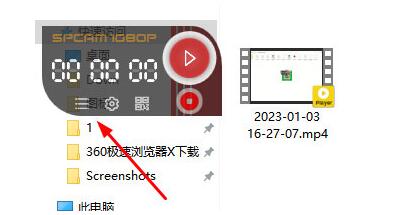
After recording, click on the file list to view the recorded video.

SPCAM update log

Working day and night just so you can be happier

Mummy, Mummy, coax~all the bugs are gone!

Huajun editor recommends:

Say goodbye to junk software, SPCAM (Streamlined Screen Recording Software) is a green and safe software, the editor has personally tested it! Our Huajun Software Park serves you wholeheartedly. There are alsoZhuanzhuan Master screen recording software (video recording),Aoruan screen recording,Minimal screenshot tool (FastStone Capture),Screen recording software,zh-u1led display control software, available for you to download!

FAQ

SPCAM (simplified screen recording software)

SPCAM (simplified screen recording software) v1.0 free version

close

