




Highlights of Jinzhou Screen Recorder
HD quality and smoothness
Resolution and frame rate: Supports recording at up to 4K resolution (3840×2160), with optional frame rates of 15fps, 30fps, and 60fps to balance image quality and file size.
Game optimization: Automatically identify mainstream games (such as "League of Legends" and "Genshin Impact"), turn on the exclusive recording mode with one click, and support high frame rate (such as 60fps) recording to ensure smooth game screen without lag.
Hardware acceleration: Provides three modes: "High Performance", "Balanced" and "Power Saving", which automatically adjusts resource usage according to computer configuration to avoid lagging during recording.
Multi-level image quality adjustment
It supports original painting, high-definition, ultra-clear and other quality options to meet the needs of professional video production.
Real-time key and mouse effects
Button display: Real-time display of button operations during recording, suitable for teaching demonstrations or product explanations.
Mouse effects: Display mouse click animations (such as circles, highlights), customize mouse pointer styles (such as amplification, color change), and improve the clarity of explanations.
Jinzhou Screen Recording Master software functions
Flexible recording in multiple modes
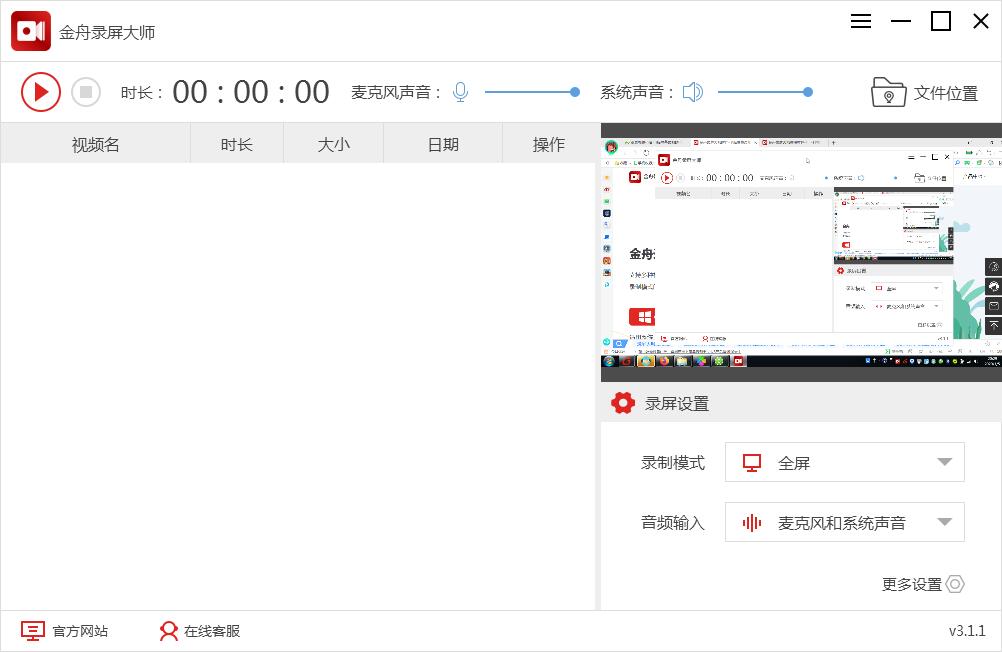
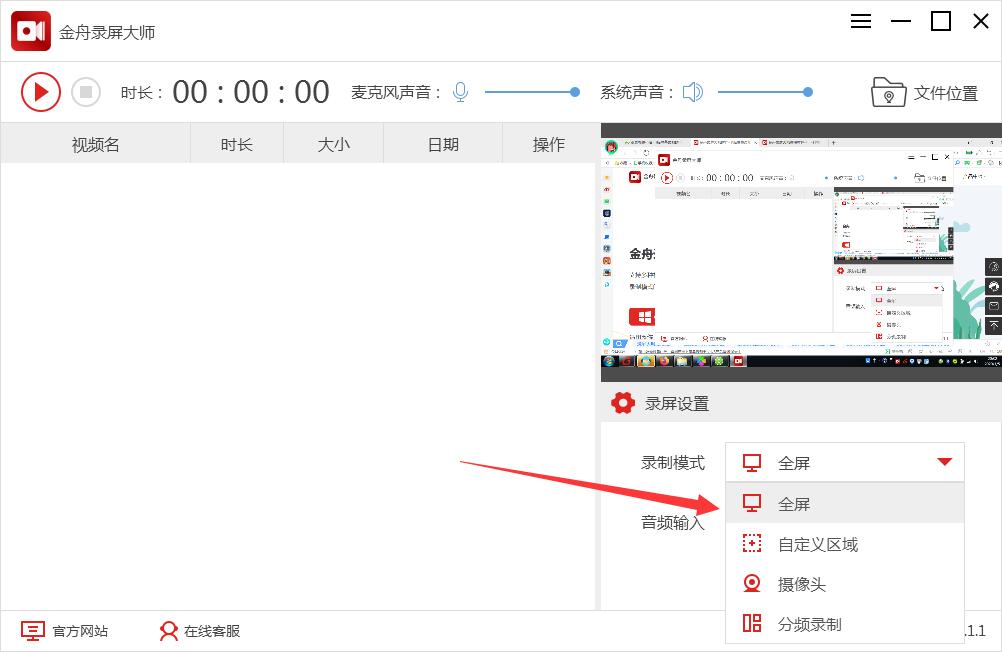
Full-screen recording: Capture the entire screen content with one click, suitable for recording full-screen scenes such as online courses, movies, and live broadcasts.
Regional recording: Customize any area of the screen (such as a specific window, rectangular frame) to accurately record local content and avoid interference from irrelevant information.
Game recording:
Supports high frame rate (such as 60fps) recording to ensure smooth game screen without lag.
Automatically identify mainstream games (such as "League of Legends" and "Genshin Impact") and enable exclusive recording mode with one click.
Camera recording:
Record camera footage separately (such as portraits, handwriting tablets), or record with screen content in the same frame (picture-in-picture mode).
Supports adjusting the size, position and transparency of the camera window to adapt to different video styles.
Sound recording:
System sound: Record computer internal audio (such as video, music, game sound effects).
Microphone: Record vocal narration or external sounds.
Mixed recording: record system sound + microphone at the same time to achieve synchronous collection of "background sound + human voice".
High-quality output and format support
Resolution and frame rate:
Supports recording at up to 4K resolution (3840×2160) to meet professional video production needs.
The frame rate can be selected from 15fps, 30fps, or 60fps to balance image quality and file size.
Output format:
Video: MP4, AVI, WMV, FLV, MOV, GIF (animated graphics).
Audio: MP3, WAV, AAC, OGG (when recording sound only).
Enterprise version extension: supports MKV, WebM and other formats, and is adapted to more editing tools.
Intelligent recording and scheduled tasks
Scheduled recording:
Set the start/end time, and the software will automatically start or stop recording (such as recording a live broadcast in the early morning).
Supports weekly cycle timing (such as recording courses at 10 a.m. every Monday to Friday).
Segment recording:
Automatically split videos by file size or duration (e.g. save as a file every 10 minutes), making it easier to manage long-term recordings.
Shortcut key operations:
Customize global shortcut keys (such as F7 to start/pause, F8 to stop) for quick control even in full-screen mode of other applications.
Features of Jinzhou Screen Recording Master software
Real-time annotation and interactive enhancement
Brush tool:
During the recording process, use a brush to mark key points (such as arrows, text, highlighted areas) on the screen, which is suitable for teaching demonstrations or product explanations.
It supports multiple colors, brush thicknesses and eraser functions, and the annotation content can be saved with the video.
Mouse effects:
Display mouse click animations (such as circles, highlights) to guide viewers to follow the steps.
Customize the mouse pointer style (such as magnification, color change) to improve the clarity of explanations.
Video editing and post-processing
Basic clipping:
After the recording is completed, you can crop video clips, merge multiple files, and adjust the playback speed directly within the software.
Add subtitles, watermarks (text/pictures), and background music to enrich video content.
Advanced filters:
Apply filters such as color correction, blur, and sharpening to optimize video quality.
Enterprise version features: Supports professional editing such as green screen keying and picture-in-picture synthesis.
Exclusive optimization for game recording
Performance mode:
It provides three modes: "High Performance", "Balanced" and "Power Saving", which automatically adjusts resource usage according to computer configuration to avoid lagging during recording.
Live streaming:
Directly push the recorded footage to live broadcast platforms (such as Douyin, Bilibili), supporting RTMP protocol, without the need for additional tools.
Game highlights:
Automatically identify exciting operations in the game (such as pentakills and clearance), generate short video clips and save them.
Multi-device collaboration and cloud synchronization
Mobile phone screencast recording:
Connect your phone via WiFi or USB, project your phone screen to your computer and record it (requires Jinzhou screen projection tool).
Supports Android/iOS devices and adapts to different brands of mobile phones.
Cloud storage backup:
Exclusive for Enterprise Edition: Recorded files are automatically uploaded to storage services such as Alibaba Cloud and Tencent Cloud to prevent local data loss.
Frequently Asked Questions about Jinzhou Screen Recorder
Recording video freezes or drops frames
Problem performance:
During the recording process, the screen freezes and delays, or the generated video has frame drops.
This is especially noticeable when recording at high resolutions (like 4K) or high frame rates (like 60fps).
Reason analysis:
Insufficient hardware performance: CPU/GPU cannot encode high-load video in real time.
Background programs occupy resources: browsers, games and other programs occupy a large amount of memory or CPU.
The recording parameters are too high: the resolution, frame rate, and bit rate settings exceed the hardware capabilities.
Solution:
Reduce recording parameters:
Adjusting the resolution from 4K to 1080p reduces the frame rate from 60fps to 30fps.
The bit rate is recommended to be set to 2000-5000 Kbps (depending on content complexity).
Close background programs:
Close non-essential software (such as Chrome, Steam) before recording.
Enable hardware acceleration:
Check "GPU acceleration" in the settings of Jinzhou Screen Recorder (requires graphics card support, such as NVIDIA NVENC/AMD VCE).
Change recording mode:
Try "Game Mode" (optimized for highly dynamic scenes) or "Normal Mode" (balanced image quality and performance).
Jinzhou Screen Recorder update log
Sweep the bug out and carry it out to the end
Optimize user feedback issues and improve detailed experience
Huajun editor recommends:
Don’t miss it when you pass by. If you miss Jinzhou Screen Recorder, you will never experience such a good service again. This site also recommends to youZhuanzhuan Master screen recording software (video recording),Aoruan screen recording,Minimal screenshot tool (FastStone Capture),Screen recording software,B station recorder










Useful
Useful
Useful