If you are looking for software to use, go to Huajun Software Park! software release AI product list

Hello, if there is a need for software inclusion, please package the software and attach the software name, software introduction, software-related screenshots, software icon, soft copy, business license (if you do not have a business license, please provide the front and back of the corresponding developer ID card and a photo of yourself holding the ID card), and send it to email http://softwaredownload4.com/sbdm/user/login

Close >>

Send to email:news@onlinedown.net

Close >>

Location: Home pagePC softwaremedia toolsVideo recording software D3DGear (game recording software)
D3DGear (game recording software)

D3DGear (game recording software) v5.00.2157 multi-language version

QR code
  • Software licensing: free software
  • Software size: 19.75MB
  • Software rating:
  • Software type: Domestic software
  • Update time: 2024-12-30
  • Application platform: WinAll
  • Software language: Simplified Chinese
  • Edition: v5.00.2157 Multi-language version

Download the service agreement at the bottom of the page

Software introduction Related topics FAQ Download address

Basic introduction
D3DGear (game recording software) segment first LOGO
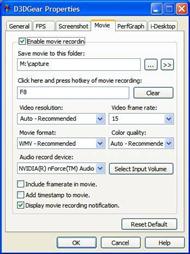
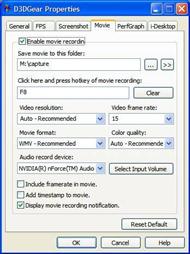
D3DGear (game recording software) is the fastest and best computer game screen recording software in the world. It can completely capture the screen of computer games and record the game process into high-definition movies. D3DGear has no or minimal impact on PC game speed and frame rates. The movies recorded by D3DGear are of very high quality and take up little hard drive capacity. D3DGear (game recording software) recording also supports Face Camera image overlay and Push-To-Talk manual voice recording. D3DGear is the world's fastest and best computer game recording software. D3DGear (game recording software) is also the fastest and best computer game live streaming software in the world. It can completely capture the screen of computer games and live broadcast the game process to today's popular game live broadcast platforms, such as twitch.tv and ustream.tv game live broadcast platforms. D3DGear is very fast, easy to use and very stable. It can work normally even on low network speeds. D3DGear (game recording software) live broadcast also supports Face Camera image overlay and Push-To-Talk manual voice live broadcast. D3DGear is the world's fastest and best computer game live streaming software. D3DGear (game recording software) is very easy to use. Users only need to start D3DGear and then open the desired computer game software. When you need to start recording or live broadcast, press the predefined hotkey, and the recording or live broadcast will start. When you need to end the recording or live broadcast, just press the same hotkey again. D3DGear (game recording software) supports almost all computer games developed with DirectX8, DirectX9, DirectX9Ex, DirectX10, DirectX10.1, DirectX11, DirectX11.1 or OpenGL API. D3DGear supports all 32 or 64-bit Windows XP, VISTA, Windows 7, Windows 8 and Windows 8.1.

FAQ

D3DGear (game recording software)

D3DGear (game recording software) v5.00.2157 multi-language version

close