



Highlights of Yunmai OCR text recognition software
Office scene
Quickly convert paper contracts, reports, invoices, etc. into editable electronic documents to reduce manual entry workload.
Supports table recognition to facilitate processing of structured information such as financial data and statistical reports.
Education scene
Identify the text content in paper materials such as books, test papers, notes, etc., and support the organization and citation of academic materials.
The mixed recognition function meets the digital needs of Chinese and English documents.
financial scene
It accurately completes invoice identification, extracts face information, and automatically completes invoice verification. It is a good helper for enterprises to process financial bills in batches.
Supports the identification and processing of various bills such as checks, money orders, delivery orders, contracts, etc.
Government affairs scene
Facilitate the digital editing of paper documents, PDF images and other materials to improve the efficiency of government affairs.
Supports the extraction and entry of ID card, passport, marriage certificate, business license and other document information to improve processing efficiency.
traffic scene
It is mainly used for license plate recognition, identifying license plate number, color, type and other vehicle characteristic information, and is used in mobile police, lane parking, parking lot management and other fields.
Yunmai OCR text recognition software functionsMulti-mode recognition support
Supports image photo recognition, batch import recognition and PDF file import recognition to meet document processing needs in different scenarios.
Photo recognition is highly adaptable to ambient light and can maintain a high recognition rate under bright or dark light conditions.
High-precision recognition capability
The advanced deep learning OCR recognition engine is used to realize text recognition in complex scenes.
It supports print and handwriting recognition, and the handwriting recognition accuracy is significantly higher than similar products (for example, the handwriting recognition rate reaches 86.18%, which is better than ABBYY TextGrabber's 2.03%).
The recognition results can be exported to editable formats such as Word, PDF, TXT, etc. to facilitate subsequent processing.
Image processing and optimization
Through technologies such as beautifying images, sharpening contrast, and reducing noise, the clarity of images is improved, thereby improving the accuracy of text recognition.
Supports image beautification processing such as cropping, tilt correction, enhanced beautification, rotation, compression storage, etc., helping to store original documents clearly.
Document management and sharing
Supports printing, internal and external sharing, double-layer PDF export, quick image retrieval and other functions.
Provide document tag management, improve document search efficiency, and facilitate the digital utilization of paper documents.
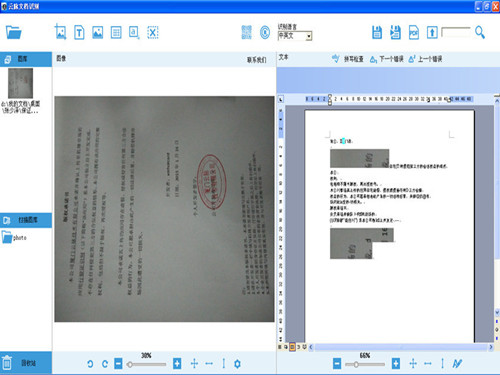
Features of Yunmai OCR text recognition software
deep learning engine
OCR technology based on deep learning can automatically locate, cut, classify, and identify text in images, achieving efficient and accurate text extraction.
Multi-platform compatibility
Supports multi-platform call identification such as Android, iOS, and Win to meet the needs of different users.
High pixel image processing
It supports image collection at up to 2560*1920 resolution, with 24-bit color, and the optimal shooting size is A3 paper to ensure clear image details.
Real-time synchronization and cloud storage
It supports real-time synchronization of documents to cloud storage. Users can access and manage files through various network devices anytime and anywhere to ensure data security and not loss.
Frequently asked questions about Yunmai OCR text recognition softwareThe image is blurry, incomplete or defaced
Cause: The shooting environment is insufficiently lit, the device has low pixels, hand shake, or the original document printing quality is poor.
Solution: Choose a well-lit environment, use high-pixel equipment to shoot, and keep it stable; perform preprocessing on images such as grayscale, binarization, and noise reduction; try to use clear, non-defaced original files for scanning or shooting.
Inaccurate text recognition or missing characters
Reason: Poor picture quality, special fonts, and complex layout.
Solution: Ensure that the picture is clear, evenly lit, and free of obstructions; for documents with special fonts or complex layouts, perform preprocessing such as cropping and rotation in advance; use Yunmai OCR's advanced functions, such as automatic correction, multi-language recognition, etc.
Yunmai OCR text recognition software update log:
1. Sweep the bug out and carry it out to the end
2. The most stable version ever
Huajun editor recommends:
Yunmai OCR text recognition software andScreenshot Master,King of Han ocr,Wink,Snapshot software HprSnap,JPG screenshot toolThese are all very good software, welcome to my site to download and experience!























Useful
Useful
Useful