





ABBYY FineReader 14 OCR text recognition software features
High-precision OCR recognition
99.8% recognition accuracy: supports 192 languages (including Chinese, English, Japanese, Korean, etc.), and can accurately identify text, tables, pictures and even fax content.
Complex layout retention: Automatically analyze the document structure and retain the original format (such as fonts, paragraphs, tables, headers and footers, etc.) to reduce post-adjustment work.
Mathematical formula and symbol support: Added single-line mathematical formula recognition function to meet the needs of academic and technical documents.
PDF processing and editing
Full-featured PDF tool: It supports editing text, modifying pictures, arranging pages, adding watermarks, filling out forms, etc. Its functions are comparable to those of professional PDF editors.
Searchable PDF creation: Convert scanned documents into high-precision, searchable PDFs for easy digital archiving and retrieval.
Security and sharing: Add password protection, digital signature or Bates number to PDF to ensure document security and compliance.
Document comparison and collaboration
Intelligent difference detection: Quickly identify differences between different versions of the same document (such as PDF, Word, scans or photos) to reduce the risk of oversight.
Annotations and comments: Add comments, annotations, or reply to other people's comments in PDF to support team collaboration and review processes.
Batch processing and automation
Hot Folder Automation Tasks: Automatically perform batch conversion, compression or optimization operations by monitoring folders to simplify repetitive tasks.
Multi-format support: input formats include PDF, TIFF, JPEG, DOCX, etc.; output formats include Word, Excel, PDF, TXT, etc. to meet diverse needs.
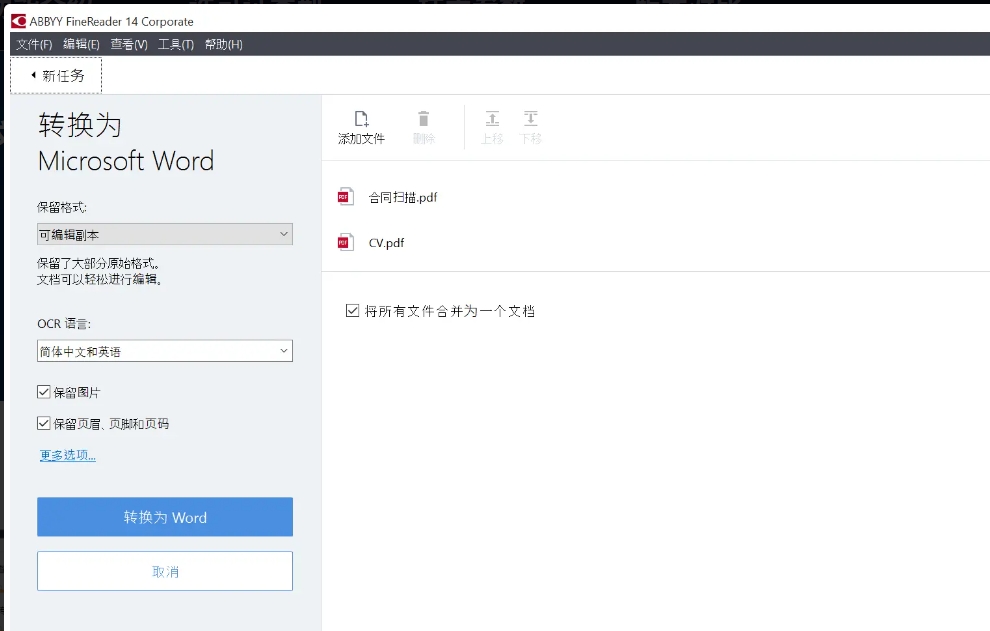
ABBYY FineReader 14 simplifies working with paper documents and PDFs by combining powerful OCR and conversion technologies with essential PDF tools.
Table analysis optimization: accurately identify complex table structures, support advanced copying and retain styles when exporting to Excel.
Image quality improvement: Automatically optimize scanned images, reduce noise, and improve recognition clarity.
Multi-language mixed recognition: Supports mixed recognition of multiple languages in the same document, adapting to international office scenarios.
Use the Hot Folder program to schedule batch processing to streamline the conversion process and keep track of documents to be converted in the Monitor folder.ABBYY FineReader 14 OCR text recognition software features
The latest ABBYY FineReader 14 has major breakthroughs in converting PDF and scanned files, editing and commenting on PDFs, comparing documents, and automatic conversion. Easily create editable digital copies of paper documents without retyping them.
Office document conversion: Quickly convert paper contracts, reports or invoices into editable Word or Excel files to improve work efficiency.
Academic research: Identify text and graphics in books and papers, and support the organization and citation of academic materials.
Legal and Finance: Compare different versions of contracts or financial statements to ensure content consistency and reduce compliance risks.
Archives management: Digitize historical paper archives and create searchable PDF libraries for long-term storage and retrieval.
On the 'PDF Tools' toolbar, click the 'Erase' button and select the area you want to erase.ABBYY FineReader 14 OCR text recognition software FAQ
What should I do if the OCR recognition effect is not good?
Check the image quality of the original file and make sure the scanned file uses a resolution of 300 dpi or higher.
For text with smaller font sizes, a resolution of 400 to 600 dpi is recommended.
Try adjusting OCR recognition settings, such as character set, recognition mode, etc.
If the file contains complex layouts or special characters, it may need to be corrected using a more advanced OCR engine or manually.
ABBYY FineReader 14 OCR text recognition software update log:
1. Fixed other bugs;
2. Optimized software compatibility.
Huajun editor recommends:
The editor guarantees that as long as you use ABBYY FineReader 14 OCR text recognition software, if you don't like it, you can come and hit me! The editor has also prepared for youScreenshot Master,King of Han ocr,Wink,Snapshot software HprSnap,JPG screenshot tool

















Useful
Useful
Useful