

If you are looking for software to use, go to Huajun Software Park! software release AI product list

Hello, if there is a need for software inclusion, please package the software and attach the software name, software introduction, software-related screenshots, software icon, soft copy, business license (if you do not have a business license, please provide the front and back of the corresponding developer ID card and a photo of yourself holding the ID card), and send it to email http://softwaredownload4.com/sbdm/user/login

Close >>

Send to email:news@onlinedown.net

Close >>

Location: Home pagePC softwareNetwork softwareNetwork assistance Network configuration tool AshampooInternet
Network configuration tool AshampooInternet

Network configuration tool AshampooInternet official version

QR code
  • Software licensing: free software
  • Software size: 6.3MB
  • Software rating:
  • Software type: Domestic software
  • Update time: 2024-12-26
  • Application platform: WinAll
  • Software language: Simplified Chinese
  • Edition: Official version

Download the service agreement at the bottom of the page

Software introduction Related topics FAQ Download address

Basic introduction
Network configuration tool AshampooInternet segment first LOGO
Ashampoo Internet AcceleratorIt is a network configuration optimization tool. Whether you are a novice or a professional user, Ashampoo Internet Accelerator allows you to easily configure the system's network settings. Optimize the system's network configuration to make the Internet smoother!

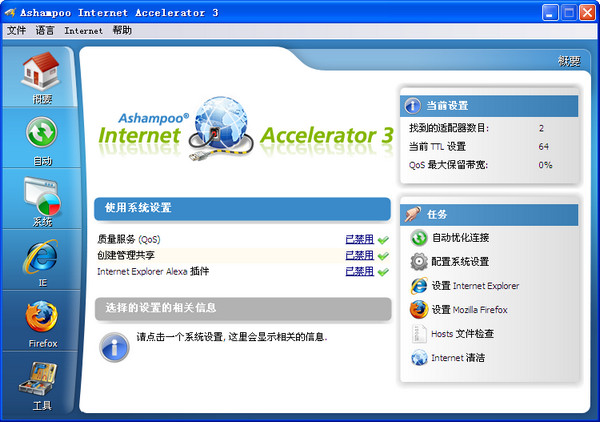
Screenshot of network configuration tool AshampooInternet

Function description

If you want to save trouble, Ashampoo Internet Accelerator's automatic settings are of course the first choice. No human intervention is required, and everything is configured according to the software's default optimal parameters. In the "Automatic" tab option of the software, you only need to specify the network environment and Internet device you are currently using (both are selected in the drop-down menu), and then click "Start". The configuration process is very fast, and you need to restart the system to take effect.

After optimization, you can use some functions in the "System" tab to test whether the before and after effects have been improved. In addition, the software provides some interfaces for modifying the setting parameters of the two mainstream web browsers, IE and Firefox, which helps to improve browsing speed and saves you the trouble of searching for parameters that need to be modified in the browser settings. Especially for Firefox, modifying its setting parameters is still similar to the original command line form (about:config entry). The function of each parameter is not easy to understand, and it will be troublesome if you correct it wrongly.

FAQ

Network configuration tool AshampooInternet

Network configuration tool AshampooInternet official version

Close

