





- Green versionView
- Green versionView
- Green versionView
- Green versionView
- Green versionView

WPSSoftware features
1. Barrier-free and compatible with doc, xls, ppt and other filesFormat, one multipurpose tool for easy office use; 2. This WPS is a free full version, small in size, fast to install and run, and can be used with confidence;
3. You can switch between multiple interfaces at will, and you can get started in the classic and new interfaces without re-learning;
4. It is simple and easy to use, easy to get started, and supports "cloud office" to allow you to carry an office assistant with you.
WPSInstallation steps
1. Download directly from this pageWPS Office, run as administrator.
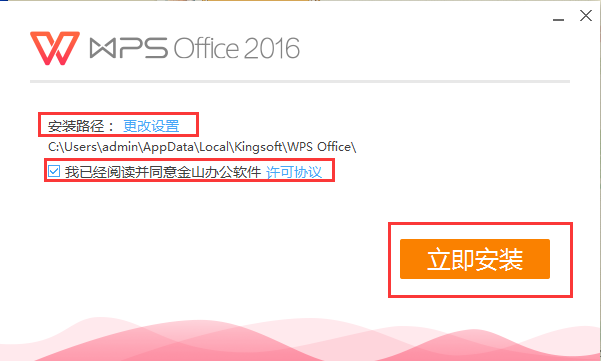
2. Click [Change Settings] to modify the software installation path. If you do not select it, it will be installed on the C drive by default. After confirming the installation path, check [License Agreement] and click [Install Now]
3. When the installation progress reaches 100%, the installation will be completed.
WPSSoftware function
Text operations: create new documents, encrypt documents. Document content can be edited: search and replace, revision, word count, text paragraph setting, insert pictures, insert formulas and other basic operations. It supports multiple modes. In reading mode, the document page can be enlarged or reduced.
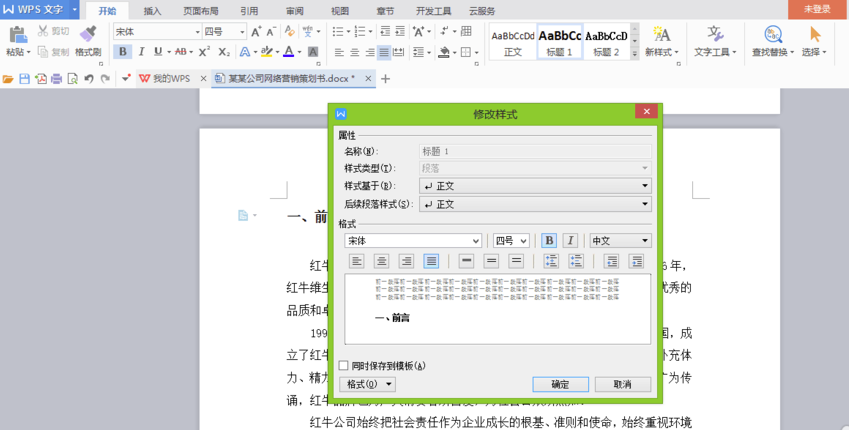
Table operation: Insert a table, automatically adjust row height and column width, merge and split cells at will, and support viewing comments.

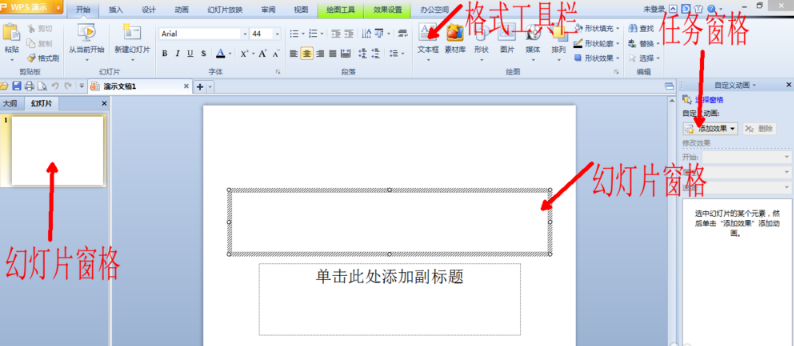
PPT operation: Create a new PPT, support various animation effects to make your presentation more cool, and connect to other devices to play the current slide simultaneously.
WPSTips
Edit documentShortcut keys:
Create a new document Ctrl+N or Alt+F+N (corresponding to New)
Open the document Ctrl+O or Alt+F+O (corresponding to Open)
Close the document Ctrl+W or Alt+W+C
Save the current document Ctrl+S or Alt+F+S (corresponding to Save)
Select the entire document Ctrl+A
Copy format Ctrl+Shift+C
Paste format Ctrl+Shift+V
Undo the previous operation Ctrl+Z
Restore the previous operation Ctrl+Y
Delete one character on the left Backspace
Delete a word on the left Ctrl+Backspace
Edit table shortcut keys:
Create a new blank document Ctrl+N
Switch to the previous worksheet of the active worksheet Ctrl+PageUp
Switch to the next worksheet of the active worksheet Ctrl+PageDown
Wrap lines in cells Alt+Enter
Insert hyperlink Ctrl+K
Enter date Ctrl+;(semicolon)
Enter time Ctrl+Shift+: (colon)
Edit PPT shortcut keys:
Execute the next animation or switch to the next presentation page N
Execute the previous animation or return to the previous presentation page P
Execute the previous animation or return to the previous presentation page Page Up
Execute the next animation or switch to the next presentation page Page Down
Execute the next animation or switch to the next demonstration page Enter
Exit demo playback Esc or Ctrl + Back Space
WPSHow to use
WPS officeHow to automatically generate a directory?
1. Open the document we want to edit, and first determine the table of contents title (big title, subtitle), which is the content to be displayed in the table of contents. Please note that the content of the table of contents title should be concise and can summarize the main content. After determining the table of contents title, the next step is to format the title. Select the title and click the "Title 1" button, as shown in the figure below:

2. You can choose the title style customized by the program. Of course, you can also modify the title style yourself. The operation method is very simple. You only need to position the cursor in front of the title, then right-click on the title bar to modify the title style. Here you can set the font format, font size, spacing, etc. Then we can set the second-level headings and third-level headings in the same way.
3. Next we apply styles to each title. The specific operation is to place the cursor in front of the title, click "Title 1" and "Title 2" above, and determine how many titles there are according to your needs. Then, be sure to format each title.

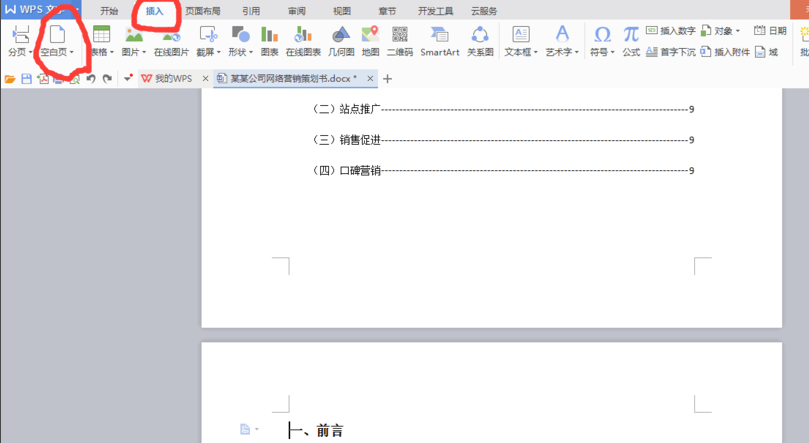
4. The catalog title has been determined and the format has been applied. Then we place the cursor in front of the first title and click the Blank Page button in the Insert column. Insert a blank page to place the table of contents on a separate page, making it easier to view and modify.
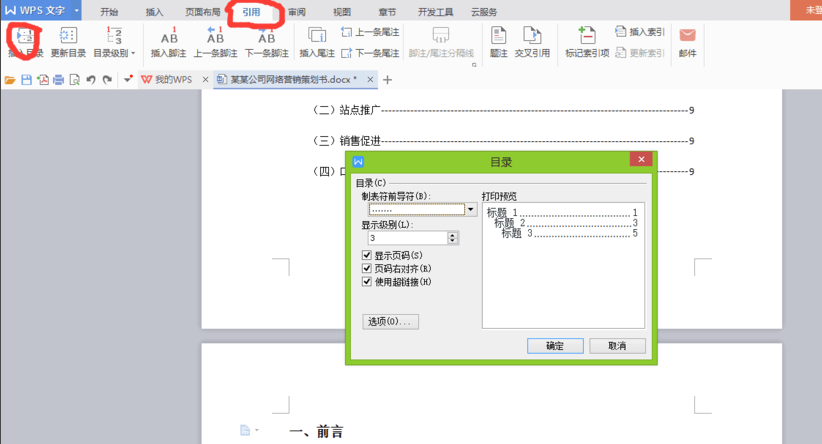
5. Finally, we click on the directory under the reference column, set the tab character and display level in the "Directory Options" in the inserted directory (that is, how many levels of directories you set earlier), and then click OK to generate the directory.
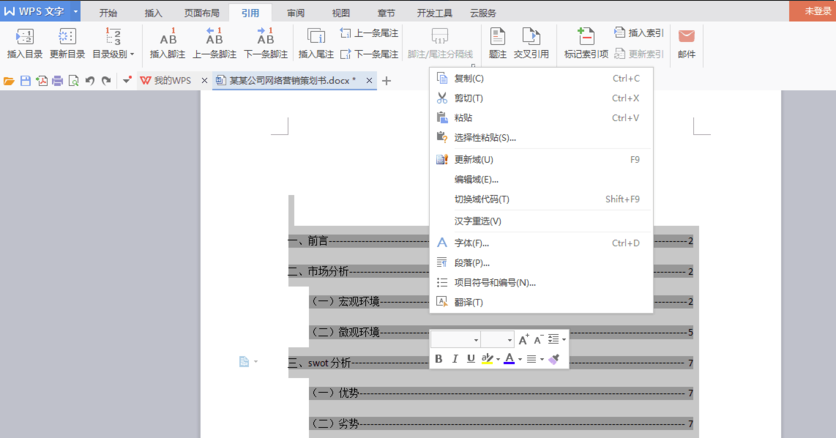
6. After generating the directory, we can also set the format of the directory. Just select the generated directory, right-click, and set it in the pop-up dialog box.
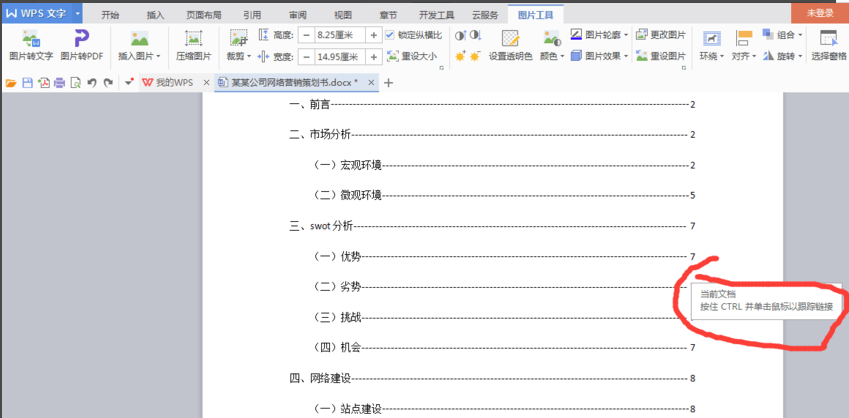
7. After generating the table of contents, we can hold down the CTRL key and click on the title in the table of contents to jump to the text where the title is located, and we can quickly find the content we want to see.
WPSFAQ
wpsHow to sum the table
1. Use WPS spreadsheet software to open the data you want to operate.
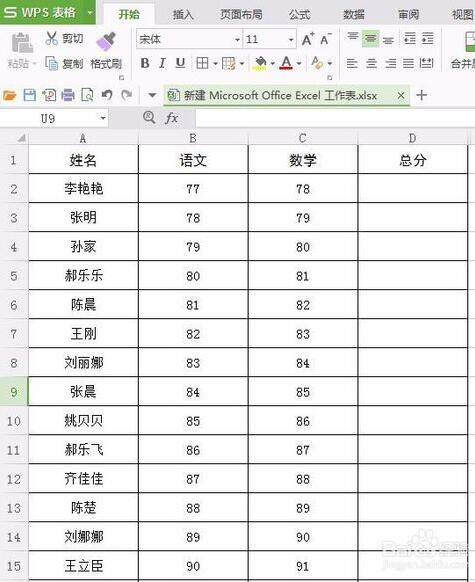
2. Select the cell where you want to put the summed data, and click [Formula] in the menu bar of the WPS table.

3. Then select [Automatically Calculate] in the toolbar

4. Press the Enter key, and the summation result will appear.

5. Place the cursor in the lower right corner of the cell where the sum value is placed. When it turns into a black cross, double-click the mouse to get the sum of this column.

wpsHow to set row height in table
1.Open the WPS spreadsheet software and selectYou need to set the row height of the content. You can use the mouse to select the content you want to set the row height or keep pressing the shift key until the selection is completed.

2. Click the wps menu and find the rows and columns in the upper right corner. Find Row Height in the drop-down menu.

3. Click on the row height and set it to the row height you want. After the modification is completed, click [OK].

4. Then you can show your modified results.

WPSWhich one is better to use with Office?
Microsoft office
1. Less lag
Office software is an excellent office software. The software has high system compatibility and relatively good adaptability. Bugs, lags and other problems that users encounter when using it are also relatively rare.
2. Large size
Because Office software covers a lot of content, the software package is relatively large and takes up a lot of system content.
3. Cloud synchronization is difficult
Microsoft cloud synchronization is more difficult than WPS software, because WPS is in China and Microsoft Office is abroad, so it is definitely influential.
4. Chargeable software
Microsoft office software requires a fee, and the fee is calculated on an annual basis, which is relatively expensive.
WPS
1. Cloud roaming and team collaboration
After you use wps software to edit the required document forms, you can directly upload them to the cloud and save them. It can ensure the security of your data and prevent it from being lost or leaked easily. It is more convenient to use.
2. Similar to office
The functions of wps software and office software are similar, and the general functions of the two software are the same.
3. Free software
WPS software is free to use. Although there are advertisements, it is still welcomed and used by many users compared to office paid software.
The above is the comparison between WPS software and office software brought to you by the editor. Both softwares have their own characteristics and diverse functions. You can choose the appropriate software to download according to your needs. Friends who need Microsoft office software can click:http://softwaredownload4.com/soft/429588.htmDownload.
WPSChange log
1. WPS Office fixes the problem that new documents cannot be created when the system user name is specified as a special user name (alice---leung)
2. WPS Office fixes the problem of blurry display of high-definition pictures after they are cropped after rotation and saved in ooxml format.
3. Fixed the problem that the vertical scroll bar cannot be displayed in the document structure diagram under the classic interface.
4. WPS Office fixes the lag issue that occurs when you select all documents containing a large number of pinyin guide fields and right-click to bring up the copy menu.
5. Fixed the problem that when the cursor is positioned in a table with >= 60 rows, the ‘Borders and Shading’ dialog box is brought up slowly.
6. WPS Office fixes the problem of selecting a text box containing a domain and pressing shift+f9 to update the domain, causing the program to crash.
7. Fixed the problem that when the table contains many rows and columns, the program responds extremely slowly when positioning through the next row and next column in the table properties dialog box.
Huajun editor recommends:
WPS Office is an office software popular with many friends. Not only is the operation very simple, you can also perform document input, form processing, PPT presentation and other functions. Moreover, WPS2016 software is also very powerful and has many unique functions. This site also recommends to youHanwang Attendance Management System,Aimo mind map,WPS Office,NTKO large file upload control,Kuai Dao Ke platform softwareWaiting for software, welcome to download.




























Useful
Useful
Useful