Hot search terms: 360 Security Guard Office365 360 browser WPS Office iQiyi Huawei Cloud Market Tencent Cloud Store
Hot search terms: 360 Security Guard Office365 360 browser WPS Office iQiyi Huawei Cloud Market Tencent Cloud Store

Office software Storage: 248MB Time: 2020-06-05
Software introduction: WPS is a very easy-to-use office software launched by Kingsoft. WPS software is compact and quick to install, takes up very little memory, and starts up quickly. It includes...
wpsThe software is simple to operate. You can use it to operate text, tables, PPT presentations, etc. So how does WPS automatically generate a table of contents?wpsHow to automatically generate a directory? Let the editor give you the answer below!

wpsHow to automatically generate a directory?
1. Position the insertion position:
Move the cursor to where you want to insert the table of contents, either at the front of the document or at the beginning of a chapter.
2. Select the directory to insert:
Click the "References" tab in the top menu bar.
In the "References" tab, find and click the "Table of Contents" button.
WPSA variety of table of contents styles are provided for you to choose from, such as "Auto Table of Contents 1" and "Auto Table of Contents 2".
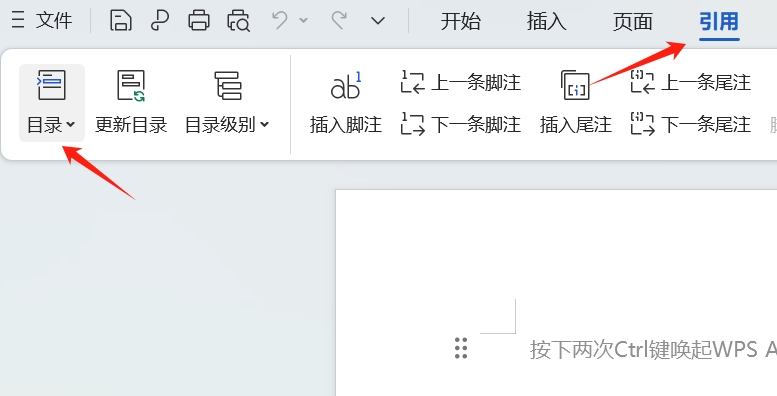
3. Automatically generate directory:
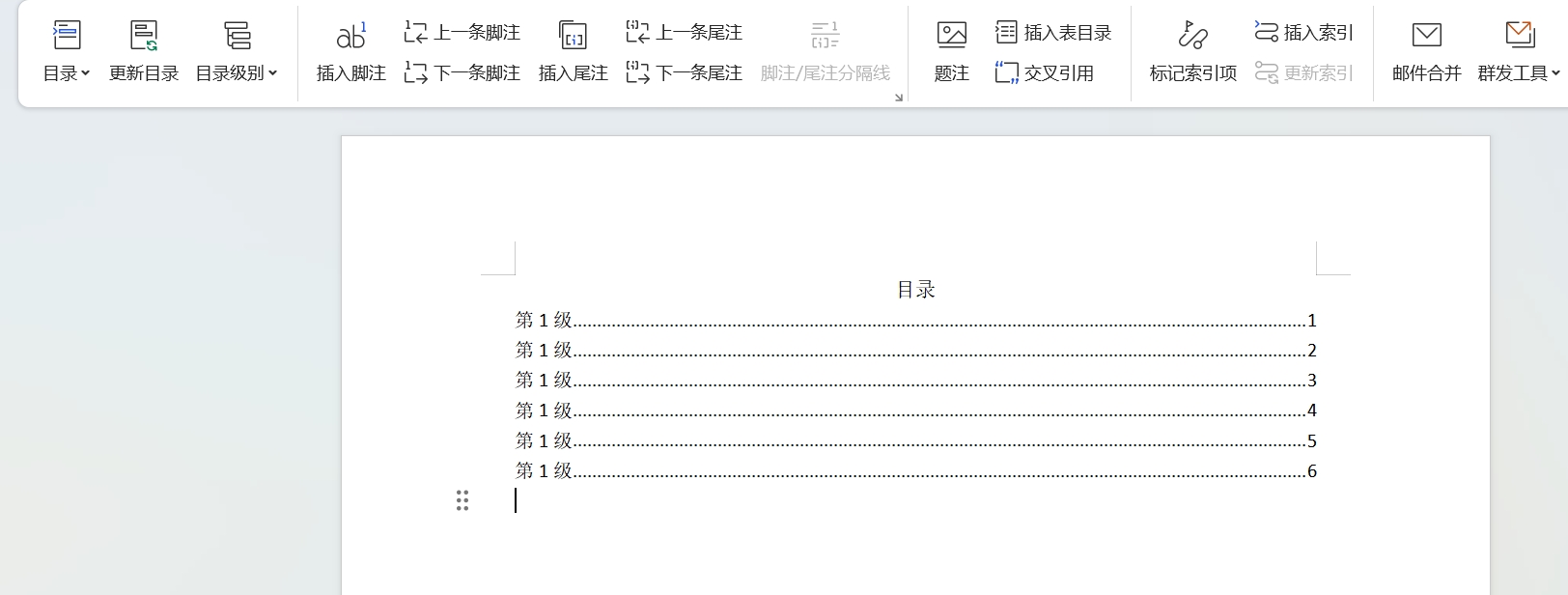
After selecting the directory style,WPSA table of contents is automatically generated based on the heading style in the document and inserted into the specified location.
The generated table of contents is aligned with the main text content, and each table of contents entry maps to the corresponding location in the document.
The above is what the editor of Huajun compiled for you.wpsHow to automatically generate a directory?wpsHere is a method to automatically generate a directory, I hope it can help you.

 Microsoft Edge browser
 Steam
Steam
 Tencent Video
 WPS Office
 iQiyi
iQiyi
 Sohu video player
 Lightning simulator
 MuMu emulator
 Eggman Party
 What to do if there is no sound after reinstalling the computer system - Driver Wizard Tutorial
 How to switch accounts in WPS Office 2019-How to switch accounts in WPS Office 2019
 How to clear the cache of Google Chrome - How to clear the cache of Google Chrome
 How to fire bullets in scratch-How to fire bullets in scratch