





wps installation packageIt is a compact and powerful office software. The wps software is easy to operate. You can use it to perform operations such as text, tables, and PPT presentations. Not only that WPS Office is also very powerful. It runs fast, can provide you with free document templates, supports reading and outputting PDF files and other special functions, bringing you an efficient and convenient use experience. Huajun Software Park provides you with wps official download free full version download.
-
2021 official versionView
-
11.1 Official versionView
-
2003 official versionView
-
2007 official versionView
-
2003 official versionView
Features of WPS office software
1. It is barrier-free and compatible with doc.xls.ppt and other file formats, making it easy to work with one tool.
2. This WPS is a free full version, small in size, fast to install and run, so you can use it with confidence.
3. You can switch between multiple interfaces at will, and you can get started in the classic and new interfaces without re-learning.
4. Simple and easy to use, easy to get started, and supports "cloud office" to allow you to carry an office assistant with you.
How to use WPS Office
1. How to make forms in WPS office?
Open the WPS Word document, click "Insert", select "Table", and select "Draw Table".
Left-click and drag the mouse to draw the desired table, click "Table Style" and select "Draw Slash Header".
Select the appropriate style, click "OK", select the cells to be merged, right-click and select "Merge Cells". Row height and column width can be automatically adjusted, and comments can be viewed.

2. How to make ppt in WPS office?
Click "+New" in the upper left corner to select a blank demo.
Click "Text Box" at the top of the page, select "Horizontal Text Box", and left-click to add it to the page.
Click "Shape" to select one, left-click to add it to the page, and you can also drag and drop to change the position.
Enter your own text document or add shapes.
Click the "+" under the slide to select a blank presentation, click "Insert this page" and so on to add slides.
After the creation is completed, click "Start from now" to preview.
Click "File", click "Save As", select the save location, and click "Save" to create it successfully.
How to install wps installation package?
1. Download WPS Office directly from this page, unzip and run it.
2. Click [Change Settings] to modify the software installation path. If you do not select it, it will be installed on the C drive by default. After confirming the installation path, check [License Agreement] and click [Install Now]
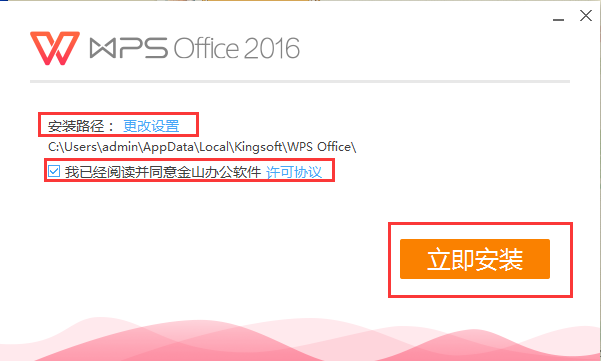
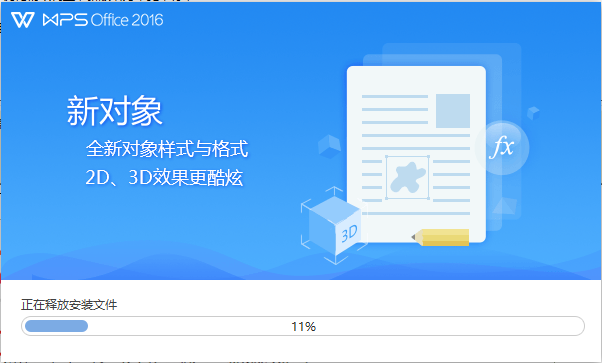
3. When the installation progress reaches 100%, the installation will be completed.
WPS Office FAQ
How to block ads in WPS Office office software photos?
1. To remove ads, you need to modify the source file, so you must first enter the WPS installation folder.
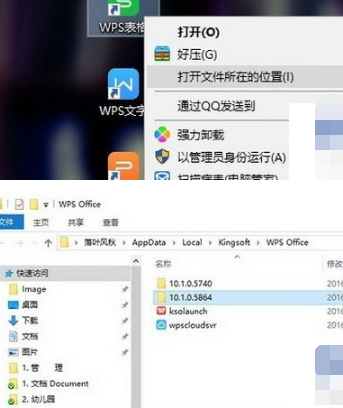
2. The specific method is to right-click the "WPSXX" icon on the desktop and select "Open file location". At this point you will see some folders composed of numbers. This is the WPS upgrade history folder.
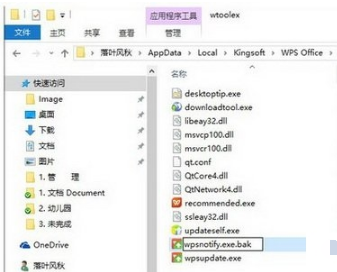
3. Generally, we need to select a folder with a high version number to enter and find the "wtoolex" → "wpsnotify.exe" file in it.
4. First, rename the original "wpsnotify.exe" and add the suffix ".bak" for backup (that is, the new file name is "wpsnotify.exe.bak"). Next, right-click to create a new TXT file in the original folder location, and rename the TXT file to "wpsnotify.exe" to replace the original file. This step is actually the so-called "Great Shift". Once completed, our ad blocking method will be completed.
How does WPS office automatically generate a directory?
Prerequisite preparation work: First download and install WPS on this site, prepare materials (documents to generate a catalog), double-click to open WPS and start editing.
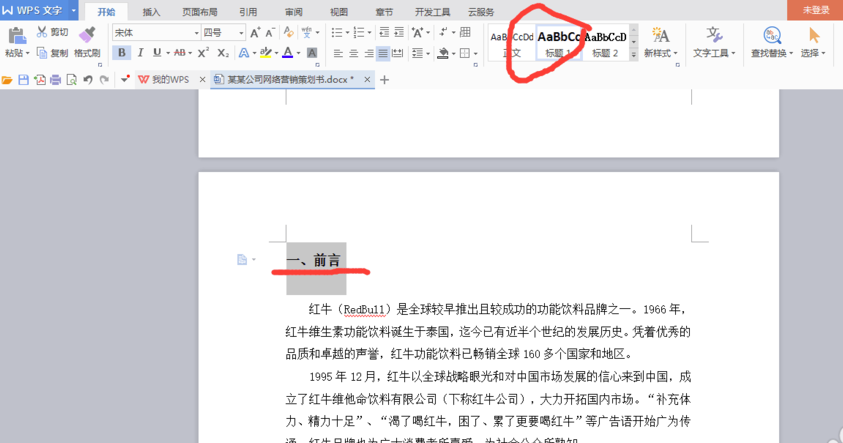
1. Open the document we want to edit, and first determine the table of contents title (big title, subtitle), which is the content to be displayed in the table of contents. Please note that the content of the table of contents title should be concise and can summarize the main content. After determining the table of contents title, the next step is to format the title. Select the title and click the "Title 1" button, as shown in the figure below:
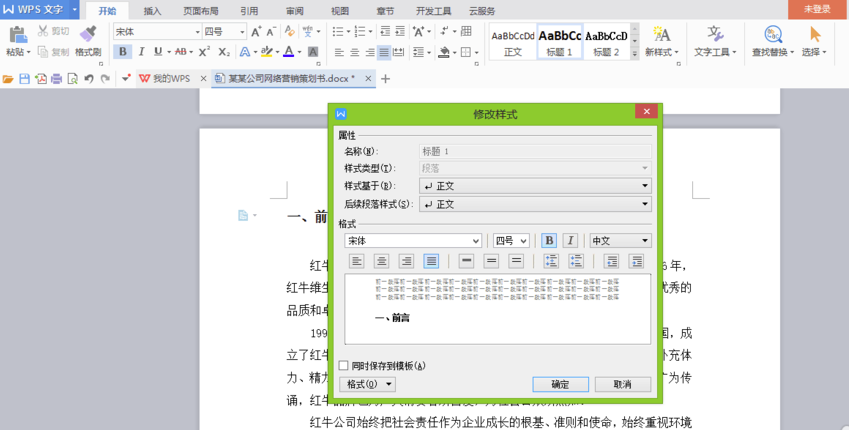
2. You can choose the title style customized by the program. Of course, you can also modify the title style yourself. The operation method is very simple. You only need to position the cursor in front of the title, then right-click on the title bar to modify the title style. Here you can set the font format, font size, spacing, etc. Then we can set the second-level headings and third-level headings in the same way.
3. Next we apply styles to each title. The specific operation is to place the cursor in front of the title, click "Title 1" and "Title 2" above, and determine how many titles there are according to your needs. Then, be sure to apply formatting to each title, otherwise it will be in the table of contents.

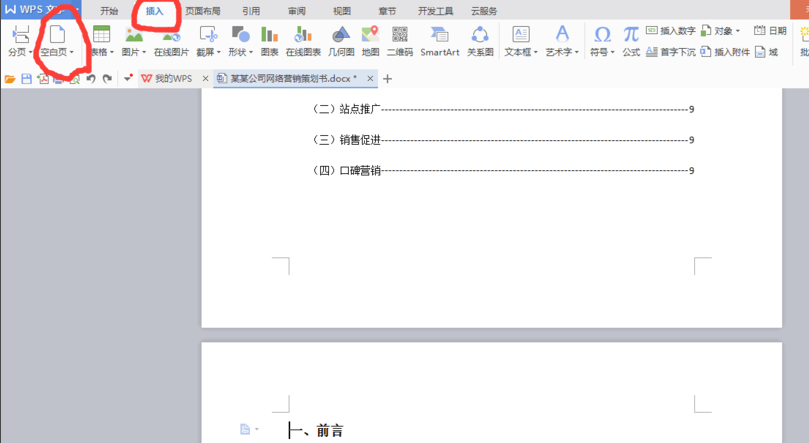
4. The catalog title has been determined and the format has been applied. Then we place the cursor in front of the first title and click the Blank Page button in the Insert column. Insert a blank page to place the table of contents on a separate page, making it easier to view and modify.
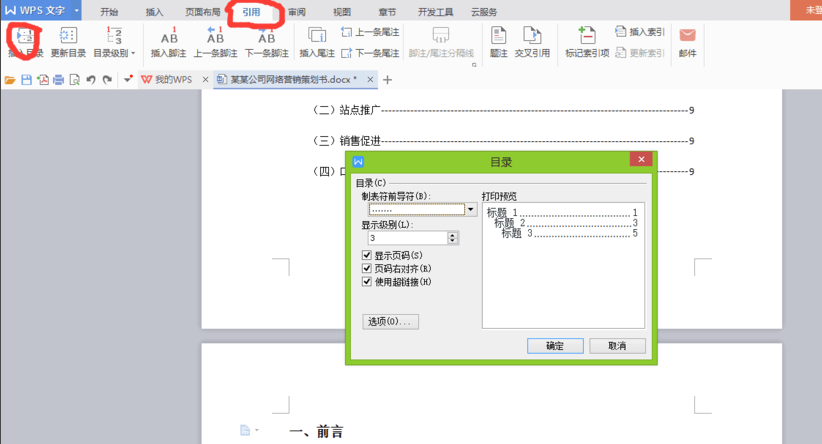
5. Finally, we click on the directory under the reference column, set the tab character and display level in the "Directory Options" in the inserted directory (that is, how many levels of directories you set earlier), and then click OK to generate the directory.
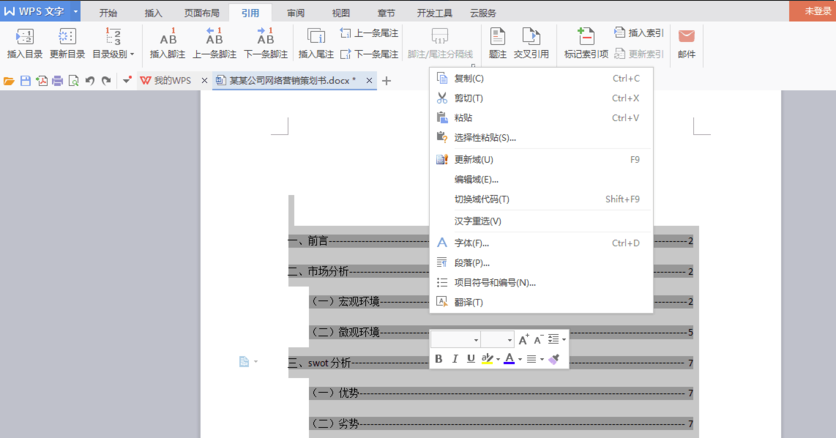
6. After generating the directory, we can also set the format of the directory. Just select the generated directory, right-click, and set it in the pop-up dialog box.
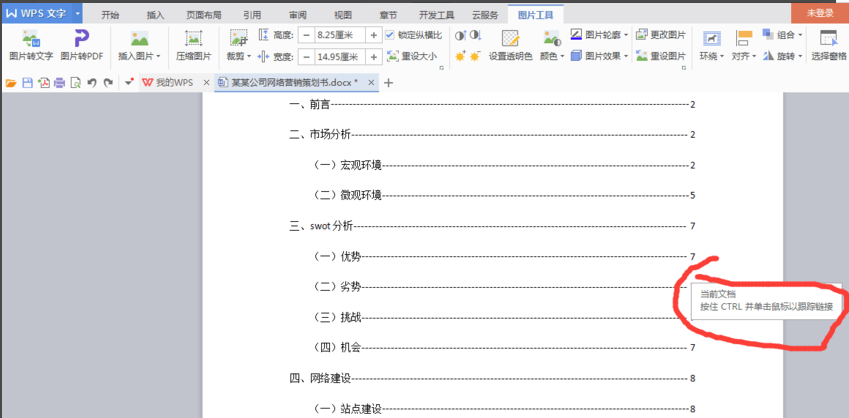
7. After generating the table of contents, we can hold down the CTRL key and click on the title in the table of contents to jump to the text where the title is located, and we can quickly find the content we want to see.
How to delete blank pages in WPS office? How to delete blank pages in WPS document?
First, let’s talk about the first method
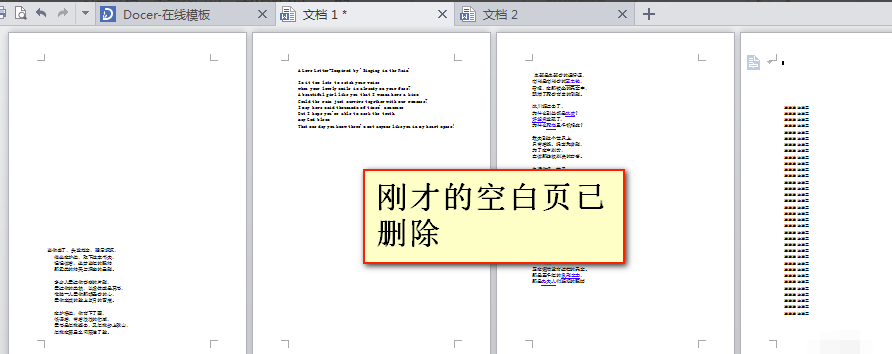
1. Open the document, find the blank page, select (ctrl+a) the blank page, and then click backspace.
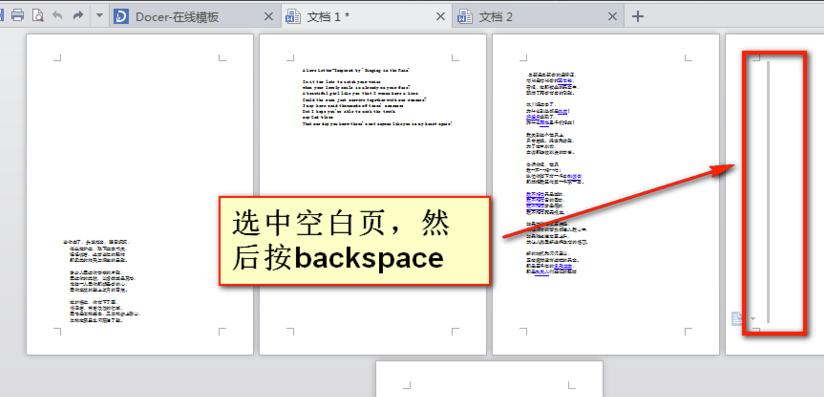
2. Let’s look at the picture below. Has the blank page just been deleted?
The second method
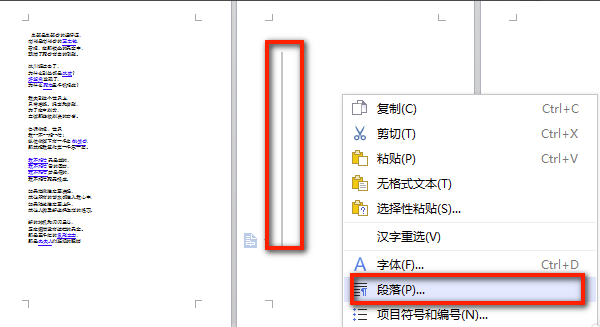
1. If the first method doesn’t work, we can directly select the blank page-right-click-paragraph
2. Indent and spacing in the paragraph window - line spacing (set to a fixed value)
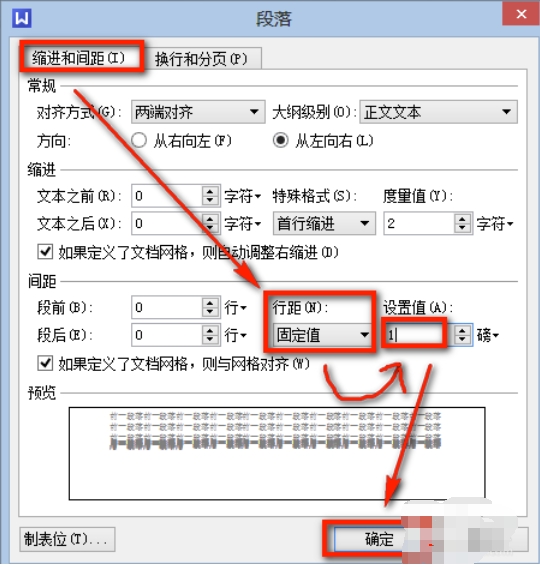
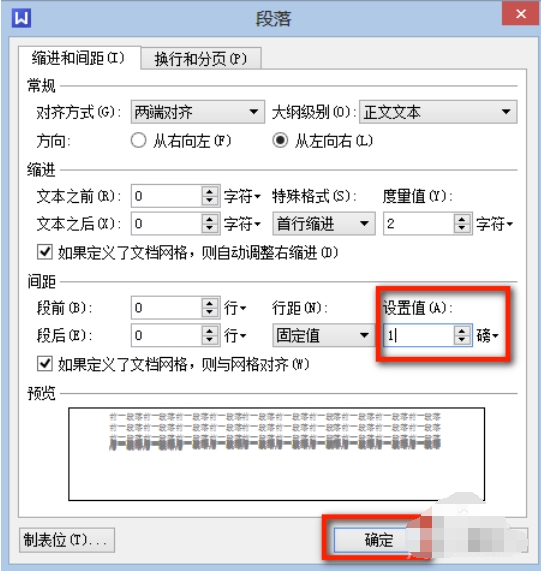
3. Manually enter the setting value behind the line spacing as 1 - OK, this will delete the blank page.
WPS office update log
1. Significantly improve performance and reduce resource usage.
2. The ultra-small installation package covers viewing and editing support for all common office formats (DOC, XLS, PPT, etc.).
3. The new operation interface is more refreshing and concise, and provides a variety of skins to switch at will, and also supports customization of window backgrounds and fonts.
4. Brand new home page. Quickly search and access documents, obtain various office services, and view status updates.
5. Brand new tag management system. Any type of document tags can be placed in the same window, and tags can be split or merged into multiple windows.
6. Integrate the new interface to create any commonly used documents with one click.
7. Added PDF format support, and can be converted into doc files with one click.
8. Integrate WPS network disk service, synchronize and back up files across devices with one account, faster and more secure.
Huajun editor recommends:
WPS OfficeIt is a very easy-to-use office software. When using it, data may occasionally be lost. For this reason, Huajun Software Park provides all users with download channels for related data recovery software. I believe everyone will like these software.Office Document Recovery Tool,Chitu Office Word Recovery Software, everyone is welcome to download!












Useful
Useful
Useful