




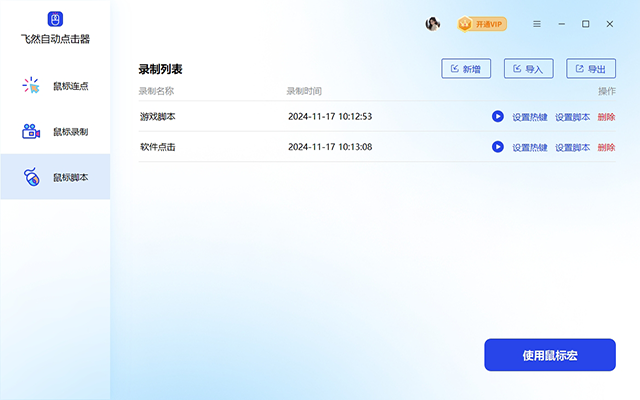
Auto clicker software features
1. Smart mouse point connection
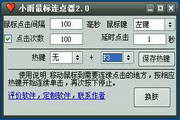
Feiran automatic clicker can simulate the user's mouse click action and supports custom click frequency and intervals. Users can flexibly adjust the number of clicks per second and choose single or double-click to meet the needs of different application scenarios. Through intelligent connection points, users do not need to keep clicking the mouse for a long time, and tedious repetitive tasks can be automatically processed. Whether it is brushing copies in the game or processing files in batches, efficiency can be greatly improved.
2. Mouse action recording
Feiran automatic clicker supports the full recording function of mouse operations. Users only need to perform one manual operation, and the software can accurately record each click position, mouse trajectory and operation sequence. After the recording is completed, users can play back these operations at any time and the software will automatically repeat them. This function is especially suitable for complex operation processes, and can help you easily implement one-click execution without manual repeated operations.
3. Custom mouse script
Feiran automatic clicker also provides a flexible and powerful mouse script function. Users can write customized operation scripts and perform a series of operations in batches. Through scripts, users can set up multi-step automated tasks, such as continuously clicking on different locations, controlling intervals, and performing a set of specific operations. Supports flexible control of mouse left-click, right-click, double-click and other operations, greatly improving the flexibility and diversity of task automation.
Auto clicker software features
Full scene gesture simulation
It supports basic operations such as single-point, multi-point circular click, long press, sliding (up, down, left, right/custom path), double-click, etc., covering most repetitive task requirements.
Provides combined action chains (such as "click + slide + input") to complete complex tasks (such as game task chains, form filling).
Support scheduled tasks, set a specific time to start or stop, and achieve unattended operation.
Intelligent identification and adaptation
Screen Color Picker: Identify the position of dynamic elements (such as the "Attack" button in the game) through color to solve the problem of click offset caused by resolution changes or interface updates.
OCR text recognition (supported by some versions): Recognizes screen text content (such as "Confirm" and "Next") and triggers corresponding operations. It is suitable for text interaction scenarios.
Multi-resolution adaptation: Automatically calibrate the screen coordinates of different devices to ensure universal use on mainstream models (such as Huawei, Xiaomi, OPPO).
Script editing and sharing
Visual recording: record operation traces with one click, generate editable scripts, and lower the threshold for novice users.
Code-level editing: Advanced users can manually adjust script parameters (such as delay time, number of loops, random offsets) to achieve fine control.
Cloud script market: Provides script libraries shared by users, covering gaming, social networking, office and other fields, which can be directly downloaded and used (such as automatic mining of "Genshin Impact" and automatic likes of "Douyin").
auto clickerApplicable scenarios
Game automation: Players can use the Feiran automatic clicker to set up automatic copy spawning, automatic monster killing, automatic tasks, etc. to free their hands, reduce repetitive operations, and make the game experience easier.
Office automation: In office tasks that require batch clicking (such as data entry, web page refresh, form processing, etc.), Feiran automatic clicker can save a lot of time and improve office efficiency.
Software testing: Developers and testers can use the recording and scripting functions of Feiran Auto Clicker to automate testing steps and improve the efficiency and accuracy of software testing. Data capture and web page automation: For tasks that require batch capture of web page data or automatic clicks on web links, Feiran Automatic Clicker provides accurate mouse operation simulation, greatly simplifying these tedious tasks.
FAQ
Start button cannot be clicked
Reason: Accessibility permission or floating window permission was not granted.
Solution: Enter the system settings and manually enable the accessibility permissions and floating window permissions for the automatic clicker.
Auto clicker fails
Reason: Loss of accessibility permissions after application upgrade or system crash, or Android system BUG.
Solution: Re-grant permissions and restart the phone; if the problem persists, wait for system updates or contact the developer.
Auto clicker update log:
1. Fixed BUG, the new version has a better experience
2. Some pages have been changed
Huajun editor recommends:
As a widely used and powerful free keyboard and mouse, the latest version of Auto Clicker has been highly praised by many netizens. It is strongly recommended that everyone download and use it. In addition, there areSee9 computer mouse automatic point connecter,Logitech SetPoint (32-bit),Hotkey input assistant,mouse clicker,Keyboard lock kingIt is recommended for everyone to download and use.



























Your comment needs to be reviewed before it can be displayed