





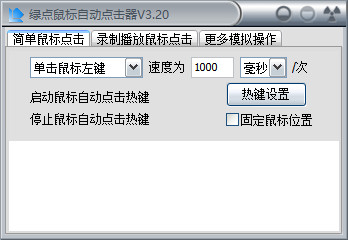
Green Dot Mouse Auto Clicker Software Instructions
Green point mouse automatic clicker software has a wide range of applications. It can be used for online game leveling, QQ bombing, advertising clicks, website traffic... As long as you think of it, it can do a lot. Green point mouse automatic clicker software is free green software, no installation is required, and it is completely free.
Green dot mouse automatic clicker function introduction
1. Completely simulate the automatic click function of the recording mouse and play it back.
2. The green dot mouse automatic clicker is simple and convenient to operate, and has detailed operating documents.
3. You can judge whether to run the key file based on the color of the point.
4. Green, no installation required, no plug-ins
How to use green dot mouse automatic clicker
How to record and play back mouse and keyboard actions?
To record and play back mouse and keyboard actions, you must first remember the four shortcut hot keys: CTRL+Q to start recording, CTRL+W to end recording, CTRL+E to start playback, and CTRL+R to end playback. It's easy to remember, they're all on the same column on the keyboard.
Okay, now let’s start recording and playback!
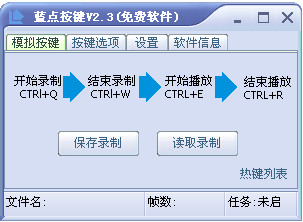
Example:
1. Press CTRL+Q to start recording
At this time, you will find that a dot on the software will flash and flash, and the tray in the lower right corner of the operating system will also flash and flash. At this time, it is in the recording state.
2. At this time, you can move the mouse and click keys on the keyboard arbitrarily (at will)
You can try double-clicking the "My Computer" icon and so on.
3. Press CTRL+W to end recording
At this time, you will find that the flashing dot on the software no longer flashes.
4. Press CTRL+E to start playing
At this time, you will find that the mouse is no longer under your control. It will learn the actions you just made, such as double-clicking the "My Computer" icon.
5. Press CTRL+R to end playback
If you want to end the playback early, just press this shortcut key. Of course, you can also not press it and wait for it to finish playing on its own.
Green Dot Mouse Auto Clicker Notes:
1. Statements containing "delay", "run script", and "press" will not be executed during single-step testing.
2. The user may start testing by selecting a certain sentence in the script. If not, the green dot will start testing from the first sentence.
"Single-step test running is a newly added function. If this function causes some of Green Dot's original normal functions to fail, please raise it in the Green Dot forum so that it can be corrected next time.
Comparison of similar software:
Happy Mouse Automatic Clicker:
Happy Mouse Automatic Clicker is a very useful small software. If you often need to click a lot of left or right mouse buttons in your daily games or work, and if you like to play online games or RPG games, then you must have a lot of experience in clicking the mouse. It is a waste of time, energy, and mouse consumption! This small software can free your fingers! Just press the hotkey and let the automatic mouse clicker click for you!
Green Dot Mouse Auto Clicker:
Green Dot Mouse Automatic Clicker is a fully simulated recording mouse automatic click function and playback. It is simple and convenient to operate. It has detailed operating documents. You can judge whether to run the key file based on the color of the point.
Huajun editor recommends:
Green Dot Mouse Automatic Clicker is a software that is simple to operate, powerful, and easy to use. You can download it and try it. Everyone is welcome to download it. This site also providesLogitech SetPoint (32-bit),Hotkey input assistant,Boss Key,mouse clicker,Keyboard lock kingWaiting for you to download.











Useful
Useful
Useful