




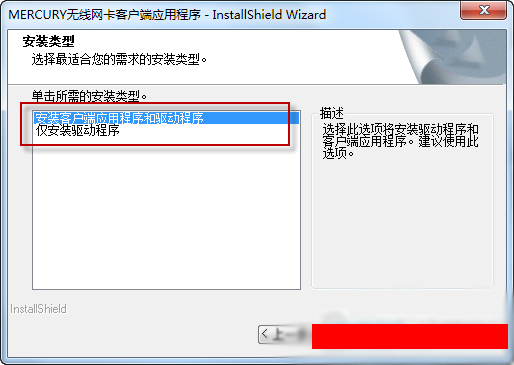
Basic introduction to mercury wireless network card driver
Mercury wireless network card driver is a wireless network card driver software specially designed for Mercury network cards. This software can effectively help users solve the driver problems of Mercury wireless network cards, so that your wireless network card can operate normally. When paired with the Mercury wireless router, it can maximize the performance of your network card.
Mercury wireless network card driver function introduction
Mercury MW150UM and MW150US adopt a new mini shape design, are exquisite and compact, adopt 11N wireless technology, and have a wireless transmission rate of up to 150Mbps. They support simulated AP functions, easily build wireless LANs, and are compatible with some Internet TVs and IPTV set-top boxes.
Mercury MW150UM 2.0/MW150US 2.0 wireless network card driver, in addition to the driver, also contains Mercury's dedicated configuration software.
Mercury Mercury MW150UM 2.0/MW150US 2.0 wireless network card driver version 1220 For WinXP-32/WinXP-64/Vista-32/Vista-64/Win7-32/Win7-64 (released on December 21, 2012)
Mercury wireless network card driver software features
1. Driver suitable for MW150UM V2.0 network card.
2. Optimized the simulated AP function of the device.
by
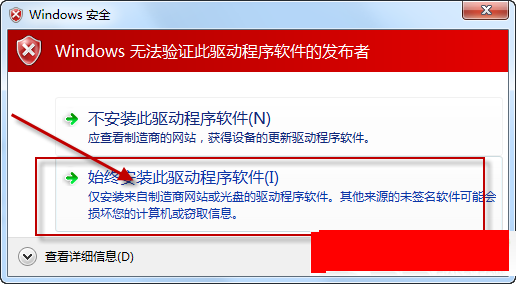
When the following picture appears, select "Install this driver software anyway".
Mercury wireless network card driver installation steps
1. Right-click on the computer interface and click Manage to enter the device manager;
2. Open the device manager in sequence--scan for hardware changes--update drivers;
3. Select “Browse my computer for driver software”;
4. Select the path where the driver is located;
5. Click Next;
6. Select "Install this driver software anyway" when the dialog box appears;
7. After the installation process is completed and the device manager displays normally, it can be used normally.
FAQ
The driver cannot be installed or the installation fails
Possible reasons:
The operating system version is incompatible.
The driver is damaged or missing.
Security software or firewall blocks installation.
Solution:
Confirm operating system version: Make sure the driver you download matches your operating system version.
Re-download the driver: Re-download the driver from the Mercury official website or a reliable driver download platform to ensure a stable network connection during the download process.
Turn off security software: Before installing the driver, temporarily turn off security software or firewalls to prevent them from blocking the installation process.
Run as administrator: Right-click the installer and select "Run as administrator" to ensure you have sufficient permissions to install the driver.
mercury wireless network card driver update log
1.Fix some bugs
2. Optimized some functions
Huajun editor recommends:
The mercury wireless network card driver can help you solve many problems. I believe that as long as you dare to use it, you will definitely love it. I also recommend it to you.D-Link DWA-133 wireless network card driver,Tmall magic disk portable wifi driver,Realtek RTL8152B USB network card driver,Universal network card driver,Mercury MW150UH Wireless Network Card Driver







Useful
Useful
Useful