




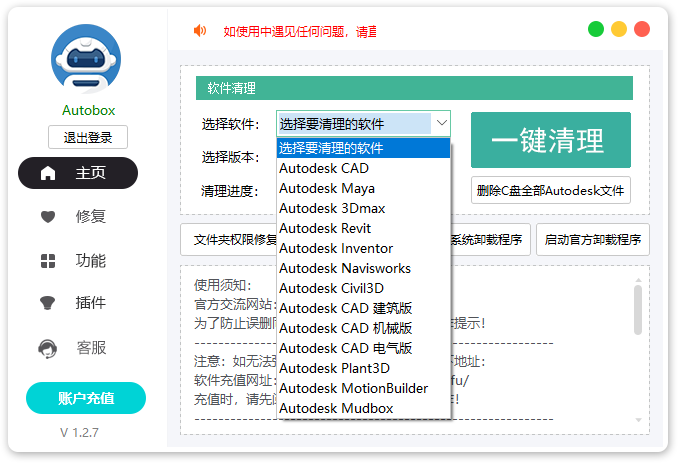
Features of Autobox toolbox CAD uninstall tool software
1. Support Autodesk series software, one-click quick cleanup, one-click cleanup of all CAD versions, and no mistake in deletion;
2. It has the function of repairing installation faults, such as: error 1063/error 1025/error 103 and other error code repairs;
3. Built-in practical and convenient extended functions, such as: one-click initialization, one-click CAD setting classic mode, Chinese and English switching, etc.;
4. The software is small in size, fast in running speed, green and requires no installation, and can be used smoothly even on low-configuration computers;

Special tip: Since the tool involves registry cleaning, some anti-virus software will report viruses. Please exit the anti-virus software first, or add trust before running this tool.
The Windows Defender that comes with the system needs to turn off the real-time protection function before running this program.
Autobox toolbox CAD uninstall tool update log
Latest update: Added multiple software cleaning and repairs!
Added one-click cleaning function for all versions of CAD and MAYA, which already supports the latest 2026 version;
Adjusted the repair process of error 1603 and added multiple fault repair functions
Optimize user feedback issues and improve detailed experience
Several software bugs have been optimized, and a cleaning function has been added to all software.
Autobox toolbox is a tool designed for Autodesk series software (including AutoCAD, Maya, 3ds Max, Revit, Inventor etc.) provides cleaning and repair tools. As an industry leader Autodesk The core function of the ecological auxiliary solution is mainly used to solve the stubborn problems encountered by users in software installation and uninstallation, including problems such as inability to install and inability to uninstall. The toolbox has the ability to quickly clean up software residual files and registration residues with one click, making uninstallation and installation no longer a "headache"!
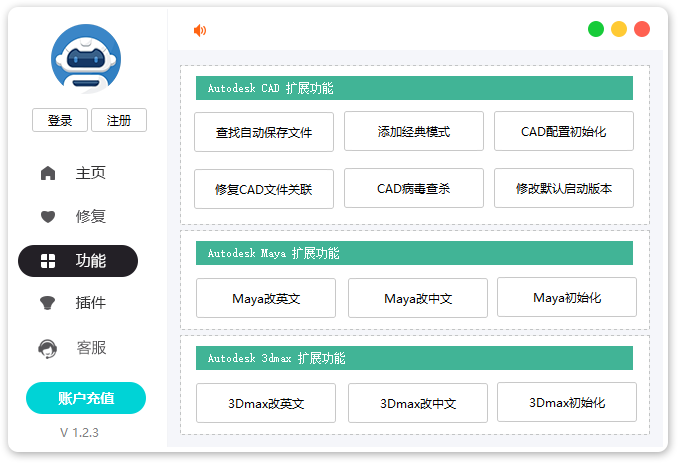
Features of Autobox toolbox CAD uninstall tool software
1. Supports Autodesk series software, one-click quick cleanup, one-click cleanup of all CAD versions, no mistake in deletion;
2. It has the function of repairing installation faults, such as: error 1063/error 1025/error 103 and other error code repairs;
3. Built-in practical and convenient extended functions, such as: one-click initialization, CAD one-click setting classic mode, Chinese and English switching and other functions;
4. The software is small in size, fast in running speed, green and requires no installation, and can be used smoothly even on low-configuration computers;
Special reminder: Since the tool involves registry cleaning, some anti-virus software will report viruses. Please exit the anti-virus software first, or add trust before running this tool.
The Windows Defender that comes with the system needs to turn off the real-time protection function before running this program.
FAQ
An error code (such as 1063/1025/1603) appears during the uninstallation process
Problem: Uninstallation failed due to environment dependency issues (such as missing .NET Framework and VC++ runtime library) or insufficient permissions.
Solution:
Use the "Fault Repair" function of the Autobox toolbox to select the corresponding error code to repair.
Make sure the system has the latest version of .NET Framework and VC++ runtime installed.
Run the toolbox as an administrator to avoid insufficient permissions.
Toolbox does not recognize the installed CAD version
Problem: Some users reported that the installed CAD version was not listed in the toolbox, making targeted cleaning impossible.
Solution:
Confirm whether CAD is installed through official channels. Irregular installation may cause the toolbox to be unrecognizable.
Manually select the "All Version Cleanup" function to forcefully clean up all Autodesk-related residues.
Check whether the system environment variables have been tampered with and reset the environment variables if necessary.
Can't reinstall CAD after uninstalling
Problem: After cleaning, it still prompts "Similar products are already installed" or the installation fails.
Solution:
Use the Autobox toolbox's "Multiple Version Management" feature to check and clean up any remaining CAD versions.
Make sure there are no Chinese or special characters in the installation path. It is recommended to use the default path or a pure English path.
Close all Autodesk-related processes (such as background services, processes) to avoid conflicts.
Autobox toolbox CAD uninstall tool update log:
Added the function of cleaning all versions of CAD and MAYA with one click, and the latest 2026 version is supported;
Adjusted the repair process of error 1603 and added multiple fault repair functions
Optimize user feedback issues and improve detailed experience
Optimized many bugs in the software, and added a cleaning function to all software
Huajun editor recommends:
The Autobox toolbox CAD uninstall tool is one of the best in the industry. I believe many friends will have used it. If you don’t use it anymore, you will be OUT. This site also prepares for you.NET Cleanup Tool,Uninstall software (GeekUninstaller),CCleaner,office2017 uninstall tool,Geek Uninstaller




Your comment needs to be reviewed before it can be displayed