





Introduction to Mount Olive Quick Mockup Software
Mount Olivet Quick Mold is perfectly compatible with Revit2017, CAD2017, T20 and other versions. It has multiple functions such as fast modeling and accurate modeling, which can effectively save designers’ time and improve modeling efficiency. The new version of Mount Olive Quick Mold 5.0 adds the function of adding surface plastering and removing the surface to create walls, and also supports batch component renaming.
Mount Olive Quick Mold Software Functions
1. Support Revit2018
1. Olive Mountain Quick Template is the first in the industry to support the upcoming Revit2018 version, and is the first comprehensive BIM software in China to support Revit2018. The speed of some functions of Revit2018 has been greatly improved compared to the previous version. We tested that the collision check speed is more than 2 times.
Please run the Mount Olive Quick Model desktop shortcut as an administrator (specific method: right-click the Mount Olive shortcut -> Properties -> Compatibility tab -> Run this program as an administrator) to start the Mount Olive Quick Model under Revit2018
2. Brand new powerful wind system for mold turning
1. Added new air duct turning mold, supports Hongye and Tianzheng drawings, supports custom selection of mold turning system, supports automatic connection of pipes, supports automatic recognition of label text to adjust pipe height, etc.;
2. Added new air outlet molding, supports the generation of air outlets connected to air ducts in the form of risers, and automatically generates riser ducts, supports the generation of air outlets that fit the air ducts, and automatically calculates and adjusts the height of the air outlets;
3. Add new attachments to turn the mold
4. Add new equipment and turn over the mold
3. Wire pipe interruption (supports water pipes, air ducts, bridges, and wire pipes)
1. Add two new interruption points, interrupt the specified pipe segment according to the specified position, and automatically delete the specified pipe segment;
2. Add length interruption, interrupt the pipeline according to the specified distance, and automatically connect the interrupted pipelines;
4. Wire pipe avoidance (supports water pipes, air ducts, bridges, and wire pipes)
1. The new version of the intelligent bending tool is more powerful and more convenient to operate; it adds bending according to a specified distance and optimizes the operation logic;
2. A new lifting connector tool is added to adjust the specified connector according to the specified distance, and the associated pipeline is bent according to the specified starting point to quickly adjust the pipeline;
5. Wire pipe connection (supports water pipes, air ducts, bridges)
1. A new two-pipe connection tool is added to automatically connect two designated pipes. It supports the automatic connection of vertical and collinear pipes with height differences, supports the automatic connection of collinear and vertical pipes in the same plane, and supports the connection of risers and designated pipes, etc.;
2. Added a new three-pipe connection tool to automatically connect pipes in the same horizontal plane;
3. Added a new four-pipe connection tool to automatically connect pipes in a unified horizontal plane;
6. Collision report and headroom analysis
1. A new tool for calculating the net height is added, which automatically calculates the net height of specified types of components in the specified area. After the calculation is completed, the specified area is automatically marked with a clear height mark;
2. A new tool for finding components below the net height is added to search for components of the specified type that do not meet the requirements within the specified height. The program will automatically perform statistics and display the component;
3. A new collision report tool is added to perform collision inspection on specified component types in the model. After the inspection is completed, it supports searching and identifying collision components. It also supports exporting collision reports as excel files. The software automatically takes plane and three-dimensional screenshots of collision components and exports them into word documents with pictures and texts, which facilitates recording and modification of models and drawings. Users of the collision report template can modify it themselves to meet the format requirements of the unit.
7. Building formwork
1. Enhance the batch specification function of door and window types. You can customize the door and window types corresponding to the read doors and windows according to the specified family type, and automatically bring in the number;
8. Structural mold turning
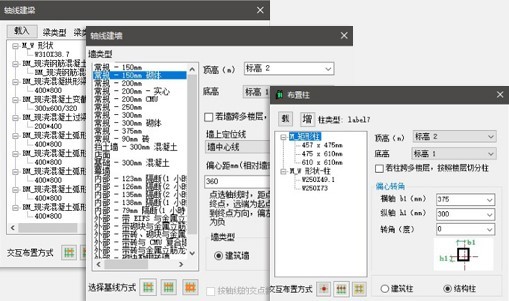
1. Added a custom family selection method to support selecting the column/beam family type in the current template file;
2. For special-shaped columns, T-shaped columns and L-shaped columns are better supported, and the naming rules for special-shaped columns are optimized;
3. Fixed the problem of duplicate specification of special-shaped column material and structural material parameters in the old version;
4. Supports automatically bringing the beam span number into the "beam number" parameter to meet Wanda model data requirements;
5. Optimized the naming function of specified rules for columns and beams;
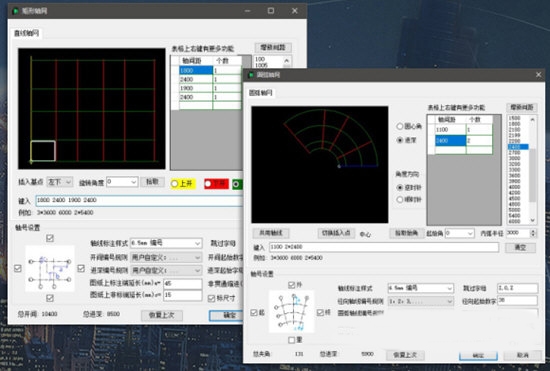
9. Quick Floor Grid Tool
1. Provides the axis number constant display tool setting function, which can customize the display style of the axis number;
2. A new 3D axis tool is added, which can display the axis network in the plan view in the form of model lines and 3D text in the 3D view, making it easier to view component positioning.
10. Quickly generate components
1. Added a new tool for building walls under beams, which supports the quick generation of specified types of walls under beams, facilitating the rapid creation of walls at inclined beam locations
Model batch modification tool
2. The "Beam Aligned with Inclined Plate" tool has been enhanced to support selection alignment to the bottom of the plate and automatic splitting of beams;
3. The "Edit Beam" tool has been enhanced to support automatically bringing the span number in the annotation into the "Beam Number" parameter;
Features of Mount Olive Quick Mockup Software
Convert the main components in the Tianzheng DWG file: axis, axis number, wall, door and window (including door and window number, door and window opening direction), column (including special-shaped column), and room into Revit model objects. The successful conversion rate of these objects in drawings of T5 (inclusive) and above formats is particularly high. Other building components (such as balconies, floors) cannot yet be converted into Revit models.
It can quickly convert architectural DWG drawings into Revit 3D models. For medium-sized buildings, it only takes 2 to 3 minutes to convert one floor.
You can interactively position the converted components in the Revit model
You can specify to generate only some components in Revit.
Floor and wall column heights use the given upper and lower floors to determine the floor and height of the component when turning over the form in Revit
The operation is very convenient. Even if you have no experience in using Revit, you can easily generate a Revit model from DWG by following the step-by-step instructions here.
Users can customize the scope of the pipeline tree that needs to be exported (by selecting the starting point of the pipeline tree)
For pipe sections without marked pipe diameters, the program automatically calculates the pipe diameter according to the specified specifications (mild hazard, terminal hazard) based on the nozzle load
The pipes generated in Revit can be automatically connected. (Users can specify custom fittings)
It can automatically turn up and down the nozzle and riser.
The speed is very fast. It takes only 3-4 minutes to complete all the mold turning of a one-story basement of tens of thousands of square meters.
Mount of Olives Quick Model Update Log
1. The details are more outstanding!
2.BUG gone without a trace
Huajun editor recommends:
Children's shoes, Olive Mountain Quick Model can definitely meet your needs. From the software interface to the software functions, it is absolutely eye-catching. Everyone is welcome to download and use it! There are similar software on this siteDoor and window CC manufacturer version,Dutt door and window master,vect2000 vectorization software,3D piping design software,GeoCorelDRAW!




Useful
Useful
Useful