





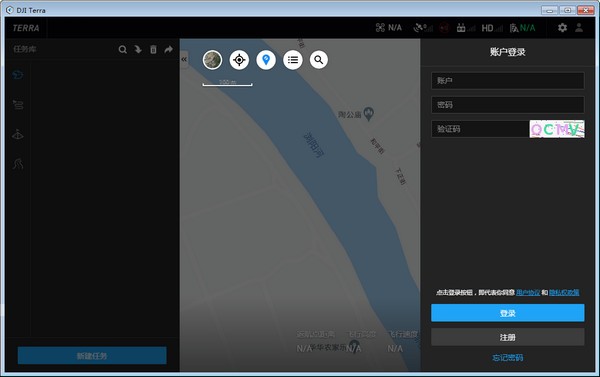
Introduction to DJI Map software
"DJI Terra” is a computer aerial photography and mapping assistant launched by DJI Drone for users. After use, it can help users perform computer aerial photography and mapping operations more easily and conveniently. The software can help users convert real scenes captured by drones into digital assets, providing functions such as independent route planning, flight aerial photography, two-dimensional orthophotos and three-dimensional model reconstruction.
Introduction to DJI Map functions
Function 1: Route planning
1. Waypoint flight
Setting a series of waypoints on the map will automatically generate a route. It supports setting rich waypoint actions for each waypoint. At the same time, the flight altitude, flight speed, flight direction, gimbal pitch angle and other parameters of the waypoint can be adjusted. For refined flight missions, waypoint planning can also be carried out on the established two-dimensional orthomap or three-dimensional model, making the planning effect more intuitive.
2. Mapping and aerial photography
The route can be automatically generated by selecting the target area. Provides map marking, KML file import, aircraft marking, etc. 3 Add boundary points in this way, and it can work normally even without network. During the planning process, the interface will display important information such as the estimated flight time, estimated number of photos, and area.
3. Oblique photography
The selected target area can automatically plan 5 sets of routes: 1 set of orthographic routes and 4 sets of routes A set of inclined routes in different directions. The comprehensive viewing angle helps build a higher-precision real-life 3D model, and it also supports setting parameters such as tilting the gimbal angle to meet the needs of different scenes.
Function 2: Model reconstruction
1. Real-time mapping
Based on synchronized positioning, map construction and image orthorectification algorithms, two-dimensional orthoimages are generated in real time during flight, enabling mapping while flying. Problems can be discovered in time at the work site and more targeted countermeasures can be taken flexibly.
2. Two-dimensional reconstruction
The algorithm is optimized according to different scenes such as farmland and city. The comprehensively upgraded true radiographic imaging technology effectively avoids image distortion and accurately presents target objects and measurement areas.
3. Three-dimensional reconstruction
Import images taken from different angles and automatically generate high-precision real-life 3D models. The reconstruction speed is fast, the memory is small, and it is suitable for 3D reconstruction of large-scale data.
Function Three: Data Analysis
1. Two-dimensional and three-dimensional measurement
On the built model, various key data such as coordinates, distance, area, and volume of the target object can be easily measured to provide data support for further analysis and decision-making.
2. Model annotation
After the measurement, the measurement results are managed, such as naming measurement objects, marking dimensions, exporting results, etc., to make data storage more reasonable and project optimization and reporting more intuitive and efficient.
3. Camera pose
Click anywhere on the model to quickly display all the photo points and images here. Quick switching between models and images makes it easy to check on-site conditions at any time and check specific details.
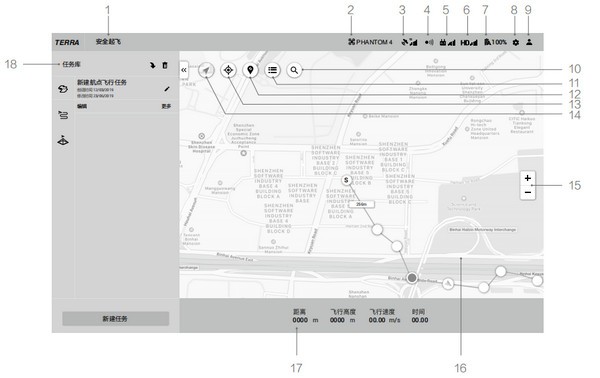
Features of DJI Map software
1. Aircraft status prompt bar
Displays the flight status of the aircraft and various warning messages
2. Aircraft connection status
Shows the connection status of the aircraft
3. GNSS signal strength
Displays the current GNSS information strength and the number of acquired satellites
4. Visual obstacle avoidance system status
Shows whether the visual obstacle avoidance system is working properly
5. Remote control link signal quality
Displays the quality of the remote control signal between the remote controller and the aircraft
6. High-definition image transmission chain signal quality
Displays the quality of the high-definition image transmission link signal between the aircraft and the remote controller
7. Aircraft battery power
Displays the remaining battery power of the aircraft at the current time
8. Setting menu
Click to open the settings menu
9. Account information
Log in/out of the account, activate the license, view the list of unlocked certificates, version number and privacy policy, and set the privacy data switch
10. Search
You can enter a name to search for a location on the map
DJI Maps update log
Optimize user feedback issues and improve detailed experience
Huajun editor recommends:
DJI Map has always been the most commonly used software by most netizens. Huajun Software Park also hasDoor and window CC manufacturer version,vect2000 vectorization software,Show me my house,3D piping design software,GeoCorelDRAWIt is also a software that is very popular among netizens. You can download it from Huajun Software Park!




Useful
Useful
Useful