




- Green versionView
- Green versionView
- Green versionView
- Green versionView
- Green versionView
Light and shadow magic hand software functions
Exposure and color correction
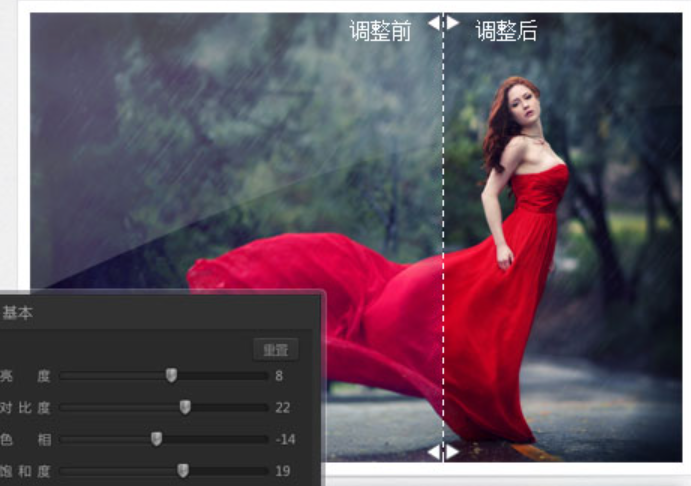
Brightness/Contrast: Adjust the lightness and darkness of photos with one click to enhance the layering of the picture.
Saturation/Hue: Control the vividness of colors and correct color cast problems (such as reddish skin tones, greenish landscapes).
White balance: Automatically or manually correct color temperature to solve color casts caused by lighting (such as warm light, cold light).
Color Level/Curve: Advanced users can adjust the light and dark distribution of the picture through the color level map to enhance contrast.
Cropping and composition
Free cropping: Manually select areas and remove excess background.
Fixed ratio cropping: supports common ratios such as 1:1 (square), 4:3, 16:9, etc., adapting to social media or printing needs.
Rotation/flip: 90° rotation, horizontal/vertical flip, quickly correct shooting angle problems.
portrait beauty
Skin microdermabrasion: softens skin texture, retains facial features and avoids a "plastic feel".
Freckle and acne removal: Precisely remove facial blemishes and support adjusting brush size and intensity.
Face Slimming/Big Eyes: Fine-tune facial contours to create a natural beauty effect.
Teeth Whitening: Brighten your teeth and improve the texture of your smile with just one click.
Software Highlights
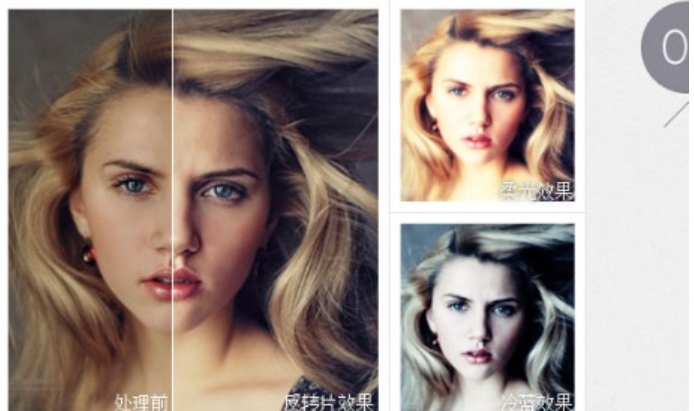
Imitate the style of studio photos that are very popular now, including cold tones, highlight overflow, and softening.
Easily combine three photos with different EVs generated by bracketed exposure shooting into one high-latitude photo
ID photo layout. Up to 16 1-inch ID photos can be arranged on a 6-inch photo. It can be completed with one click. It is extremely simple.
Correct the color deviation of digital photos and restore natural colors, which can be fine-tuned manually - there are no inaccurate photos.
Intelligently corrects the tones of photos with inaccurate white balance
To imitate the effect of old photos, dull colors and nostalgic mood
Simulate the high latitude of negative film and increase the highlight levels and shadow details of photos
It has special effects on photos with a large span of light and dark, such as the sky, morning glow and sunset, with bright colors and natural transitions.
Noise suppression is performed on photos of night scenes and large dark areas, with significant denoising effect without affecting sharpness.
For cameras with dead spots on the CCD, after one setting, you can repair the dead spots on all the photos it takes, which is very convenient and effective.
Intelligently adjust the exposure range of photos to make them more suitable for visual appreciation
Software features
Designed for CCD's weakness in red resolution, it can effectively repair photos with red overflow (such as red flowers without red details)
Imitate the LOMO style, with dark corners and adjustable color tone, convenient and easy to use
Multi-channel adjustment, the operation is the same as PS, advanced users can do whatever they want
Sharpening, blurring, noise, brightness, contrast, gamma adjustment, inverse color, decolorization, RGB tone adjustment, etc.
Any scaling, free rotation, cropping
A series of actions can be set to automatically complete all operations with one click
Supports batch scaling, batch positive film, etc., suitable for mass pre-printing processing
Users can set 5 signatures and backgrounds, and the text background can also set the color and transparency arbitrarily.
Print your own designed watermark anywhere on the photo. Files in translucent formats such as PNG and PSD are supported. You can watermark whatever you want.
Easily create a variety of photo frames, such as film style, white border style, etc.
Provides a large number of fancy border materials with varied shapes, lively and interesting, and new borders are constantly available for download
Quickly combine multiple photos into one image. Suitable for product display or personal photos.
Users can freely adjust parameters to obtain satisfactory results
Remove unnecessary parts of the photo
Light and shadow magic hand frequently asked questions
Problem: The automatic white balance effect is not obvious.
Reason: Wrong operation sequence, automatic exposure will overwrite color data.
Solution:
Correct order: do automatic white balance first → then do automatic exposure → finally add borders/text.
If the color cast is serious, use "Severe White Balance Error Correction" preprocessing first.
Problem: The digital fill light/light reduction function is invalid or stuck.
Reason: Insufficient system resources or the image resolution is too high.
Solution:
Close other large programs (such as Photoshop, video players).
First scale the image to a suitable size (such as 2000 pixels or less) before processing.
Upgrade software to the latest version (optimize resource allocation strategy).
Light and shadow magic hand update log
1. Sweep the bug out and carry it out to the end
2. The most stable version ever
Huajun editor recommends:
The editor promises that as long as you use the magic hand of light and shadow, if you don't like it, you can come and hit me! The editor has also prepared for youPhoto BlowUp,Adobe Illustrator CC,AutoCad 2020,Beautiful pictures,ps download Chinese version free cs6
















Useful
Useful
Useful