




- Green versionView
- Green versionView
- Green versionView
- Green versionView
- Green versionView
Highlights of Xingyou Image Processing Master Software
Enterprise Office: Helps efficient enterprise office, converts image formats in batches, supports a variety of image processing functions, and improves work efficiency.
New media operation: supports various picture production and processing functions, batch processes multiple materials, and exports photos of multiple styles with one click to meet various picture needs of new media.
E-commerce design: E-commerce design requires processing a large number of product images. Xingyou Image Processing Master provides image processing functions with complete tools and simple operation, making image creation more time-saving and interesting.
Digital Photography: Meets the detail processing needs of various ID photos and photography pictures. You can add watermarks to pictures, crop, resize, classify pictures in batches, etc.
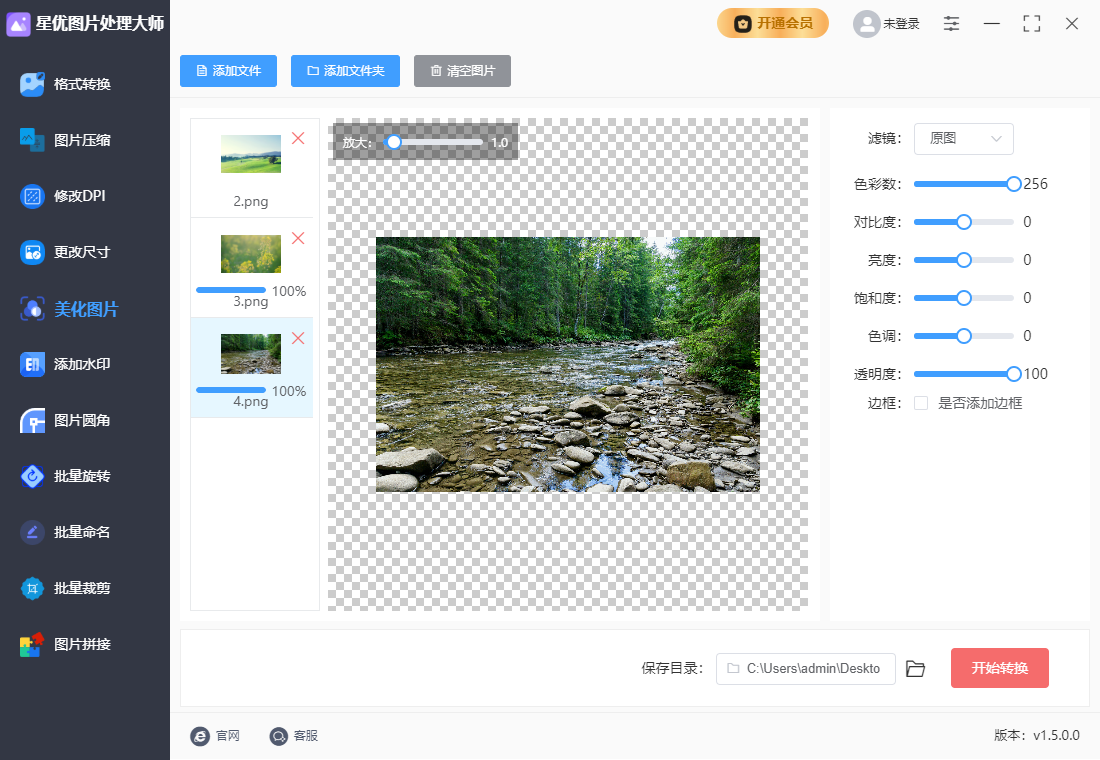
Features of Xingyou Image Processing Master software
Easy to operate: The software interface is intuitive and the functions are easy to use, making it suitable for novices in image processing to get started quickly. Users do not need to have professional skills to efficiently complete various image editing tasks.
Batch efficient: supports processing of multiple images at the same time, significantly saving time and repeated operations. Users can process a large number of pictures at one time to improve work efficiency.
Convenient preview: Cropping, splicing and other operations support real-time preview to reduce error adjustments. Users can view the effect in real time during the operation to ensure that the final result meets expectations.
Strong compatibility: The software is adapted to Windows systems and supports common office and design scenarios. Users can run the software stably on different versions of Windows systems to meet diverse needs.
Xingyou Image Processing Master Software Functions
Image format conversion: Supports mutual conversion of more than ten image formats (such as PNG, JPG, HEIC, WebP, BMP, TIFF, GIF, SVG, TGA, PSD, etc.), and supports batch operations to quickly convert images to the required format.
Image compression: Customize the compression quality and reduce image size in batches while maintaining image quality as much as possible. Users can set the compression quality value according to their needs. The lower the value, the smaller the image will be compressed, but care should be taken to avoid excessive compression that may lead to a decrease in image quality.
Size adjustment: Provides two modes: proportional scaling and custom size, and supports batch modification of image sizes. Users can adjust the image size as needed to meet usage needs in different scenarios.
Beautification editing: built-in filters, brightness/contrast adjustment, border addition and other functions to meet basic color adjustment needs. Users can beautify images and improve image quality.
Watermark addition: Supports text watermarks and picture watermarks, and can customize watermark color, position, transparency and other parameters to make the watermark more perfect.
Picture rounded corners: Quickly turn the four corners of the picture into rounded corners. The angles can be set freely. Batch operations are supported to improve efficiency.
Image rotation: Images can be rotated clockwise or counterclockwise to any angle, and batch processing is supported to facilitate users to adjust the image direction.
Batch naming of pictures: Name pictures in batches according to the "name + number" method to simplify the picture management process.
Image cropping: Supports both proportional cropping and size cropping. Users can crop images as needed and preview the cropping effect.
Picture stitching: Three stitching methods are provided: long vertical pictures, long horizontal pictures, and customized puzzles. Users can freely set the parameters of the stitched pictures to stitch together pictures that meet their needs.
Modify DPI: Quickly modify the resolution DPI of pictures in batches without affecting the size and size of the pictures themselves, meeting the needs of use in specific scenarios.
Xingyou Picture Processing Master FAQ
Software freezes or crashes
Cause of the problem: It may be related to the computer configuration, software version or other programs running at the same time.
Solution:
Make sure the computer configuration meets the minimum requirements for running the software, such as memory, processor, etc.
Update software to the latest version to fix possible bugs and compatibility issues.
Close unnecessary background programs to release system resources and increase software running speed.
Xingyou Image Processing Master update log:
1. The details are more outstanding!
2. BUG gone without a trace
Huajun editor recommends:
The editor of Xingyou's picture processing master personally identified it, and it's clear that you can't be deceived! There are similar software on this sitePhoto BlowUp,Adobe Illustrator CC,AutoCad 2020,Beautiful pictures,Picture Factory Official Version, welcome to click to download and experience!
















Your comment needs to be reviewed before it can be displayed