




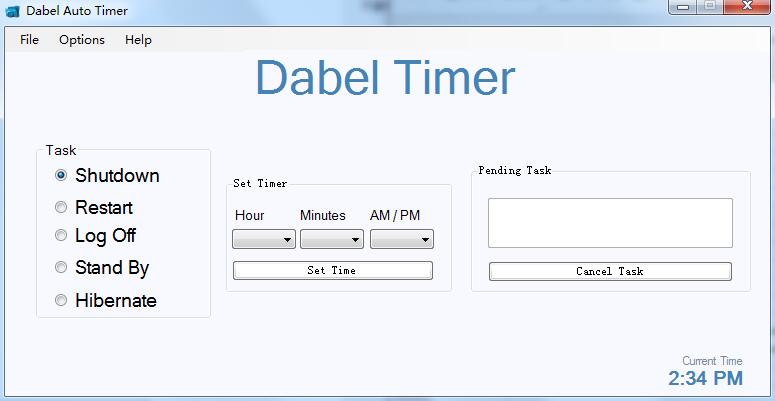
Dabel Auto Timer software features
Scheduled restart
Scheduled shutdown
Regular logout
Scheduled sleep
Dabel Auto Timer installation steps
1. Download the installation package of the official version of Dabel Auto Timer in Huajun Software Park

2. After downloading, unzip the compressed package into a folder named after this software

3. Open the folder and double-click the "exe" program
4.Dabel Auto Timer is green software and can be used without installation.
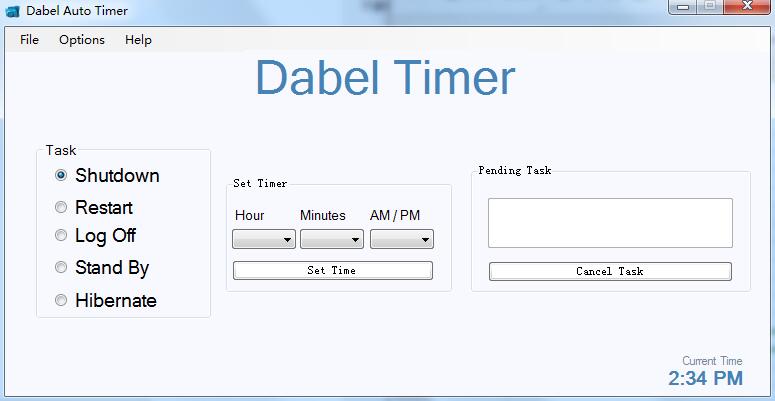
Dabel Auto Timer Instructions for Use
1. Download and double-click the .exe file to run the software directly.
2. Select the task, Shutdown (shutdown), Restsrt (restart), Log Off (log off), Stand By (system standby), Hibernate (sleep).
3. Set the time, select Hour, Minutes, AM/PM, and click Set Time.
4. After the task is set successfully, just wait for the software to execute automatically.
Dabel Auto Timer update log
The developer of GG said that there are really no bugs this time~
Huajun editor recommends:
Dabel Auto Timer is very simple to install, powerful, and has no installation garbage. It is specially recommended to everyone. Everyone is welcome to download it! This site also hasPPT timer,Small accurate timing,Eye protection elf,Conference speech timer,Hanmeng timing broadcast system, available for you to download!




Useful
Useful
Useful