



- Green versionView
- Green versionView
- Green versionView
- Green versionView
- Green versionView
At present, many information materials need to be converted into electronic documents to facilitate various applications and management. However, due to the backward way of digital processing of information, it is not only time-consuming and labor-intensive, but also consumes huge amounts of money, resulting in a backlog of large amounts of document materials. Therefore, there is an urgent need for a fast and efficient software system to meet this massive input demand.
This software system is suitable for individuals, small libraries, small archives, and small enterprises to input large-scale documents, reprint books, and digitize large amounts of materials.
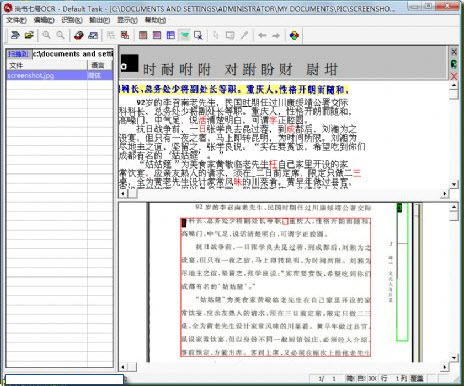
How to use Shangshu No. 7?
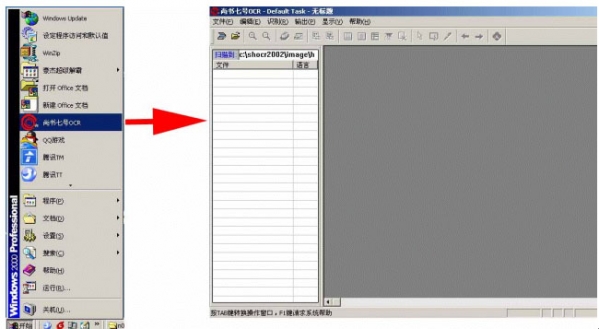
After the software is installed, users please click "Start" in the lower left corner of the desktop, find the "Shang Shu No. 7 OCR" software icon, and click it. Open the user interface of Shangshu No. 7 OCR.
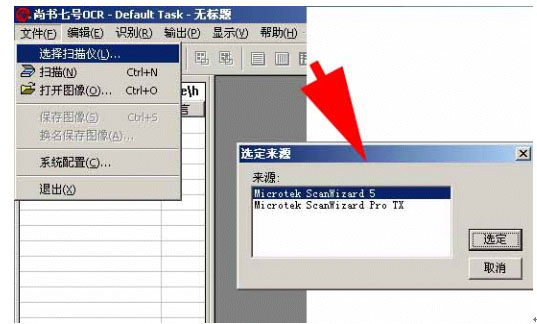
3. Open "Select Scanner" under the "File" tab of Shangshu No. 7 OCR, and select the option corresponding to the scanner's driver "MICROTEK SCANWIZARD 5". and select OK.
4. Select "Scan" under the "File" menu to open the scanner driver.
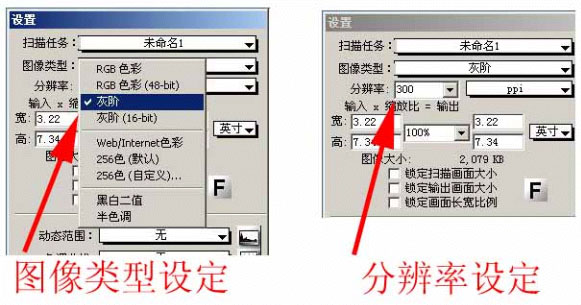
5. Supporters, please pay attention to selecting the "Image Type" in the "Settings" window on the left in the SCANWIZARD 5 software. Please select the "RGB Color" or "Grayscale" type, and note that the scanner resolution is 300PPI.
6. After the user completes the "preview" and sets the range to be scanned, he can click the "Scan" button and the scanner will start scanning. Pass the scanned files directly to the default directory of Shangshu No. 7 OCR (the default directory for storing image files is the IMAGE directory under the SHOCR2002 directory under the C drive of the user's computer). After the scan is completed, please close the scanner driver SCANWIZARD 5. The user can see that the file to be scanned has been delivered to Shangshu No. 7, and the default file name is HW001.JPG.
7. Users are asked to select "Automatic Skew Correction" under the "Edit" menu in Shangshu No. 7 software, and let Shangshu No. 7 software rotate the scanned image accordingly to ensure that the text in the image is arranged horizontally, not tilted. Because text that is too slanted will affect the recognition effect of Shangshu software.
Because users continue to call us to inquire about the use of Shangshu No. 7 software, we have written a practical example of how to use Shangshu No. 7 software to help users make good use of Shangshu No. 7 OCR software. Many of them are our own experience in using Shangshu software. Users are requested to try to follow the examples.
Through the above points, it can be seen that the Shangshu No. 7 OCR system is indeed a good helper to improve the efficiency of document office.
PS: Shangshu No. 7 can only recognize pure text, not tables. After processing the text and saving it, open Shangshu No. 7, then open the image, and then press Start Recognition. Then you paste the recognized text into the writing board, but the content must be correct, and handwritten content cannot be recognized.

















Useful
Useful
Useful