





- Green versionView
- Green versionView
- Green versionView
- Green versionView
- Green versionView

Microsoft Japanese input method software features
Multi-mode input support:
Romaji input: Users can automatically convert Romaji into corresponding kana by inputting Romaji, which is suitable for beginners who are not familiar with keyboard layout.
Kana direct input: supports direct input of hiragana or katakana through the keyboard to meet users who have higher requirements for input efficiency.
Kanji conversion: After inputting kana, press the space bar to convert it to kanji. The system provides a list of candidate words based on the context, and the user selects through the arrow keys or numeric keys.
Intelligent prediction and auto-completion:
Analyze Japanese corpus based on statistical language model to predict words or phrases that users may input and reduce the number of keystrokes.
The auto-complete function completes the remaining words based on the entered content, allowing for fast input, especially suitable for common phrases and professional terms.
Handwriting and voice input:
Handwriting input: Supports inputting pseudonyms through a handwriting pad or touch screen. The system automatically recognizes and converts it into digital text, which is suitable for users who are not familiar with keyboard operations.
Voice input: Use speech recognition technology to convert speech into Japanese text to improve input efficiency.
Features of Microsoft Japanese input method software
Personalized learning and memory:
The system records the user's commonly used vocabulary and input habits, and places recently used vocabulary at the top of the candidate word list to improve input efficiency.
Supports custom vocabulary library, users can add professional terms or personal frequently used words to further optimize the input experience.
Real-time translation and word search:
Integrated real-time translation function, users can quickly obtain Chinese or other language definitions of words when typing, assisting learning and communication.
Provides word search function to facilitate users to check the meaning of new words at any time.
Simple interface and convenient operation:
The candidate word window has a simple design and supports adjusting the transparency, size and position to adapt to different usage scenarios.
Provides a wealth of shortcut key operations, such as quickly switching input modes, custom vocabulary input, etc., to improve operating efficiency.
Microsoft Japanese input method installation steps
1. Download Microsoft Japanese Input Method from this site. After downloading, you will get a .zip software package, unzip it. After that, you will see the following interface: two folders, the 32-bit version of the Microsoft Japanese Input Method and the 64-bit version of the Microsoft Japanese Input Method. Here you can choose a suitable version.
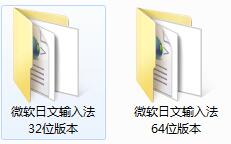
2. The following editor will continue to explain to you using the 32-bit Microsoft Japanese input method. The installation method of the 64-bit version is the same, so you can refer to it. First open the folder of the 32-bit version, then double-click ime32.msi to run it and wait for the program to automatically install.

3. Micro installation is very fast, please wait patiently during the installation process. After the installation is completed, we can click on the language bar of the computer, and then we can see the Microsoft Japanese input method we installed.

Microsoft Japanese Input Method Instructions
1. The Japanese input method is to press “Enter” to confirm Japanese, and press “Space” to select “Chinese characters”.
2. How to type "っ"?: Double the first consonant of the romaji pronunciation of a kana, such as "もっと" as "motto".
3. How to type “ん”?: Just type nn;
4. How to use “ー” in “コーヒー”: hit “-” (minus sign)
5. How to play the small "ぁ ぃ ぅ ぇ ぉ": x + Roman pronunciation, for example "ぁ"xa
How to switch between hiragana and katakana in Microsoft Japanese input method
CTRL+CAPS LOCK is to switch to Hiragana
ALT+CAPS LOCK is to switch to katakana
ATL+~ is to switch to English input
Switch between flat and film titles during the input process:
F6 is converted to hiragana F7 is converted to katakana
Microsoft Japanese input method shortcut keys
[Ctrl]+[K]: Change the input mode to [ひらがな]
[Ctrl]+[P]: Change the input mode to [Full-width カタカナ]
[Ctrl]+[O]: Change the input mode to [Half-width カタカナ]
[Ctrl]+[U], [Chr]+[;]: Change the input mode to [full-width alphanumeric]
[Ctrl]+[L]: Change the input mode to [standard half-width alphanumeric]
[Ctrl]+[I]: Symbol and text insertion menu
Microsoft Japanese Input Method FAQ
Question: How to switch the handwriting state in Microsoft Japanese input method?
Answer: If you want to change the Japanese input method to handwriting mode, you can switch the input method to Microsoft Japanese input method, and then click the icon as shown in the figure below to open the input method input pad.


Question:What should I do if I can’t find the Microsoft Japanese input method after installing it?
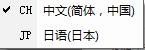
Answer: Generally speaking, the Microsoft Japanese input method will be automatically added to the language bar after the installation is completed. If you find that there is no "JP Japanese" option in your language bar, then you can try the following method to manually add the Japanese input method to the language bar.
1. First, use the mouse to click on the CH Chinese input method in the language bar, right-click and select Settings.
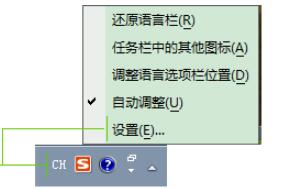
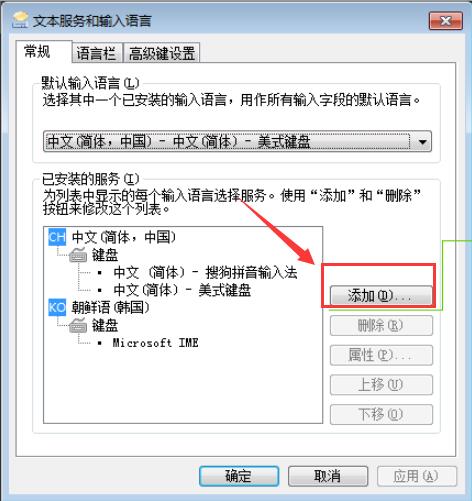
2. Then in the settings panel, we can see three tabs: General, Language Bar, Advanced Key Settings, etc. Here we switch the tab to "General" and then click the "Add" button on the right;
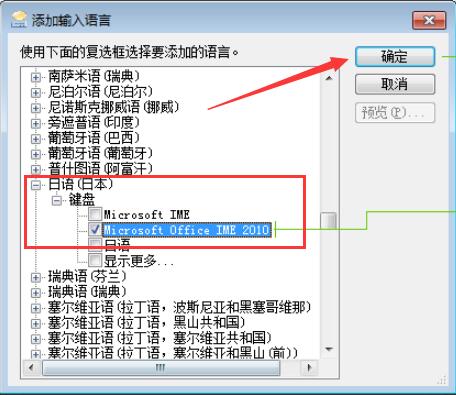
3. Then an "Add Input Language" dialog box will pop up. Here we click "Japanese", check "Microsoft Office IME 2010" in the Japanese drop-down list, and click OK;
4. At this time, you can see the Microsoft Japanese input method by looking at the language bar.
Comparison of similar software
Baidu Japanese input methodIt is an input method software developed by Baidu to enter the Japanese market. The computer version of Baidu Japanese Input Method can support the input of Japanese and emoticons. It also has a unique dictionary of new words and hot words, mastering Japanese popular vocabulary in real time, and you can easily switch input method skins. Baidu Japanese input method is very powerful and comes with a rich vocabulary. From the perspective of input habits, it associates input vocabulary with a very user-friendly design. It is very suitable for Japanese learners to input Japanese quickly and conveniently.
Google Japanese input methodIt is a free Japanese input method launched by Google, with a rich vocabulary and accurate word selection function. Google Japanese Input Method automatically generates dictionaries from the Internet and collects a large number of new words, specialized terms, artist names, etc. to enrich the vocabulary of Google Japanese Input Method. The Google Japanese input method also has a good association function. You can select candidate vocabulary applications by simply entering numbers. It conforms to the characteristics of popular Japanese speaking habits and can be used in email, chat tools, Office documents and other environments.
Microsoft Japanese input method update log:
Sweep the bug out and carry it out to the end
Optimize user feedback issues and improve detailed experience
Huajun editor recommends:
It is highly recommended to download Microsoft Japanese Input Method. Who knows who uses it? Anyway, I have already used it. In addition,Today's goal,Hanwang Attendance Management System,WPS Office,NTKO large file upload control,Kuai Dao Ke platform softwareIt is also a good software. Welcome to click to download and experience it!

























Useful
Useful
Useful