If you are looking for software to use, go to Huajun Software Park! software release AI product list

Hello, if there is a need for software inclusion, please package the software and attach the software name, software introduction, software-related screenshots, software icon, soft copy, business license (if you do not have a business license, please provide the front and back of the corresponding developer ID card and a photo of yourself holding the ID card), and send it to email http://softwaredownload4.com/sbdm/user/login

Close >>

Send to email:news@onlinedown.net

Close >>

Location: Home pagePC softwareNetwork softwareNetwork detection NetTraffic
NetTraffic

NetTraffic 1.38.1 Chinese version

QR code
  • Software licensing: free software
  • Software size: 0.4MB
  • Software rating:
  • Software type: Domestic software
  • Update time: 2024-12-26
  • Application platform: WinAll
  • Software language: Simplified Chinese
  • Edition: 1.38.1 Chinese version

Download the service agreement at the bottom of the page

Software introduction Related topics FAQ Other versions Download address

Basic introduction
NetTraffic segment first LOGO
NetTraffic is a compact network traffic monitoring software that takes up very little system resources.

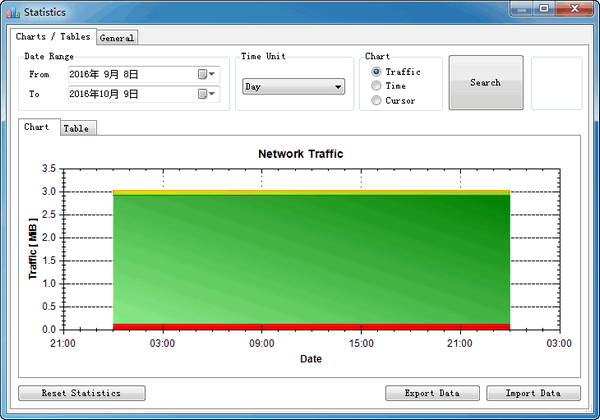
NetTraffic screenshot

Function introduction

When you are browsing the web or transmitting data, NetTraffic can monitor your network usage in real time, with both numerical and graphical displays. Through NetTraffic, you can observe cumulative statistical data such as daily traffic, weekly traffic, and monthly traffic. The software is particularly suitable for use in areas with restricted broadband traffic or for traffic package users. It can enable you to understand your broadband usage and prevent you from being charged overage fees by communication companies at the end of the month.

NetTraffic is a software based on network port monitoring, so by setting its monitoring wide port, you can also understand the data traffic of different ports, including inflow (download volume) and outflow volume (upload volume). The port is automatically scanned by the software, such as a general Internet port, or if you have a virtual machine installed, you can also see its corresponding port. Normally, you only need to select all interfaces, so that all the upload and download volumes of your PC can be seen at a glance.


FAQ

Associated version

close