





Blue Snake Port Scanner Software Features
1. Blue Snake port scanner provides IP scanning function, and the scanned IP can be set in the software
2. Support adding functions, you can add continuous port scanning method
3. Supports target IP setting, allowing users to set a target IP themselves
4. Specific port settings are also supported, and users can also add specified ports.
5. Provide information management. The IP information you configure can be recorded in the software.
6. It also supports adding discrete port scanning tasks
7. Supports repeated scanning, and can continue scanning the same IP
8. You can also switch IP and choose the same port for scanning
9. It also provides domain name IP query function. You can search domain name IP in the software.
10. Faster search, providing multi-threaded channels to find your IP
Features of Blue Snake Port Scanner Software
1. Scan the specified port or specified IP based on the IP task or port task.
2. Task-based information management capabilities are integrated internally to facilitate users to manage and perform repetitive tasks.
3. Arrange multi-threads according to the number of CPU cores of the machine to maximize the use of machine resources.
4. It has a complete task monitoring interface, and users can independently control the execution progress of tasks.
5. Provide the function of generating result reports and completing automatic shutdown, minimizing the burden of manual intervention by users.
6. Comes with a customizable, editable port dictionary and has query function.
7. The program automatically remembers the user’s adjustments to the interface to meet the needs of different users for different views.
8. Support specific application layer scanning.
Blue Snake Port Scanner Installation Steps
1. Download the Blue Snake Port Scanner from the Huajun Software Park and extract it to the current folder. Click on the setup_x64.exe application to enter the installation wizard interface, and then click Next.
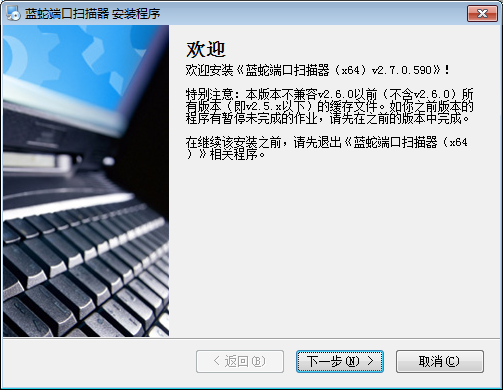
2. Select the software installation location interface. Huajun editor recommends that users install it on the D drive, select the installation location and click Next.

3. The installation of Blue Snake Port Scanner is completed, click Finish.

How to use Blue Snake port scanner
1. Open the Blue Snake port scanner. Here are the added functions. You can add the IP that needs to be scanned here.
2. As shown in the figure, enter the IP here to create a new scanning task.

3. Prompt query interface, enter the domain name here to start the query

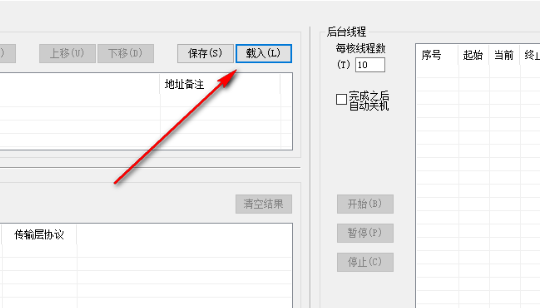
4. Prompt to load task function. If you have edited the task, you can load the project into the software here.
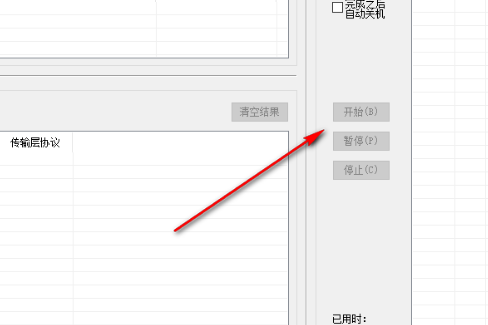
5. When prompted to start the function, click here to start scanning. It also provides the function of completing the shutdown, which can be checked.
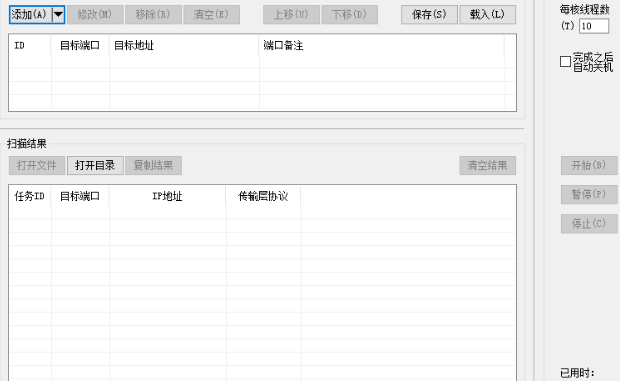
6. Provides port scanning function. The setting interface here is the same as the IP interface. You can configure the task yourself.
7. Port dictionary interface, application layer protocol: tcpmux TCP port service multiplexing, rje remote job entry, echo simple TCP/IP service

8. You can choose to insert a new port or add new content in the software. Server and transmission protocol tips are provided below.

9. Scanning with Blue Snake Port Scanner is very simple. Just add an IP or port to start scanning. It is a very easy-to-use port scanning software!
Blue Snake Port Scanner FAQ
Q: How to uninstall Blue Snake port scanner software?
Answer: Method 1: Install and open the computer manager software, select the software management option, click the uninstall option, find the Blue Snake port scanner software in the list, and click uninstall
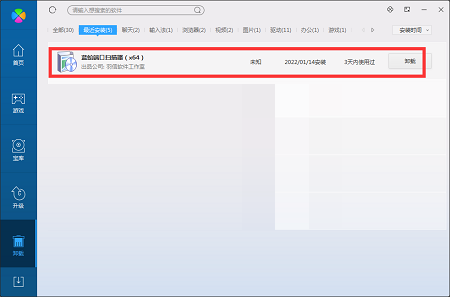
Method 2: Install and open360 software manager, find the Blue Snake Port Scanner software in the list of uninstall options, and click to uninstall it.
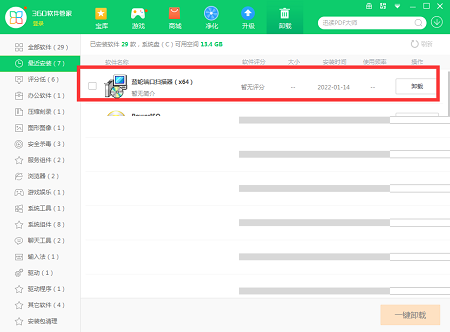
Applicable objects of Blue Snake port scanner
Server administrators, Internet cafe administrators, server developers, network security practitioners and enthusiasts, network administrators of enterprises and institutions, network builders, college students, etc.
Applicable scenarios for Blue Snake port scanner
Check the server port
Users can use the "Scan ports based on address" panel or the "Scan addresses based on ports" panel to check whether the specified ports of one or more servers are open. The program will automatically output reports, making it easier for users to record and read.
Discover host ports
Users can use range port scanning to discover which ports are open on one or more hosts.
Discover service hosts
Users can use the "Port-Based Scan Address" panel with the "Application Layer" scan settings to discover which hosts provide which services.
Specially pointed out that in the above three scenarios, this product is suitable for large-scale operations, so it will be very suitable for routine operations in large organizations.
Learn computer network knowledge
Students can use this software to do some computer network experiments, deepen their knowledge and understanding of computer network courses, open up the knowledge correlation of the five-layer teaching protocol of computer networks, and discover knowledge points not covered in books.
Query port dictionary
Users can use the "Port Dictionary" panel to query the exact public convention of a port.
Query domain name IP
Users can use the "Query IP of Domain Name" dialog box to query the IP address bound to a domain name.
Comparison of similar software
Port Scanner (SZ Port Scan)Scans the computer network for open ports and it will generate a list showing what ports and services are available for each (MAC address, HTTP, SMB, FTP, iSCSI, SMTP and SNMP services) To find the details of all devices, you can easily filter the list by port number, computer name or service and also save the results to an XML file.
ip port scanner batch ip scanner, that is, specifying a port to scan an IP segment, which is very practical for network administrators, and this software is a green version. You can use it by double-clicking it after downloading, and no additional installation is required.
Blue Snake Port Scanner Update Log
v3.7.0.1285 (08:54 2025/03/20)
01. Alleviate the BUG of GetFirstSpecific().
02. Add RDP scanning options.
03. Add SFTP/SSH scanning options.
04. Move "Load from reusable result file" from the task dialog box to the dialog box that pops up from the "Load" button on the main interface.
05. XML results can be loaded into the results list.
v4.0.0.1300 (15:15 2025/6/25)
01. Optimize the pause and resume interface display in the two-stage pipeline mode.
02. Alleviate the BUG that will crash when opening the rename dialog box.
03. Restore the "Load from reusable result file" button in the task dialog box, and modify the number of loaded tasks.
04. Fine-tune the task dialog interface.
05. Modify the field names of the result file.
06. If application layer scanning is checked, the results will be listed only if the application layer scan hits.
07. Fixed the BUG in transport layer scanning.
08. Modify the check and update logic.
09. Upgrade the VC++ runtime library to version 2022.
Huajun editor recommends:
Blue Snake Port ScannerIn the latest version, users can add IP addresses to be scanned in the software, set an IP range, and query IP domain names. Blue Snake Port Scanner is a software that is completely fool-proof and super simple to operate.
















Useful
Useful
Useful