If you are looking for software to use, go to Huajun Software Park! software release AI product list

Hello, if there is a need for software inclusion, please package the software and attach the software name, software introduction, software-related screenshots, software icon, soft copy, business license (if you do not have a business license, please provide the front and back of the corresponding developer ID card and a photo of yourself holding the ID card), and send it to email http://softwaredownload4.com/sbdm/user/login

Close >>

Send to email:news@onlinedown.net

Close >>

Location: Home pagePC softwaregraphic imageimage processing CAD mini drawing
CAD mini drawing

CAD Mini View 2016 R7

QR code
  • Software licensing: free software
  • Software size: 11.42MB
  • Software rating:
  • Software type: Domestic software
  • Update time: 2025-07-03
  • Application platform: WinAll
  • Software language: Simplified Chinese
  • Edition: 2016 R7

Download the service agreement at the bottom of the page

Software introduction Related topics FAQ Other versions Download address

Basic introduction
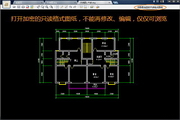
CAD mini picture section first LOGO
CAD Mini Viewer (CAD Viewer) is the fastest and smallest CAD multi-functional drawing viewing tool. CAD Mini Viewer (CAD Viewer) is completely separated from AutoCAD to browse 2D and 3D drawings of DWG/DXF/DWF versions of R14-R2015. Features of the CAD Mini Viewer (CAD Viewer): 1. Quick operations: pan, zoom, full screen, printing, measurement, calculation, annotation, layer, layout, text search and replacement, editing mode as you like; 2. Perfect fonts: Using cloud technology, it automatically loads the corresponding fonts according to the needs of different DWG drawings, solving problems such as CAD font loss and reinforcement symbol display; 3 Format conversion: Conversion of almost all popular formats such as BMP, GIF, PNG, JPEG, PDF, DXF, DWF, SVG, EMF, HPGL, etc.; 4 Fast printing: What you see is what is printed, color, black and white, frame selection range; 5 Drawing encryption: Drawings can be encrypted into read-only DWG format to protect your intellectual property rights; 6 Mobile collaboration: WeChat mobile phone integration: Drawings can be sent through WeChat without a data cable, and drawings can be easily transferred between mobile phones and computers; 7. Alternative drawing viewing: CAD collaboration you have never experienced before, 2 people = multiple people viewing drawings at the same time, remote and real-time interaction; 8. Drawing splitting and printing: the simplest and fastest drawing browsing and splitting printing; 9. Tianzheng conversion: such as Tianzheng format drawing conversion, and many VIP batch efficiency tools and services. 10 The smallest and fastest multi-functional CAD drawing viewing tool, completely separated from AutoCAD to browse DWG 2D and 3D drawings of all versions R14-R2015.
Similar software
Release Notes
Software address

Related topics

  • cad mini picture viewing topic

    cad mini picture viewing topic

  • Special topic on CAD mini picture viewing software

    Special topic on CAD mini picture viewing software

FAQ

Associated version