





- Green versionView
- Green versionView
- Green versionView
EDIUS Highlights
EDIUS non-linear editing software is designed for broadcast and post-production environments, especially for journalists, tapeless video production and storage. It has a complete file-based workflow, providing real-time, multi-track, multi-format mixing, synthesis, chroma key, subtitles and timeline output functions. EDIUS supports a variety of video formats, including SONY XAVC (Intra/Long GOP)/XAVC S/XDCAM, Panasonic AVC-Ultra/AVC-Intra/P2, Canon XF-AVC, etc., as well as all DV, HDV cameras and recorders.
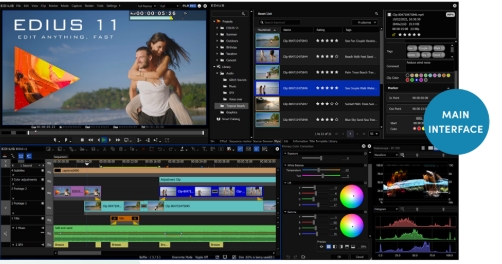
EDIUS features
Support Log and RAW files: EDIUS supports the latest color spaces of Log and RAW files, such as HLG/PQ, S-Log, Canon Log, etc., as well as LUT (.cube) file import.
Native editing of HDR materials: EDIUS supports native editing of HDR materials, which can automatically map HDR and SDR color spaces, increase or decrease the baseline brightness, and freely switch between SDR and HDR timelines.
Fast and flexible user interface: EDIUS has a fast and flexible user interface, including unlimited video, audio, text and graphics tracks.
Lite subtitles: EDIUS has a built-in Lite subtitle function that supports fast and efficient production of broadcast-level high-quality graphic and text subtitles.
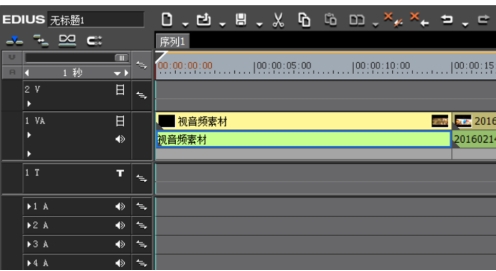
EDIUS function
4K editing process: EDIUS supports 4K editing, including hardware such as Blackmagic Design’s Deck-Link 4K Extreme and Ultra Studio 4K, as well as timeline color correction process exchange with DaVinci Resolve 11.
Third-party board support: EDIUS supports third-party boards from Blackmagic Design, Matrox and AJA, increasing the compatibility and flexibility of the software.
Multi-resolution mixing: EDIUS can mix materials of multiple resolutions, from 24x24 to 4Kx2K, and convert different frame rates in real time to improve work efficiency.
Latest file format support: EDIUS is constantly updated to support the latest file formats, such as SONY XAVCAM, Panasonic AVC-Ultra, Canon XF-AVC, etc.
Source code editing: EDIUS supports source code editing of multiple video formats, including SONY XDCAM, Panasonic P2, Ikegami GF, RED, Canon XF and EOS movie formats.
Fast AVCHD editing: EDIUS is one of the fastest AVCHD editing software currently, supporting real-time editing of more than 3 layers.
Multi-camera editing: EDIUS supports multi-camera editing capabilities of up to 16 cameras and can perform video output in real time.
Enhanced coding and decoding capabilities: EDIUS has enhanced the coding and decoding capabilities of MPEG and 264/AVC, supporting faster 4K H.264 playback.
Intel Optimization: Based on the optimization of the fourth generation Intel Core architecture, EDIUS supports Intel Quick Sync Video high-speed 264 output for Blu-ray burning.
64-bit processing: EDIUS supports 64-bit local processing, quickly processes massive static image files (JPG, TGA, DPX, etc.), providing smoother real-time editing.
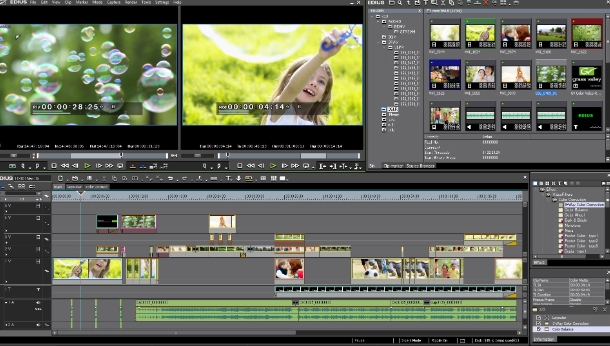
EDIUS FAQ
Computer configuration is insufficient
Possible reasons: When editing more complex projects, the computer configuration may not meet the needs.
Solution: Close some unnecessary background programs, clean up temporary files, or consider upgrading computer hardware to improve system performance.
Project file save location
Recommendation: Save project files on a local hard drive rather than an external storage device to improve editing smoothness.
EDIUS update log:
1. Optimize content
2. The details are more outstanding and bugs are gone.
Huajun editor recommends:
After seeing the introduction provided by the editor of Huajun Software Park above, are you ready to take action? Then download EDIUS quickly and use it. Huajun Software Park also providesAquaSoft Stages,Video clip format factory,Real file repairer,EV screen recording,Vegas pro video editing softwareWaiting for you to download and use.













Your comment needs to be reviewed before it can be displayed