




- Green versionView
- Green versionView
- Green versionView
- Green versionView
- Green versionView
Things to note:
Friends who use Mac to install or download application software often encounter the following three error situations. The editor here provides you with solutions to help you solve the Mac error problem:
1. "...the software is damaged and cannot be opened. You should move it to the Trash"
2. "The xxx software cannot be opened becauseApple can't check if it contains malware"
3. "Cannot open xxxsoftware because it comes from an unidentified developer"
Don’t panic if you encounter the above three situations, follow the editor’s instructions and solve them easily.
1. Turn on any source in the computer settings.Open any source.
2. Opening any source will solve the problem of most software error reports. If it does not work, it means that you need to bypass application signature authentication by executing command line code. Execute command bypassiosnotarizationGatekeeper.
3. If the above operations still cannot solve the problem, then you need tocloseSIPSystem integrity protectionOnly then can.
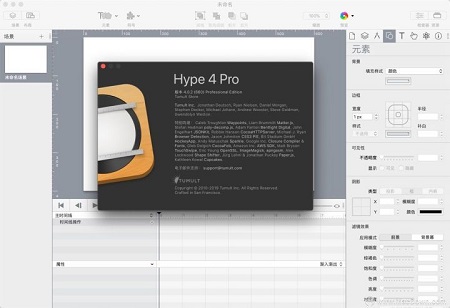
Hype 4 Pro Mac software features
1. Quick animation design
Easy-to-use, keyframe-based animation system
Record mode monitors your every move, automatically creating keyframes as needed
Create natural motion curves for Bezier paths
Create scenarios for organizations and workflows
away?
2. Add interactivity
Action handle startup and timeline control, scene switching, or running custom javascript
Visually build action handles to respond to tap, click, and animation events
3. Create great content
"What you see is what you get" scene editing based on WebKit
Intelligent guidance, arrangement and scaling tools
Easily integrate video and audio for outstanding multimedia presentations
The most cutting-edge effects: Blur, Hue Shift, Brightness, Saturation, Shadows, Reflections and 3D Transforms
Add Google fonts to your project or use your own CSS web fonts
Features an adjustable layout system that scales content to fit the screen size
Supports Retina resolution images
4. Perfect fit for mobile devices
Hype’s HTML5 output runs efficiently on mobile devices
Easily add swipes and touches
Bind drag events to timeline positions to achieve rich interactive effects
Preview your projects on iPhone and iPad with the free Hype Reflect companion iOS app
Hype Reflect’s mirror mode can display the effect of your edits in real time as you edit
5. Can be coded and expanded
Edit InnerHTML of any element
Integrated JavaScript editor for writing custom functions triggered by user actions
Use Hype’s JavaScript API to control scenes, timelines, and more
6. Export to HTML
Output the latest HTML5, CSS3 styles and JavaScript
Content runs on all browsers from IE 6 to the latest version of Chrome
Self-contained directory includes all resources and JavaScript for your document
Add 3 lines of HTML to an existing page by copying and pasting
Great for ads and fast on mobile devices: the smallest document is only 24 KB (compressed) and downloads in just 3 network connections.
7. Hype can also export
iBooks Author Widget
Video
Animated GIF
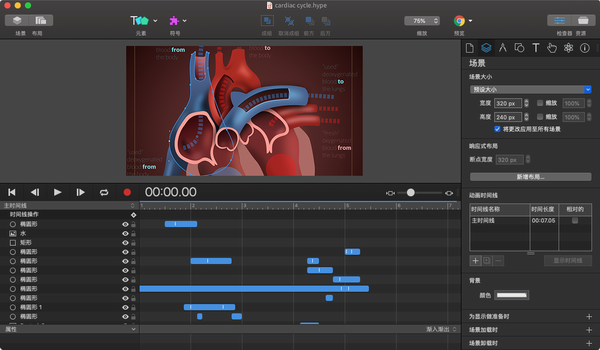
Hype 4 Pro Mac software features
1. Scene
Scenes are a useful way to separate and organize content. They are similar to the slides in a Keynote or PowerPoint presentation.
2. Elements
Elements are objects in the scene. They can be shapes, text, buttons, textured buttons, images, videos or HTML widgets.
3. Vector shapes
Vectors are shapes drawn using vector tools, including straight lines, curves, and complex shapes.
4. Animation production
Hype uses a powerful keyframe-based animation system to provide motion and transitions to elements. Its recording feature makes creating animations a breeze.
5. Timeline
The timeline contains animations. Each scene has at least one timeline, and scenes can have many timelines. Using actions to start, pause or continue a schedule creates rich and complex documents.
6. Action
Scenes, timelines and animations are the foundation of all Hype documents. Actions tie this foundation together and make documents interactive.
7. Symbols
Symbols is a powerful tool that allows you to easily reuse elements, timelines and animations.
8. Audio video
Hype supports the latest HTML5 audio and video APIs for creating documents with rich multimedia content.
9.Format
Text and font controls, Google Fonts and custom font support.
10.Physics
Physics allows you to control the physical properties of elements (bounce, friction, air resistance and density) as well as the gravity of the scene.
11. Responsive layout
Responsive layouts allow you to create multiple layouts for a single scene, which display at specific breakpoints.
12. Flexible layout
Flexible Layout is a powerful layout system for resizing and scaling documents and elements, allowing Hype animations to respond when the browser window or device’s viewport changes size.
13.Hype reflection
Hype Reflect for iOS lets you quickly preview or mirror Hype documents on any iOS device.
14. Touch and action
Hype provides several options for producing touch-friendly interactivity.
15. Preview and export
Preview Hype documents on your local browser and export documents to the web.
16. Accessibility functions
Learn about how to add alternative text, roles, and accessibility to your documents.
17. Export script
Automate Hype output by adding additional processing steps to the export process.
18. Template
Templates are "lyophilized" Hype documents - opening a Hype template creates a new document based on the opened template.
19. Resources Resources
Resources are images, videos, JavaScript functions, and other files that have been added to Hype documents.
20.JavaScript
JavaScript functions in Hype are usually run in response to user events.
21.Inspector
Hype’s nine inspectors provide easy access to document, scene and element properties, as well as a variety of other controls.
22. Shortcuts
Explore Hype’s many keyboard shortcuts to work more efficiently.
How to use Hype 4 Pro Mac
Create symbols
Speaking of symbols, this description may be too abstract, and those who have not used Hype may not know what this function is used for. Symbols are a powerful tool that allow users to easily reuse elements, timelines and animations, so how do you create a symbol?
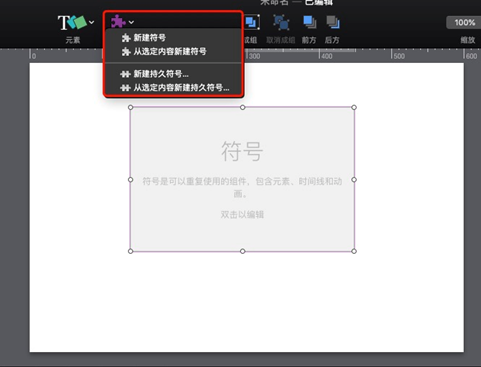
Click the "Symbol" button above Hype and select "New Symbol" to create a new empty "ordinary symbol" for the current scene; select "New Persistent Symbol" to create a new "persistent symbol", as shown in the red box in Figure 1 below.
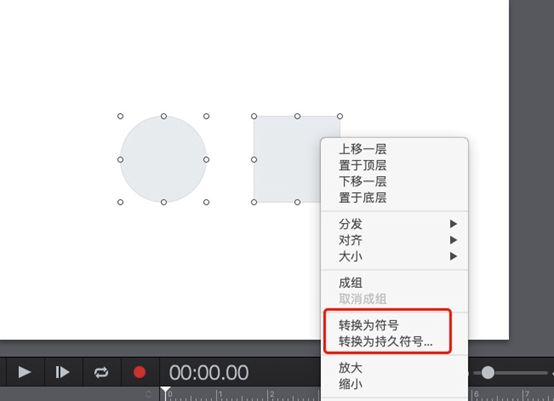
However, symbols are generally not created in this way. Generally speaking, you create several elements in the scene in the Hype "Element" button, then select these elements, right-click the mouse, and select "Convert to Symbol" or "Convert to Persistent Symbol" to directly create a non-empty symbol.
Hype 4 Pro Mac update log
1. The details are more outstanding!
2. BUG gone without a trace
Huajun editor recommends:
This software is powerful and easy to operate. I hope you will like it. In addition, this site also hasBaidu Input Method For Mac,Mac OS X,CrossOver Pro For Mac,Boot Camp,EaseUS Data Recovery SoftwareWaiting for software, welcome to Huajun Software Park to download!




Useful
Useful
Useful