





Visual Novel Reader software features
1. Use Japanese-Chinese online translation on the Internet;
2. Use the offline translation provided by JBeijing;
3. Subtitles can be displayed on the game window. Subtitles can be displayed in full screen;
4. Provides word segmentation, pronunciation, and Chinese explanations for Japanese through EDICT/JMDict and EPWING dictionaries, including Hiroshien (Japanese), Shogakukan Japanese-Chinese Dictionary (Japanese-Chinese), and Wadoku Dictionary (Japanese-German, free);
5. Read clicked Japanese words and sentences through online (Google) or local speech synthesis (TTS) services, such as VoiceText (SAPI) and support through MODI OCR to identify text anywhere on the screen and translate it;
6. Share other students’ manual translations and comments;
7. Train Japanese-Chinese machine translation from human translation;
8. Share custom dictionaries to improve machine translation;
9. Reduce the difficulties of reading VN as much as possible.
Visual Novel Reader Software Advantages
1. Train Japanese-Chinese machine translation from human translation
2. Share other students’ manual translations and comments
3. Share custom dictionaries to improve machine translation
Visual Novel Reader usage tutorial
The first thing that must be noted is: the path folder cannot contain Chinese characters, otherwise the following error will occur and it will not work directly
Once installed, you can run Visual Novel Reader.exe
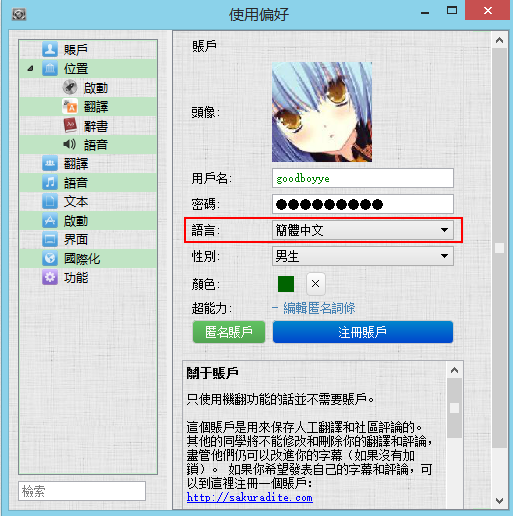
If you feel that the Traditional Chinese version is not good and want to change to the Simplified Chinese version, you can select Preferences from the right-click menu of the main interface, or you can enter the shortcut Alt+O
Select Simplified Chinese in the language selection of the account tab, and restart vnr and it will change to Simplified Chinese.

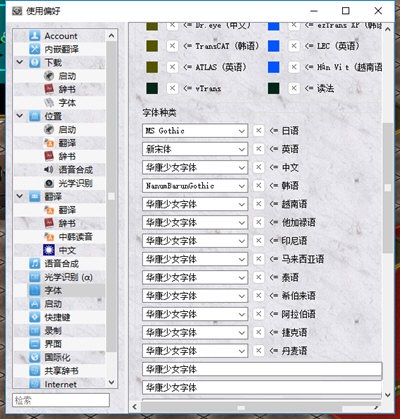
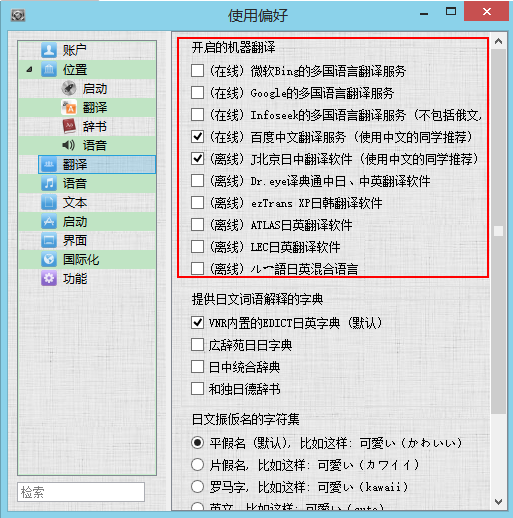
Then select the required translation engine in the Translation tab (vnr does not come with any offline translation software, so you need to download it separately).
You can refer to the full version of the tutorial for how to select the path for offline translation software. Please also note: the path cannot contain Chinese characters.
Users can choose translation tool modules according to their own preferences, such as Baidu Translation or Youdao Translation.
After running the game, vnr will automatically translate.

Visual Novel Reader update log
1. Optimize content
2. The details are more outstanding and the bugs are gone.
Huajun editor recommends:
Of course, in addition to a very convenient translation software called Visual Novel Reader, our Huajun Software Park also hasYoudao Dictionary,DXF to G code tool,Sesame Quick Translation,Super PDF Converter Universal Edition,WORD to PDF converterRelated software is available for download. If you need it, please click to download and use it.




Your comment needs to be reviewed before it can be displayed