



Frequently asked questions about CrystalDiskMark (hard disk detection tool)
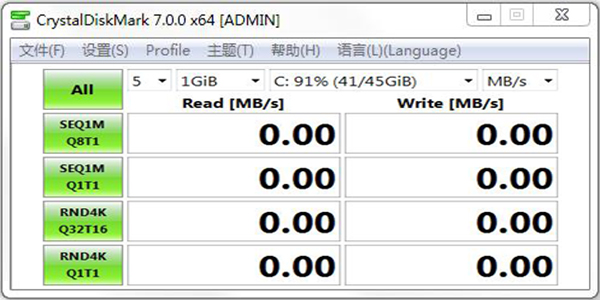
1. CrystalDiskMark detects hard drives. What do these lines of data represent?
The first line represents your current test hard disk partition.
The second line represents youhard drivereading and writing speed.
The third line represents the multi-threaded reading and writing speed of 4K files on your hard disk.
The fourth line represents the continuous read and write speed of your hard drive.
The fifth line represents the single-thread reading and writing speed of 4K small files on your hard disk.
2. Use crystaldiskmark to test the hard drivedataPlease explain, is the hard drive normal?
Generally speaking, just look at the first line, Seq, which is the sustained transfer rate. Is it a laptop hard drive or a desktop hard drive? The reading speed of 100M is not bad if it is a laptop hard drive, but it is low if it is a desktop hard drive.
The subsequent test is the reading and writing speed of small files. For mechanical hard drives, reading and writing small files will involve a large amount of head seek time, so the reading and writing speed will decrease. The smaller the file, the greater the drop. This is normal.
CrystalDiskMark (hard disk detection tool) software features
Lightweight, portable and easy to operate
No installation is required, the green version runs directly, and the interface is simple and intuitive, suitable for novices to get started quickly.
Supports multiple languages (including Chinese), and users can customize themes and interface skins.
Multiple scenario test coverage
Provides sequential read and write (SEQ), random read and write (RND) tests, data block sizes cover 4KB, 128KB, 1MB, etc., simulating different application scenarios (such as frequent access to small files, large file transfer).
Supports queue depth (QD) and thread number (T) adjustment, which can simulate high concurrent loads (such as QD32T16 extreme test).
High accuracy and compatibility
The test results are displayed in four units: MB/s, GB/s, IOPS, and Latency. The data is accurate and reliable.
Compatible with storage devices such as mechanical hard disks (HDD), solid state drives (SSD, including NVMe/SATA interface), USB flash drives.
Rich additional functions
Supports saving test results as pictures or text files for easy sharing and analysis.
It can read hard drive SMART information (such as temperature, usage time, power-on times) to assist in determining the health status of the hard drive.
CrystalDiskMark (hard drive checkTest tool) function introduction
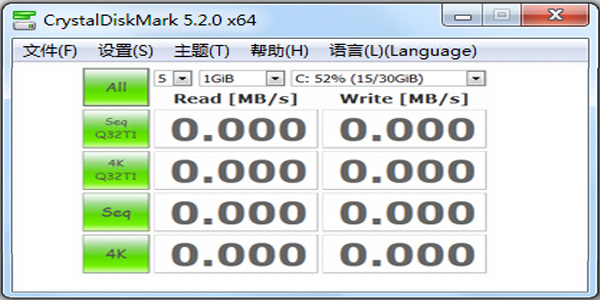
In the CrystalDiskMark interface, you can select the number of tests, the test file size and the test object. Click the buttons in the lower row to perform a single file read and write test or multiple small file read and write tests of 512kb or 4kb. In fact, this kind of software is of no use to the hard disk. I keep it in the computer to test the speed of the USB flash drive. Friends in need can try the reading and writing speed of their own USB flash drive. According to what is said online:
Performance testing
Supports sequential read and write (continuous large file transfer speed) and random read and write (small file fragmentation processing capabilities) tests.
Customizable test file size (such as 1GB, 8GB), queue depth (simulating multi-task concurrency).
Multiple interface support
Compatible with SATA, NVMe, USB and other storage devices, covering solid state drives (SSD), mechanical hard drives (HDD), USB flash drives, etc.
Multi-mode detection
Provides different block size tests such as 512 bytes, 4KB, 64KB, etc. to evaluate the device's processing efficiency of different data blocks.
Results visualization
Generate histogram/table reports to visually compare parameters such as read/write speed, response time, etc.
System compatibility
Supports Windows, macOS, and Linux systems, and has a portable version that requires no installation.
Extended functions
Supports full disk wipe (securely erase SSD data), cache test (verify the effectiveness of the device cache mechanism).
How to use CrystalDiskMark (hard disk detection tool)
The specific usage is as follows:
Seq: Continuously perform read and write hard disk detection (1024K bytes)
512K: Randomly perform read and write hard disk detection (512K bytes)
4K: Randomly perform read and write hard disk detection (4K bytes)
4K QD32: Random read and write detection for NCQ and AHCI modes (4K bytes, queue depth 32)
2. Click "All" to detect all items.

CrystalDiskMark hard drive detection tool Chinese version download
3. The hard disk read and write speed is being tested.

CrystalDiskMark hard drive detection tool Chinese version download
4. The test is completed, and each data is shown in the figure below.

5. If you need to keep the test data, click "Edit Copy" to copy the test data.
6. Paste the detected data in Word and save the data.
CrystalDiskMark to Master Biru:
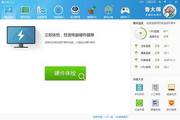
Master Lu: Master Lu is a professional, easy-to-use and completely free hardware detection tool that allows users to intuitively understand their computer configuration. Master Lu can easily identify the authenticity of computer hardware (effectively preventing hardware failures), protect the stable operation of the computer, identify computer virus hazards, optimize and clean the system, and improve the computer's running speed and other special functions. This site provides free downloads.
Download link:http://softwaredownload4.com/soft/76322.htm
CrystalDiskMark: CrystalDiskMark (hard disk testing tool) is a compact tool for testing your hard disk or storage device. The simple and easy-to-operate interface allows you to test your storage device at any time. You can choose the size and test number of the storage device, and you can also test the readable and writable speed.
Download link: http://softwaredownload4.com/soft/57364.htm
CrystalDiskMark (hard disk detection tool) update log:
1. Add random test (q8t8) SSD
2. Added maximum support of 999999 Mbytes/s
3. Delete simple sequence test
4. Fixed some bugs and optimized software performance
Huajun editor recommends:
CrystalDiskMark (hard disk detection tool) software takes up little memory, has stable performance, is free of any bundles, is green and safe, and is truly a conscientious software! This site also hasMaster Lu,ComMaster,SiSoftware Sandra,HD Tune Pro,WinBench99, available for you to download!





















Your comment needs to be reviewed before it can be displayed