



Software features
Compatible with multiple devices, covering all scenarios
Supported device types: Not limited to SSD, but also compatible with mechanical hard disks (HDD), U disks, USB devices and optical disk drives to meet diverse storage needs.
Extensive brand coverage: It supports mainstream brands such as Samsung, Intel, Western Digital, and Kingston, and its compatibility has been verified by the market.
In-depth analysis of hardware information
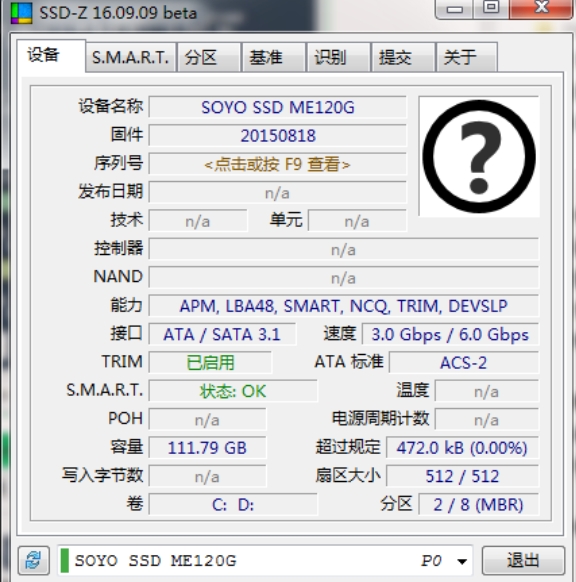
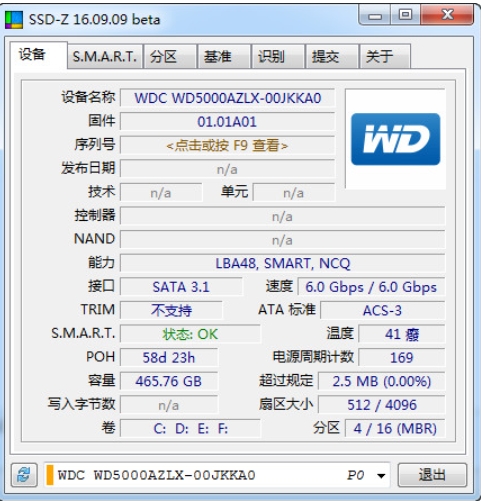
Core parameters: Display hard drive model, serial number, firmware version, interface type (such as SATA/NVMe), capacity, production technology (such as TLC/QLC flash memory), etc.
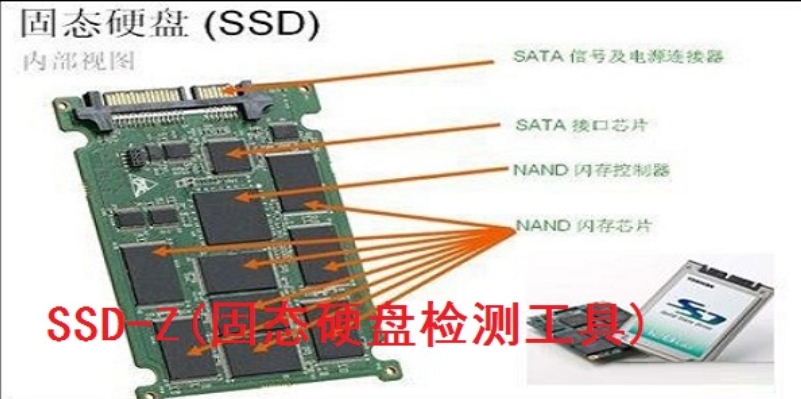
Technical details: Analyze the main control chip model, NAND flash memory type, and process technology (such as 3D NAND) to provide technical reference for professional users.
Real-time monitoring of health status
SMART detection: Read S.M.A.R.T. attribute values (such as power-on time, read amount, write amount, error count) to provide early warning of potential failures.
TRIM status verification: Confirm whether the TRIM function is enabled on the system to optimize SSD performance and life.
Performance testing is intuitive and efficient
Benchmark test: Provides key indicators such as continuous read and write speed, random read and write performance (IOPS), transfer rate and random access time.
Test scenario: Supports 512B continuous reading, 4K random reading and writing, 128K continuous reading, etc., simulating real usage scenarios.
User friendly design
Simple interface: It adopts a layout similar to CPU-Z, and the information is clearly classified, allowing non-professional users to get started quickly.
Green installation-free: single file execution program, no installation required, avoiding system residue.
Software function
Hardware information detection
Basic information: model, serial number, firmware version, interface type, capacity, etc.
Technical details: main control chip model, NAND flash memory type (such as MLC/TLC), process technology, partition information (type, size, file system).
Health status monitoring
Smart attributes: Real-time display of power-on time, read volume, write volume, error count, etc. to evaluate the remaining life of the hard drive.
TRIM status: Confirm whether TRIM is enabled on the system to avoid performance degradation.
Performance testing
Sequential Read and Write Test: Measures large file transfer speeds (e.g. MB/s).
Random read and write test: Evaluate small file access efficiency (such as 4K random read and write IOPS).
Response time test: detects hard drive random access latency (usually 0.1ms for SSD and 10-25ms for HDD).
Partition management
Partition information: Displays the type, size and file system of all partitions (including hidden, mapped, and boot partitions).
Device diagnostics
Error scan: detect bad sectors or logical errors (needs to be combined with other tools such as CrystalDiskInfo for in-depth analysis).
Firmware update recommendations: Based on the detection results, it will prompt whether the firmware needs to be updated to fix vulnerabilities or improve performance.
FAQ
Abnormal performance test results (such as too low speed)
Possible reasons:
Test mode limitations: The benchmark test function of SSD-Z is relatively simple, the data packets are fixed and cannot be customized, and may not fully reflect the performance.
System configuration impact: insufficient CPU and memory performance, or background programs occupying resources.
Interface limitations: SSD connects to SATA2 interface (actual speed is half of SATA3 interface).
AHCI/4K alignment not enabled: AHCI mode is not turned on or the partition is not 4K aligned, causing performance degradation.
Solution:
Use professional tools: Use AS SSD Benchmark and CrystalDiskMark for testing instead, supporting custom test parameters.
Optimize system configuration: close background programs and ensure sufficient system resources.
Check the interface type: Make sure the SSD is connected to the SATA3 interface.
Verify AHCI/4K alignment:
AHCI mode: Enable via BIOS settings, or check TRIM status using the fsutil behavior query DisableDeleteNotify command (returns 0 to indicate enabled).
4K alignment: Check "Align to an integer multiple of the following sector number" when creating a new partition using DiskGenius or the Windows Disk Management tool (select 2048 or 4096).
SSD-Z update log:
Developer GG said there are really no bugs this time~
Huajun editor recommends:
SSD-Z software is a software with excellent performance, which is obvious to all. Huajun Software Park also hasMaster Lu,SiSoftware Sandra,HD Tune Pro,WinBench99,cpu-zWaiting for related software that is definitely worth downloading and using, come and choose your favorite one!




Your comment needs to be reviewed before it can be displayed