

If you are looking for software to use, go to Huajun Software Park! software release AI product list

Hello, if there is a need for software inclusion, please package the software and attach the software name, software introduction, software-related screenshots, software icon, soft copy, business license (if you do not have a business license, please provide the front and back of the corresponding developer ID card and a photo of yourself holding the ID card), and send it to email http://softwaredownload4.com/sbdm/user/login

Close >>

Send to email:news@onlinedown.net

Close >>

Location: Home pagePC softwaregraphic imageImage compression Image Compressor (Radical Image Optimization Tool)
Image Compressor (Radical Image Optimization Tool)

Image Compressor (Radical Image Optimization Tool) V0.5.2.0 Green Chinese Version

QR code
  • Software licensing: free software
  • Software size: 1.3MB
  • Software rating:
  • Software type: Domestic software
  • Update time: 2024-12-30
  • Application platform: winall
  • Software language: Simplified Chinese
  • Edition: V0.5.2.0 green Chinese version

Software introduction Related topics FAQ Download address

Recommended for you:- Picture tools

Basic introduction
Image compressor (Radical Image Optimization Tool) paragraph head LOGO
To save traffic, the best way is to compress images (compression of photos is not recommended. Major free photo album websites do not limit the photo space capacity, but the traffic is limited...), which can fundamentally reduce the loss of traffic. Of course, the purpose of compressing images is not limited to blogs. Many occasions that do not have high requirements for images also require compression. What's more, RIOT can intuitively adjust the compression parameters while maintaining the minimum file size.
RIOT uses dual windows to compare the original image and the optimized image in real time. Since it is all done in memory, it is very fast. By controlling the compression, color number, metadata settings, etc., and then outputting the image (JPG, GIF or PNG format), the image size can be significantly compressed. Supports batch processing, you no longer have to open PS to process small things.
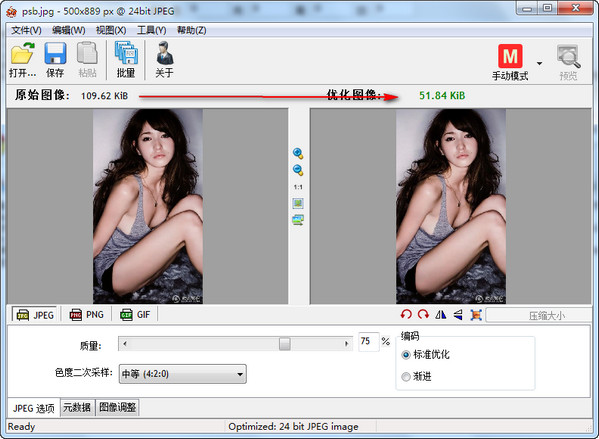
Screenshot of Radical Image Optimization Tool
The use of RIOT is very simple. After opening the image, first select the format to be output, and then you need to adjust the parameters. During the adjustment process, you can directly preview the effect. Once the desired effect is achieved, save it. RIOT can be integrated into GIMP and has IrfanView and XnView plug-ins. You can decide whether you want to keep EXIF ​​data. Supports common tools: pan and zoom, rotate, flip, basic image adjustments: brightness, contrast, gamma, invert and more.
FAQ

Image Compressor (Radical Image Optimization Tool)

Image Compressor (Radical Image Optimization Tool) V0.5.2.0 Green Chinese Version

close

