If you are looking for software to use, go to Huajun Software Park! software release AI product list

Hello, if there is a need for software inclusion, please package the software and attach the software name, software introduction, software-related screenshots, software icon, soft copy, business license (if you do not have a business license, please provide the front and back of the corresponding developer ID card and a photo of yourself holding the ID card), and send it to email http://softwaredownload4.com/sbdm/user/login

Close >>

Send to email:news@onlinedown.net

Close >>

Location: Home pagePC softwaregraphic imageImage compression JPG image compressor
JPG image compressor

JPG Image Compressor 2.0 Green Free

QR code
  • Software licensing: free software
  • Software size: 0.31MB
  • Software rating:
  • Software type: Domestic software
  • Update time: 2024-12-26
  • Application platform: WinAll
  • Software language: Simplified Chinese
  • Edition: 2.0 Green Free

Software introduction Related topics FAQ Other versions Download address

Recommended for you:- JPG tool

Basic introduction
JPG image compressor segment first LOGO
JPG Image Compressor (image compression software) allows you to easily compress the images you want with just one click! The picture compressor not only supports JPG format but also BMP format pictures. The image compression ratio supports 1-100, but the resolution is up to you. The software also supports scaling options, including scaling by proportion and scaling by size. Provided by Huajun Software ParkJPG image compressorOfficial version download service, everyone is welcome to download and use.

How to use JPG image compressor


JPG image compressor (image compression software) is simple to use. Currently, it only supports JPG format image compression. When using it, you only need to select the folder where the image to be compressed is located, and set the resolution ratio of image compression. For example, 50% means that the resolution length and width are reduced to half of the original. It is better to use 80% for image quality. The lower the quality, the smaller the compressed image will be. If it is too low, it will affect the viewing effect of the image. JPG image compressor (image compression software) is available for free download on this site, and users can use it with confidence.
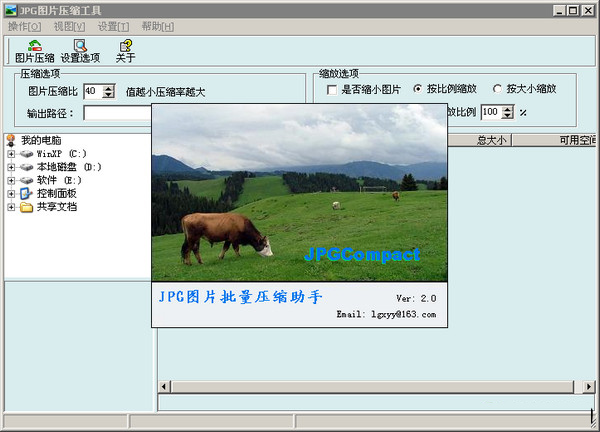

JPG image compressor screenshot


JPG image compressor related issues


How to quickly and easily compress jpg image format and make it smaller?

​ ​ 1. Let’s find a random picture on the homepage and look at its size first. Size: 6.17MB.
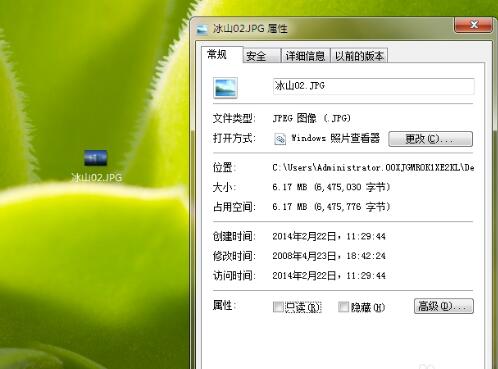

JPG image compressor screenshot


2. Then we open QQ, find a friend at random, and quickly capture the pictures that need to be compressed through screenshots in the chat window. Due to demonstration needs, the picture has not been enlarged.
3. By taking a screenshot, the picture will be in the chat window. At this time, we only need to [left-click and hold] the picture and pull down the desktop.
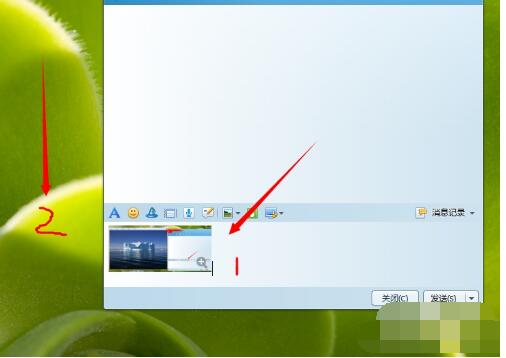

JPG image compressor screenshot


4. Let’s take a look, how big can our images be compressed through this method?
5. The image is compressed from the original [6.17MB] to [1.01MB]. By simply taking a screenshot and dragging it, you can compress the image quickly and easily even if you don't know any software. And it’s very fast~
6. If you don’t even want to log in to QQ, you can also use the browser’s screenshot function.

Related topics

  • Complete collection of image compressors

    Complete collection of image compressors

  • jpg picture software special topic

    jpg picture software special topic

FAQ

Associated version

close