





Virtual camera official version
The official version of Virtual Camera is a simulated virtual camera tool suitable for use on computers, similar to QQ Virtual Camera. VCam virtual camera can be used in any software that supports cameras, such as QQ, MSN Messenger, Messenger, Skype and other chat tools. The virtual camera also supports multiple high-quality video output functions. Huajun Software Park provides download services for virtual camera software. Everyone is welcome to download and use it!- Green versionView
- Green versionView
- Green versionView

Virtual camera software features
1.WDM driver, supports all video applications using VFW and DirectShow;
2. Supports multiple channels of high-quality video output at the same time, each channel can have different resolutions;
3. The algorithm is efficient and the CPU usage is low;
4. Based on DirectShow architecture, it has fast processing speed and a wide range of media format support;
5. Support playlists, customized program playback, and multiple parameter settings;
6. Able to multi-channel output video from video capture devices such as DV and ordinary cameras;
7. Supports transparent overlay of images, animations and videos (files or devices), and picture-in-picture function;
8. A variety of cool video effects and super performance;
9. Screen capture function, supports hotkey zoom, mouse following, full-screen capture, etc., and supports custom cursor;
10. Support camera default screen settings and default resolution settings;
11. Enable/disable/install/uninstall the camera driver in the program;
12. The interface is simple and easy to use, and supports skin changes and color schemes;
13.Multiple language support;
14. Simple and easy to use professional installer.
Virtual camera software features
Real WDM driver, supports all video applications using VFW and DirectShow technology;
VCam virtual camera supports multiple channels of high-quality video output at the same time, and each channel can have different resolutions;
VCam virtual camera is based on DirectShow architecture, with fast processing speed and wide media format support;
Supports playlists, customized program playback, and multiple parameter settings;
Able to multi-channel output video from DV, ordinary cameras and other video capture devices;
The virtual camera supports transparent overlay of images, animations, videos (files or devices) and text, and picture-in-picture function;
A variety of cool video special effects with super performance;
Camera background replacement (image snap);
VCam has face recognition and intelligent tracking functions;
Screen capture function supports hotkey zoom, mouse following, full-screen capture, etc., and supports custom cursors;
Support camera default picture settings and default resolution settings;
VCam virtual camera’s powerful video recording function;
Virtual camera installation steps
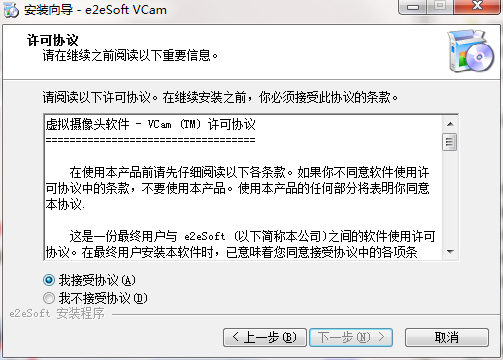
1. Download the virtual camera from Huajun Software Park and unzip it to the current folder. Click on the VCam_v5.2.exe application to enter the license agreement interface. After we check I agree, click Next.
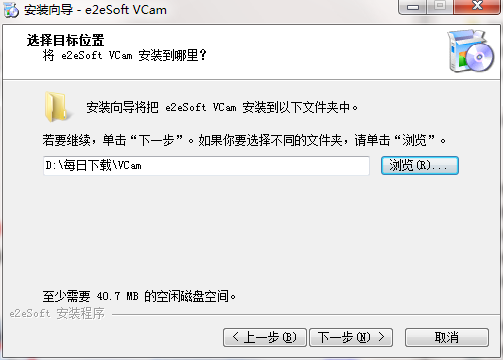
2. Select the software installation location interface. Huajun editor recommends that users install it on the D drive, select the installation location and click Next.
3. The virtual camera installation is completed, click Finish.

Virtual camera usage instructions
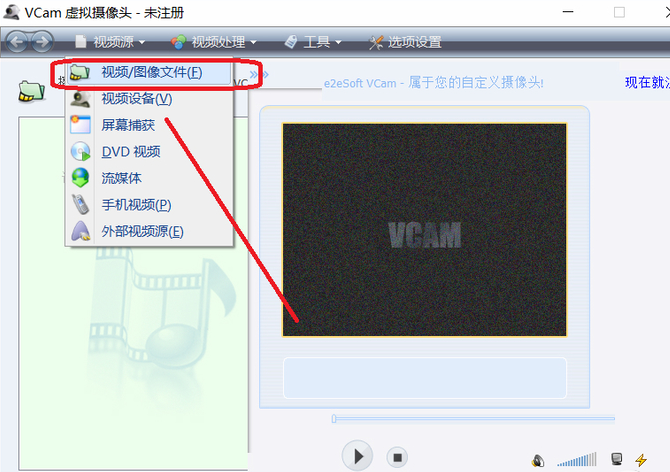
1. How to use vcam virtual camera software to play video files when video chatting with others?
1. Open the VCam virtual camera and click the video source option to select the video. If you are chatting with your friends using the camera, you can insert your own recorded video to create the effect of the camera shooting.
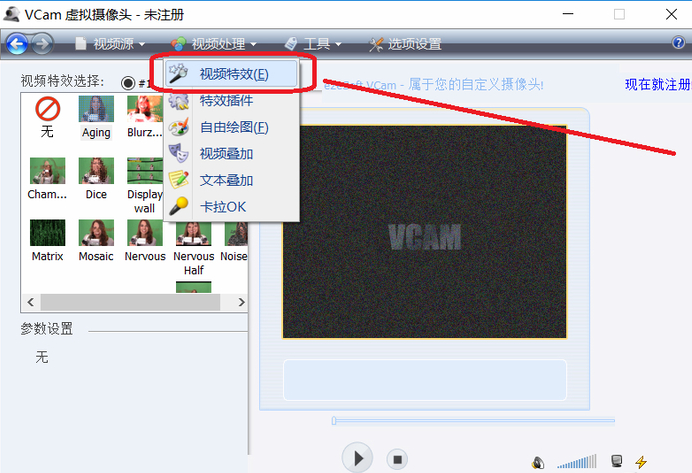
2. How to add special effects to the VCam virtual camera during chat?
1. After opening the VCam virtual camera, look for Video Processing in the column. After clicking on Video Special Effects, there are many special effects for us to choose from.
Virtual Camera FAQ
Q: Why can’t I install the VCam virtual camera on my machine?
Answer: vcam virtual camera supports Win2000/WinXP/Win2003 and needs to install DirectX 8.0 For the above versions, it should be emphasized that you must be an operating system administrator to install them correctly.
Question: Why can’t the VCam virtual camera play some formats?
Answer: The VCam virtual camera is based on the DirectShow architecture. Theoretically, as long as a suitable decoder is installed, Windows MediaPlayer VCam can play all videos that can be played.
VCam supports common video formats (*.avi; *.dat; *.vbr; *.mpeg; *.mpg; *,mp1; *.mp2; *.vob; *.wmv; *.asf; *.rm; *.rmvb; *.mov; *.3gp; *.mp4; *.mkv; *.flv...).
Question: Why is the output video of VCam virtual camera blurry?
Answer: If the video transmitted over the network is blurry, it may be caused by excessive video compression due to low network speed. If the VCam video is blurry when viewed locally, it may be caused by the default resolution being too low. You can set a slightly higher resolution in "Option Settings - Camera Settings".
Question: Why do VCam virtual cameras have black borders when playing pictures and videos?
Answer: This is caused by the inconsistent aspect ratio of pictures and videos and the resolution of VCam. Please do not select "Keepaspect" in "Option Settings-Output Settings-Video Scaling Method".
Comparison of similar software
Virtual camera (Softcam)It is a real software camera that can simulate a "real" camera and successfully fool most video chat software, such as Microsoft Netmeeting, CU-Seeme, etc. This way, even if I don't have a camera setup on my computer, I can still use these software.
MiniVCapIt is a software that uses an ordinary computer camera to record video. MiniVCap supports functions such as face recognition and synchronous recording. The software can run in the background. After users install the software, they can monitor pets at home to facilitate users to understand in time. MiniVCap can also automatically delete old files to ensure that your computer hard drive has sufficient space.
Huajun editor recommends:
Virtual VCam virtual camera can be used in any software that supports cameras, such as QQ, MSN Messenger, Messenger, Skype and other chat tools. Word-of-mouth software, guaranteed to solve all your problems! The editor highly recommends!






Useful
Useful
Useful