
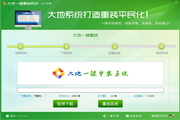



- Green versionView
- Green versionView
- Green versionView
- Green versionView
Highlights of Dadi one-click reinstallation system
One-click operation:
Users can reinstall the computer system in just a few steps without requiring too much professional knowledge.
The software has a friendly interface, simple design, and clear guidance documents, making it easy for anyone to get started.
Comprehensive coverage:
It supports computers of various brands and models, and is also suitable for different versions of operating systems, such as Windows XP, Windows 7, Windows 8.1, Windows 10, Windows 11, etc.
Whether it is a laptop or a desktop, it can further solve various computer problems.
Fast and efficient:
With the goal of speed and efficiency, it helps users solve computer problems quickly and save time and energy.
The backup data rate is faster than GHOST, the compression factor is higher, the installation package is compact (less than 9M), and it kills all similar software.
Safe and stable:
The software has been rigorously tested to ensure that no damage to user data is caused during the installation process.
Provide data or system backup and restore functions to ensure data safety and security.
It is green and non-toxic, does not contain any plug-ins and advertisements, and users can use it with confidence.
High degree of intelligence:
Back up system data to the largest system partition with one click, making the operation more intelligent.
The partition detection system has been updated to judge the partition environment more intelligently.

Features of Dadi one-click reinstallation system
Reinstall the system with one click:
Users only need to download and install the software, run the software, select the Windows version to be installed according to the prompts, and click the "Start Installation" button.
The software will automatically download the installation package and enter the installation process. The user only needs to wait for the progress bar to finish.
Data backup and restore:
Provides one-click backup and restoration of data or systems to ensure data safety and security.
Users can back up important data before reinstalling to prevent data loss.
Multi-mode reinstallation:
Supports multiple modes such as online reinstallation, USB disk creation, and customized reinstallation to meet the different needs of users.
How to use Dadi one-click system reinstallation
Download and install:
Users can download the installation program through Dadi one-click reinstallation and follow the prompts to complete the installation.
Open the software:
Double-click the desktop icon or find Dadi One-Click System Reinstallation in the start menu and click to open.
Select reinstall mode:
According to personal needs, select the corresponding reinstallation mode, such as new installation, retaining personal files, restoring factory settings, etc.
Start reinstalling:
Click the Start button and the system will automatically perform the reinstallation operation. During the process, users only need to wait.
Complete reinstallation:
After the reinstallation is complete, users can follow the prompts to make some basic settings, such as language, network connection, etc.
Frequently Asked Questions about Dadi One-Click System Reinstallation
System compatibility issues:
Phenomenon: The software prompts that the current system or hardware is incompatible and cannot be reinstalled.
Cause analysis: The computer hardware is too old, or the current system is seriously damaged and cannot support reinstallation.
Solution:
Confirm that your computer hardware meets the minimum system requirements. For computers that are too old, it may be necessary to upgrade the hardware or choose a more suitable system version.
If the current system is damaged, you can try to use the USB disk installation method, or repair the current system first and then reinstall.
Dadi one-click reinstallation system update log:
Sweep the bug out and carry it out to the end
Optimize user feedback issues and improve detailed experience
Huajun editor recommends:
Dadi's one-click system reinstallation is a very good system auxiliary software. I secretly tell you that I also use this software, and I don't tell others about it! Powerful, green and safe. Huajun Software Park also provides you with.NET,Batch Butler,Cloud Machine Manager,Hard drive serial number reader,Android Emulator MasterWaiting for you to download.















Useful
Useful
Useful