



- Green versionView
- Green versionView
- Green versionView
- Green versionView
BitDock Highlights
Aesthetic evolution: BitDock is equipped with an unprecedented skin engine, giving users unlimited possibilities to reshape the Dock. Whether it's a classic replica or an avant-garde innovation, you can freely change its appearance with just a few taps.
Desktop vitality: Through rich desktop plug-ins and practical tools, BitDock makes the desktop come alive, improving users' work and entertainment experience.
Deep Personalization: BitDock provides a full range of personalized settings, including free shuttle between multiple screens, free window zooming, advanced behavior customization, efficient task switching strategy, shortcut key customization, intelligent data management and cloud backup, to meet every detail of the user's needs.
BitDock Features
Multi-monitor support: BitDock provides a complete multi-monitor adaptation function. You can set the Dock to be displayed on the main monitor or all monitors. When switching between different monitors, the Dock will automatically adjust the position and size. It also supports setting different Dock layouts and contents for different monitors.
Shortcut key settings: BitDock supports a variety of shortcut key operations. For example, the Alt+D shortcut key is used by default to call out the Dock (can be modified in the settings), supports the shortcut function of the Ctrl key and mouse combination, and can also set independent startup shortcut keys for commonly used applications.
Running application management: BitDock can not only launch applications, but also manage running applications. The running application icon will have a special logo. Users can right-click the running application icon and select "Pin to Dock" or "Hide".
Clear interface: BitDock’s interface design is simple and clear, making it easy for users to get started.
Drag and drop operation: Adding icons, moving icons, and deleting icons can be done in a fool-like drag and drop manner, which is convenient and fast.
Personalized Settings: BitDock provides a wealth of personalized setting options, such as the position, transparency, size, etc. of the Dock bar, which users can adjust according to their own preferences.
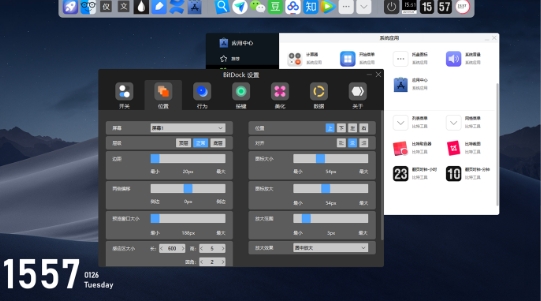
BitDock function
Mac-style Dock bar: BitDock imitates the Dock bar design of the Mac system, allowing users to drag commonly used applications, folders and even system function shortcuts here to achieve one-click startup, which greatly improves operational convenience.
Customized icons and themes: The software provides multiple icon sets with different styles for users to choose. Users can freely change the Dock icon style according to their personal preferences, and even customize the icons. Icons support ICO, PNG, JPG, SVG, and even dynamic and static GIF, BMP and other formats. At the same time, BitDock supports theme management, the Dock bar style can be modified at will, the icon style can be switched at will, and it also supports automatic skin switching at scheduled times.
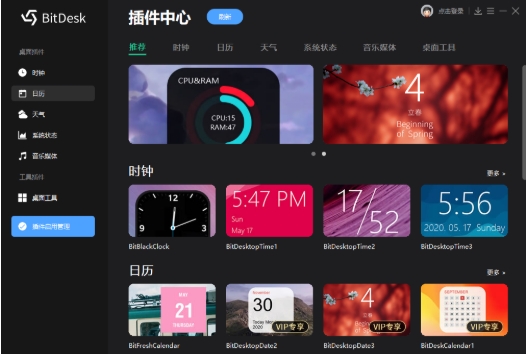
Desktop plug-in tools: BitDock integrates a dazzling treasure trove of desktop plug-ins, from practical clocks to thoughtful calendars, from real-time weather to system monitoring, and even music control and personalized notes. All plug-ins can be dragged and dropped freely, and the size, color and font can be adjusted as desired.
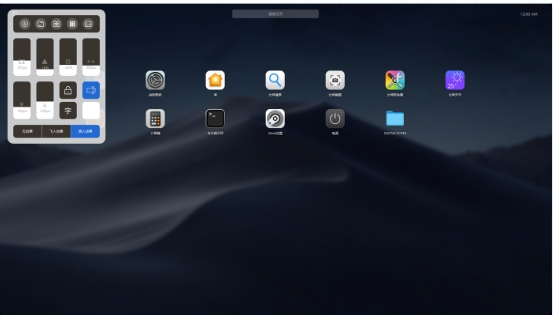
LaunchPad: BitDock provides the LaunchPad feature, a MacOS-like application launch pad. Through LaunchPad, all the user's applications will be displayed in categories with large icons that are clear at a glance. It supports folder management and multi-screen display, making it extremely easy to find and launch applications.
Practical toolset: BitDock has built-in a variety of practical functions, such as screenshots, search, color selection, eye protection, power management, etc. These tools are often used in daily computer use, avoiding the waste of resources and management troubles caused by installing multiple independent software.
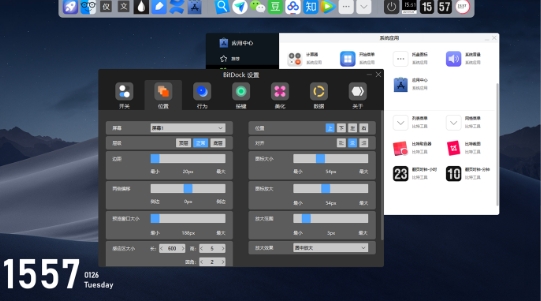
BitDock FAQ
The Dock bar does not display or displays abnormally
Possible reasons:
The Dock is set to be hidden or has a position conflict.
The resolution or scaling is too high (e.g. 200% scaling for a 4K screen).
Graphics card driver problem.
Solution:
Check the BitDock settings: right-click the Dock bar → Settings → General → Uncheck "Auto-hide" or adjust the position (such as changing from bottom to left).
Adjust the system scaling to 100% or 125% (Settings→Display→Scale & Layout).
Update the graphics card driver (download the latest driver from NVIDIA/AMD/Intel official website).
Icons cannot be dragged to the Dock
Possible reasons:
The "Allow dragging" feature is not enabled.
The target program path contains Chinese characters or spaces.
System permission restrictions.
Solution:
In BitDock settings: Right-click the Dock bar → Settings → Icons → Check "Allow dragging to add icons".
Make sure the program shortcut path is in plain English (such as C:ProgramsChrome.lnk).
Run BitDock as administrator.
BitDock update log:
1. The pace of optimization never stops!
2. More little surprises are waiting for you to discover~
Huajun editor recommends:
BitDock software is a software with excellent performance, which is obvious to all. Huajun Software Park also has.NET,Batch Butler,Cloud Machine Manager,Hard drive serial number reader,Android Emulator MasterWaiting for related software that is definitely worth downloading and using, come and choose your favorite one!










Your comment needs to be reviewed before it can be displayed