




Xls readerSoftware features
The software is compact and saves resources
Xls reader is less than 5M, very compact, saving you a lot of disk space without affecting the running speed at all.
Simple interface and simple operation
Because this is a read-only software designed for reading, the interface is very simple and easy to operate.
Strong compatibility and wide support
Xls reader supports Windows 2000/xp/2003/Vista/2008/7/8 and other operating systems, and supports both 32-bit and 64-bit systems.
out of office, run independently
Xls reader can quickly display high-quality Excel documents on its own without the assistance of Microsoft office.
Drag to open and print quickly
You can drag the Excel table document to the software interface, and it can be opened in seconds, and it supports extremely fast printing.
Xls reader installation tutorial
1. Download the Xls reader software package from Huajun Software Park and decompress the compressed package directly.
Note: To decompress the compressed package, you need to use a compression and decompression tool. WinRAR is recommended because the technology is mature and reliable. WinRAR download address:http://softwaredownload4.com/soft/5.htm

2. Open the decompressed folder and double-click the .exe application with the left mouse button to open it directly without installation.
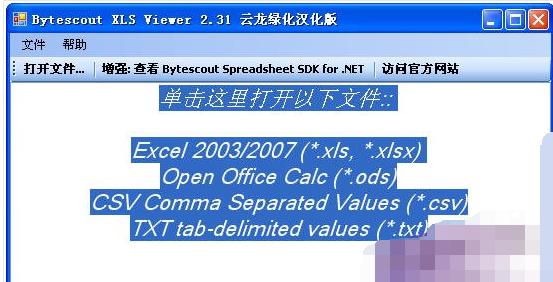
Installation summary: This software is green software, small and convenient, does not occupy memory, does not require installation, and can be used directly.
How to use Xls reader
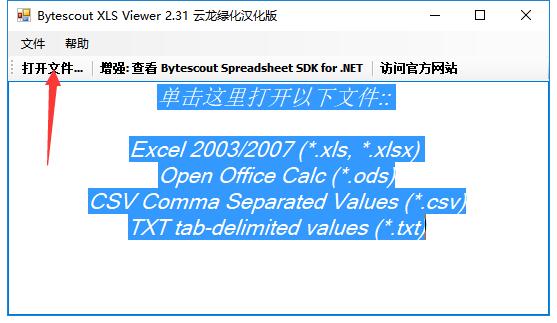
1. Open the Xls reader obtained after decompression. You can choose to click the left mouse button in the text area below or click "Open File..." in the upper left to open the corresponding file.
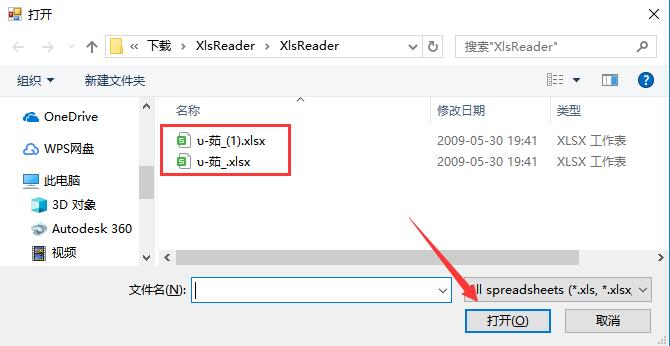
2. In the new window that opens, find the xls file you want to open for reading, click to select it, and click the "Open" button on the lower right.
3. In this way, you can directly open the xls table file. Come and try it.

Xls Reader FAQ
1.How to open table documents in Xls reader?
There are three ways to open it. The first is to open it by selecting "Open File" in the menu bar inside the software. For details, see "Usage"; the second method is to find the file you want to open, right-click and choose to open it with "Xls Reader"; the third method is to drag to open. First open the Xls reader software, and then drag the Excel document you want to open to the software interface with the mouse to open it.
2.What are the advantages of Xls reader compared with Excel?
The biggest advantage of Xls reader compared with Excel is that it is smaller and more convenient, takes up less resources, opens files faster, and browses more conveniently.
Xls reader update log
Make changes to various supported projects
Also corrected incorrect information
Huajun editor recommends:
The Xls reader is very simple to use. With just a few clicks of the mouse, you can see the content you want, and you can browse it without opening Excel. It can be said to be good news for friends with low computer configurations. If you need it, please download it! There are similar software on this siteSecSeal Security Viewer,Founder Apabi Maker,frp file reader (ONEView Demo),DynaDoc Free Reader,winmail.dat reader (winmail reader), welcome to click to download and experience!

















Useful
Useful
Useful