




Features of PowerPoint Viewer
1. Compatible with multiple PowerPoint formats
Supports viewing .ppt (PowerPoint 97-2003), .pptx (PowerPoint 2007 and later versions), .pps (show file), .ppsx (show file) and other formats.
It can play slides containing animations, transition effects, embedded video/audio, charts, SmartArt and other complex elements.
2. Lightweight viewing experience
No need to install PowerPoint: just download a standalone program (early version) of about 60MB, open the file directly and play.
Fast startup: Viewer opens files faster than launching the full version of PowerPoint, making it suitable for emergency viewing or low-configuration devices.
Full-screen show mode: supports full-screen playback of slides, simulating real presentation effects.
3. Basic navigation and control
Slide navigation: Switch slides through thumbnails, up and down arrows, or shortcut keys (such as arrow keys, PageUp/PageDown).
Playback controls: pause, resume, jump to specific slides, end show, etc.
Pen and highlighter tools: mark key points during the screening (notes need to be saved manually, supported by some versions).
4. Printing support
Print slides, handouts (multiple slides combined into one page) or notes pages for easy offline reference.
5. Multi-language interface
Supports multiple languages (such as Chinese, English, Japanese, etc.) to adapt to the needs of users in different regions.
PowerPoint Viewer Highlights
View at zero cost, no need to install the full version of Office
Completely free: Users can open and play slides directly without purchasing a Microsoft 365 subscription or installing the bulky PowerPoint program.
Lightweight stand-alone program: Early versions (such as the 2010 version) are only about 60MB and can be run directly after downloading. They do not rely on other Office components and are suitable for temporary use or old computers.
Widely compatible with PowerPoint formats
Supports old and new formats:
Old formats: .ppt (PowerPoint 97-2003), .pps (show file).
New version format: .pptx (PowerPoint 2007 and later), .ppsx (new version show file).
Retain complex elements: animations, transition effects, embedded video/audio, charts, SmartArt, etc. can all play normally to ensure that the presentation effect is not compromised.
Quick startup and smooth playback
Open files in seconds: Compared with launching the full version of PowerPoint (which requires loading plug-ins, fonts, etc.), Viewer can directly open files faster and is suitable for emergency viewing or conference presentations.
Low resource usage: It requires very little CPU and memory, and can run smoothly even on old computers (such as Windows XP systems).
PowerPoint Viewer installation method
1. First download the installation package of PowerPoint Viewer2010 from this site, right-click the installation package and select to extract it to the current folder.

2. Open the decompressed folder and double-click to open the "PowerPointViewer.exe" file.

3. Read the software license terms, check the box next to "Click here..." below, and then click Continue.

4. Open the installation wizard and click Next.

5. Select the installation location and click the Browse button to change the installation directory. It is not recommended to choose the C drive, and then click Install.

6. Installation is in progress, the user needs to wait for a moment.
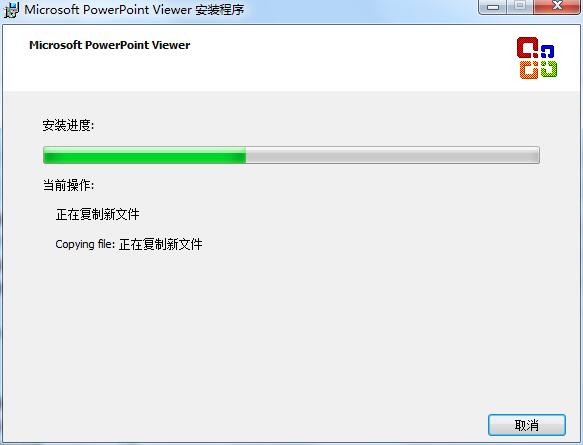
7. When the following picture appears, the installation is complete, click OK.

How to use PowerPoint Viewer
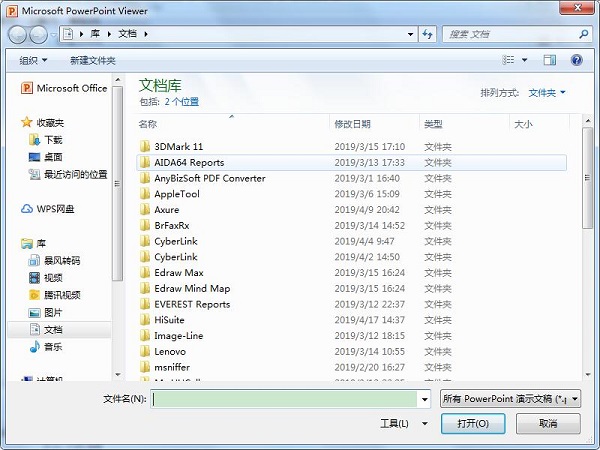
1. Open the installed PowerPoint Viewer installation directory folder and double-click to open the "PPTVIEW.EXE" file.

2. A window will pop up, then find the PPT file you want to view, open it and view it.
PowerPoint Viewer FAQ
Q: How can I view PowerPoint files for free in Office Online?
A:
Visit Office Online and sign in with your Microsoft account (or create a new account).
Click "PowerPoint" → select "Upload File" or drag the file directly to the web page.
Once uploaded, files can be viewed, edited and shared online.
Restrictions: Internet access is required, and some advanced functions (such as animations and macros) may be restricted.
PowerPoint Viewer update log
Optimized running speed
Fix bugs
Huajun editor recommends:
PowerPoint Viewer is a reading software specially designed for viewing PPT. When you want to view the prepared PPT document, you don’t need to open the huge PowerPoint, you only need to open it to view it. Come and download it and give it a try. The editor has also prepared for youSecSeal Security Viewer,frp format reader,Founder Apabi Maker,DynaDoc Free Reader,winmail.dat reader (winmail reader)
1. Microsoft has stopped maintaining this version of Office software and no longer provides genuine maintenance;
2. In order to provide users with a better experience using genuine software, we provide you with the download version: Office 365/Office 2016 version;
3. There are legal risks in using pirated software, so it is recommended to use genuine software.










Useful
Useful
Useful