





Highlights of multi-text input method
Intelligent algorithm: dynamically optimize the vocabulary and layout based on user input habits.
Cross-platform compatibility: Supports mainstream operating systems such as Android and Windows.
Low resource usage: Lightweight design ensures smooth operation even on low-end devices.

Features of multi-text input method
Smart Memory and FM
Automatically record user input habits, intelligently adjust word frequency, and improve input speed.
Rich symbol table
A variety of built-in symbols and expressions can be quickly called with one click, reducing switching steps.
Handwriting and stroke support
Handwriting recognition is accurate, supports smart stroke (T9 stroke) input, and is compatible with different input scenarios.
High degree of freedom design
A variety of preset interfaces are available, and users can freely adjust the input method style according to their preferences.

Multi-text input method function
Multi-mode input
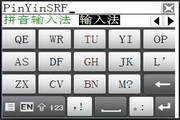
Supports full keyboard, Jiugongge (T9 mode) intelligent pinyin input to meet different user habits.
Automatic handwriting recognition input, compatible with traditional writing habits, improves input efficiency.
Interface customization
The size of the input method panel can be adjusted at will, perfectly adapting to various screen sizes (such as touch all-in-one computers, tablets, and mobile phones).
Supports interface translucency to avoid blocking screen content and improve operational convenience.
Skin and layout customization
Provides skin replacement function, users can customize the appearance of the input method.
Supports customized keyboard layout (Layout) to meet personalized needs.

Frequently asked questions about multi-text input methods
Input method cannot pop up automatically
Problem phenomenon: When clicking the text box, the input method does not pop up automatically.
Possible reason: The input method needs to intercept the user's "click" message, but some applications directly access the touch screen API, causing the input method to be unable to intercept the message.
Solution: It is recommended to use secondary development interfaces to implement more complex calling functions, or ensure that the application allows the input method to intercept click messages.
Multi-text input method update log:
1: Optimized performance
2: We are serious about solving bug problems
Huajun editor recommends:
The multi-text input method is a very practical and simple tool. Interested users can download and use it from the Huajun Software Park. In addition, there are many similar software of the same type available for download, such as:Pinyin Jiajia input method,Universal Wubi,Sogou input method (Sogou Pinyin),Universal Wubi Input Method Official Version,Easy listening and typing practice speed-increasing softwareWait.






















Your comment needs to be reviewed before it can be displayed