




Quanpin input method features
1. You can enter either single words or phrases.
2. It can fully meet the text input needs of the majority of non-professional typists.
3. Supports GB2312 character set input, and supports all Chinese characters specified in the Chinese character extended internal code specification-GBK.
4. It is relatively simple to input radicals.
5. Fully complies with the specifications of the "Chinese Pinyin Scheme".
6. You can correct the accuracy of the phrases you use.
7. You can calibrate your Mandarin pronunciation in daily life.
Quanpin input method installation tutorial
1. Select any address from this page to download the Quanpin input method software package locally, and run the installation program in the package. As follows:
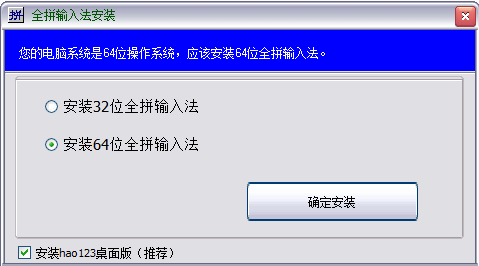
2. Please select the operating system you need. The editor here chooses 64-bit for installation.
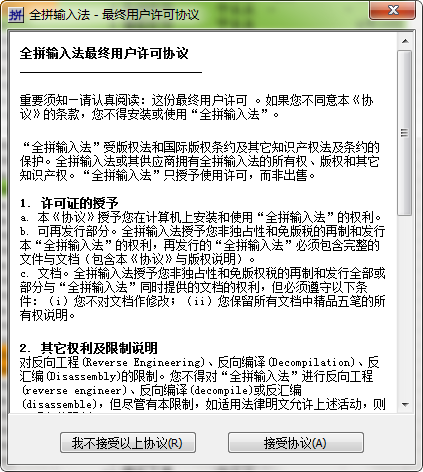
3. Then enter the QuanPin input method installation agreement interface. Please understand and agree before continuing [Accept Agreement]
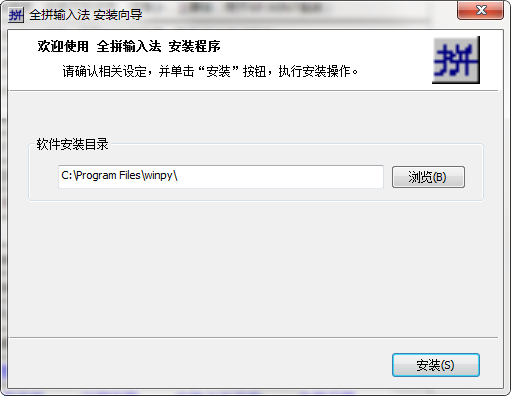
4. After agreeing to the agreement, enter the QuanPin input method installation path setting interface. Please select [Browse] to set.
5. Set up the complete input method to enter the installation interface, and wait patiently for it to be installed.
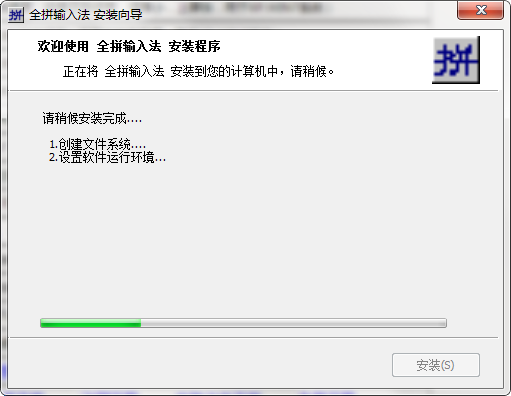
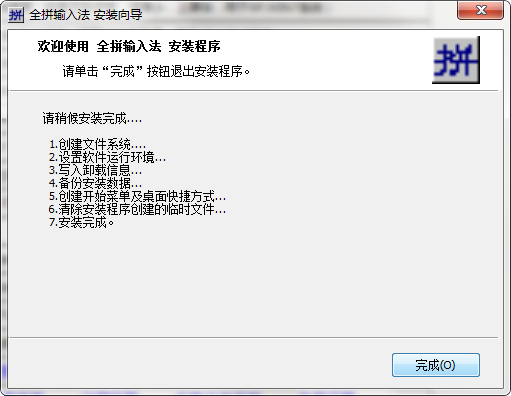
6. Finally, the QuanPin input method is installed. Click [Finish] to start the experience.
How to use Quanpin input method
1. Run and install the QuanPin input method. Follow the prompts to open the QuanPin input method.
2. If you want to use QuanPin input method directly, you can choose ctrl + shift to switch to QuanPin input method for typing experience.

3. If you want to set up some functions of the Quanpin input method, you need to first find [Start] - [All Programs]
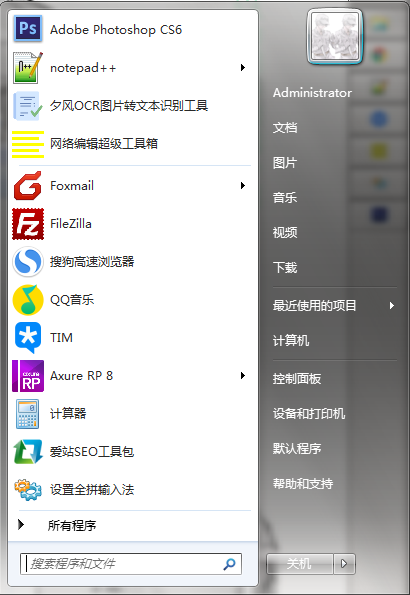
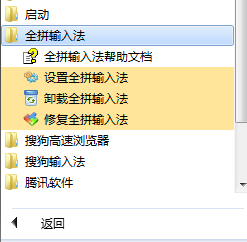
4. Then select double-click to open the [Quanpin Input Method] option and select - [Set Quanpin Input Method]
5. The following is the setting interface of Quanpin input method. Friends can set the information you need here. For example: word frequency adjustment is disabled, encoding is gradually prompted, etc.
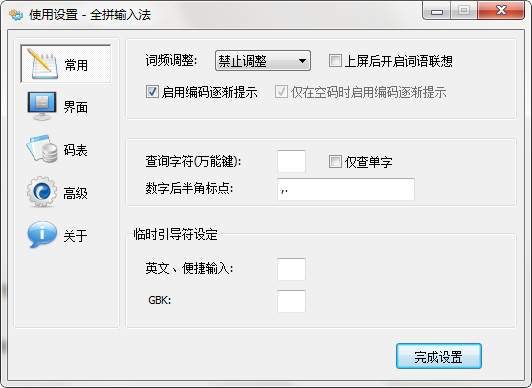
6. Friends can also select the left position function navigation to set the QuanPin input method interface information, such as: use skin, window layout, candidate arrangement, display position, etc.
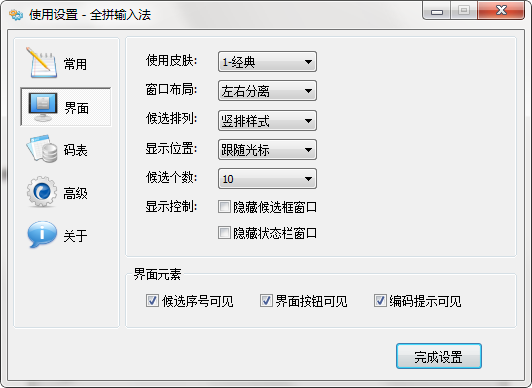
7. You can also set other options, just choose to open the settings.
Tips for using Quanpin input method
1. If you enter the wrong code, press Enter to clear it.
If the four codes are empty, the input box will not be locked. When entering the next input directly, the system will automatically clear the empty codes and assign a new input code.
2. The left Shift key can be set as a switching key between Chinese and English
Method: Right-click the input method status bar, select "Settings...", and check the item in the extended setting options.
3. Ctrl+Serial Number Manually adjust the sequence with repeated codes
If you enter IPTV, the double codes of "Party Committee" and "Standing Committee" will be displayed. "Party Committee" comes first and "Standing Committee" comes last. If you want "Standing Committee" to come first when typing again, use Ctrl+2 to enter.
4. Traditional Chinese input function enabled
Method: Right-click the input method status bar, select "Settings...", and check "Enable output of Traditional Chinese" in the extended settings options. Later, during use, input the simplified Chinese code and type out traditional Chinese characters (simplified input and traditional output).
5. Switching between GB/GBK character sets
Since the GBK font library is large and the characters are not commonly used (ordinary people don't use a few such characters in a year), in order to avoid too many repeated codes and improve input efficiency, the system defaults to the GB2312 input mode ("Best Wubi" on the status bar is black). If you want to input some uncommon characters such as "喆" and "镕", you can use the Ctrl+M keys to switch to GBK mode ("Best Wubi" on the status bar turns red), and remember to use Ctrl+M to switch back after inputting.
Frequently Asked Questions about Quanpin Input Method
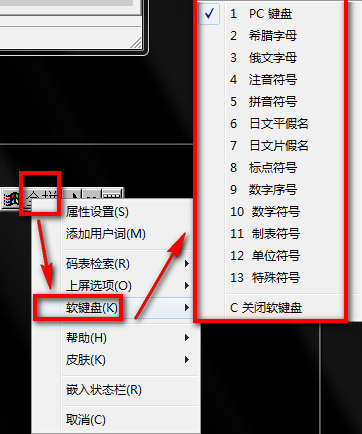
1. How to type symbols in Quanpin input method?
Directly call up the Quanpin input method, then select [Quanpin] - [Soft Keyboard] and select the symbol type you need. Such as: pinyin symbols, mathematical symbols, tabulation symbols, unit symbols, special symbols, etc.
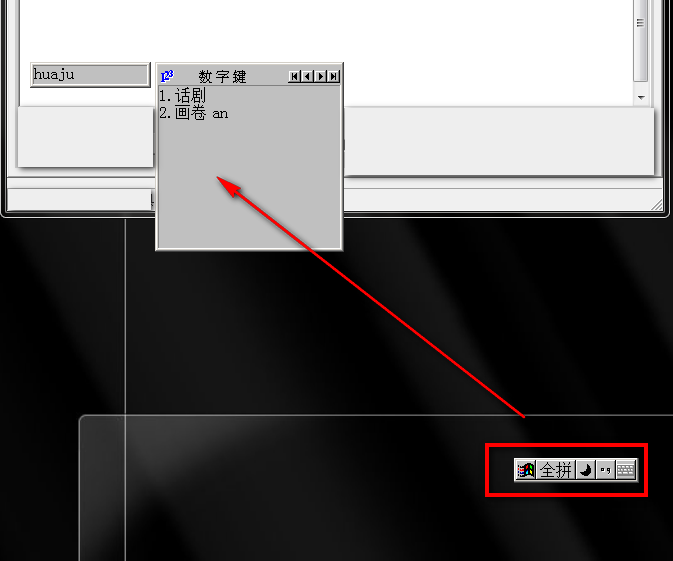
2. How to type using Quanpin input method?
First we need to call up the Quanpin input method, and then enter the pinyin of the text you need on the keyboard, and the following picture will appear: We can directly space it or select the corresponding small number to type it out.
3. How to type radicals using Quanpin input method?
When using the Quanpin input method to enter a radical, you must first know the pronunciation of the radical before you can enter the radical in Pinyin.
Is Shuangpin input method more efficient than Quanpin input method?
Quanpin input method is a tool that supports both single Chinese character input and double character input. Using the QuanPin input method, you only need to enter the corresponding radical pinyin and the corresponding radical will appear. The QuanPin input method also supports the input of traditional Chinese characters, but it will be a bit slow.
Shuangpin can be regarded as an improved version of Quanpin input tool, which allows people to input faster. In addition, the Shuangpin input method can also support custom functions. Users only need to understand the solution to be used to quickly get started.
Quanpin input method update log
fix bug
Optimize some functions
|
Huajun editor recommends: off the radical input tool? The editor recommends this Quanpin input method to everyone. The QuanPin input method software not only supports the input of commonly used characters, but also supports the input of radicals of commonly used characters. In addition, the QuanPin input method can also support the input of all Chinese characters that comply with GBK rules. In addition, the editor of Huajun has also collected and compiled other tools for you to choose and download, such as: stroke order (stroke) easy-code Chinese character input method, Jiugong Writing Pad digital Chinese character input method, etc. |























Useful
Useful
Useful