
Hot search terms: 360 Security Guard Office365 360 browser WPS Office iQiyi Huawei Cloud Market Tencent Cloud Store
Hot search terms: 360 Security Guard Office365 360 browser WPS Office iQiyi Huawei Cloud Market Tencent Cloud Store

Pinyin input Storage size: 1.17MB Time: 2022-03-04
Software introduction: Quanpin input method is a commonly used input tool. Friends can use Quanpin input method to input various characters and text radicals. All...
In the process of using the QuanPin input method, if you want to set some functions of the QuanPin input method, how should you do it? Today I will share with you the setting method of the QuanPin input method. Friends in need can come and take a look. I hope it can help you.
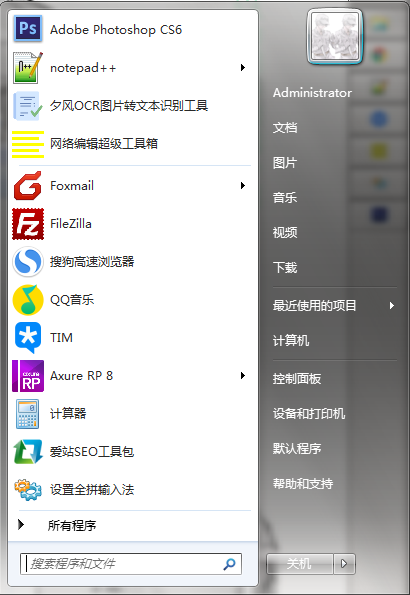
1. First, find [Start] - [All Programs]
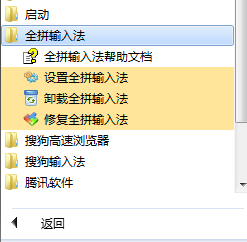
2. Then select double-click to open the [Quanpin Input Method] option and select - [Set Quanpin Input Method]
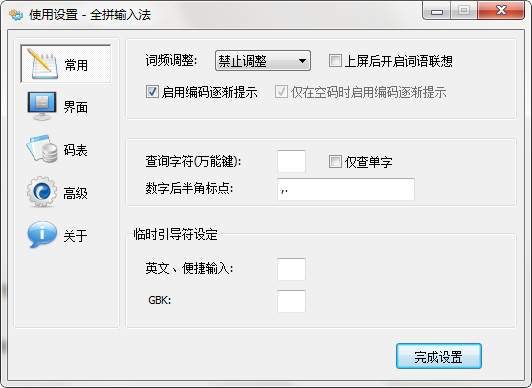
3. The following is the setting interface of Quanpin input method. Friends can set the information you need here. For example: word frequency adjustment is disabled, encoding is gradually prompted, etc.
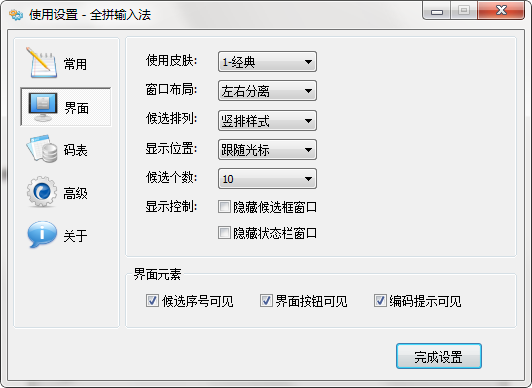
4. You can also select the left position function navigation to set the QuanPin input method interface information, such as: using skin, window layout, candidate arrangement, display position, etc.
5. You can also set other options, just choose to open the settings.
The above is the setting method of Quanpin input method shared by the editor. Friends who are not familiar with it should hurry up and learn it.

 How to add background music in python-How to add background music in python
 How to configure environment variables in python - How to configure environment variables in python
 How to run python - How to run python
 How to create a project in python - How to create a project in python
 How to make a blue sky background with scratch-How to make a blue sky background with scratch
 Microsoft Edge browser
 Steam
Steam
 Tencent Video
 WPS Office
 iQiyi
iQiyi
 Sohu video player
 Lightning simulator
 MuMu emulator
 Eggman Party
 What to do if there is no sound after reinstalling the computer system - Driver Wizard Tutorial
 How to switch accounts in WPS Office 2019-How to switch accounts in WPS Office 2019
 How to clear the cache of Google Chrome - How to clear the cache of Google Chrome
 How to fire bullets in scratch-How to fire bullets in scratch
