




- Green versionView
- Green versionView
- Green versionView
After years of development and improvement, the functions have become increasingly rich and powerful. It has not only broken through many key engraving design and processing technologies such as curved surface relief and equal-volume cutting, but also fully ensured the ease of use and practicality of the software products, greatly enhancing the processing capabilities of the Jingdiao CNC engraving machine and its ability to adapt to the diversity of the engraving field.
In terms of application fields, JDPaint software has completely broken through the more traditional engraving application categories suitable for signs, advertisements, architectural models, etc. It has also performed equally well in industrial engraving fields with higher technical thresholds, such as drop molding, high-frequency moulds, small hardware, glasses molds, copper electrodes and other manufacturing industries, and has become the best engraving software in the country.

Jingdiao software function introduction:
Industry customization
Based on years of accumulated processing experience and the processing characteristics of various industries, we customize professional and efficient programming solutions for customers.
Independent copyright
JDSoft SurfMill is a product independently developed by Beijing Jingdiao and does not involve infringement issues. Users can rest assured to use genuine software.
Simple operation
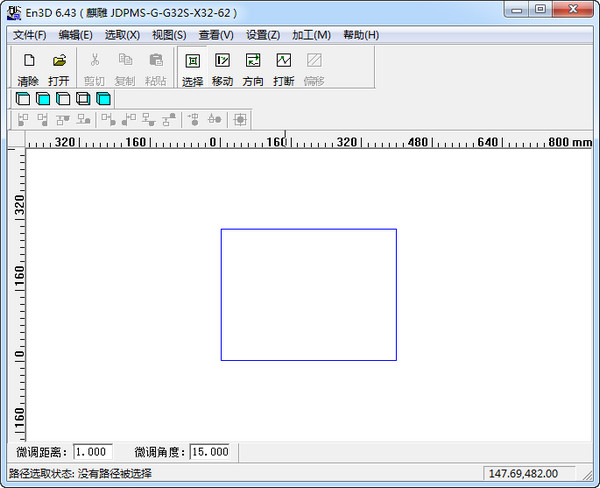
The intuitive and friendly user interface (GUI) is in line with Windows systems and popular CAD/CAM software operating habits. Both novices and experienced users can get started quickly.
Comprehensive functionality
Complete surface modeling and editing functions can meet the design needs of shoe molds, jewelry and processing auxiliary surfaces, etc., with high modeling efficiency. It supports 2~5-axis machining and path analysis and simulation; it has obvious advantages in small tool processing and five-axis machining.
Path safety
The software algorithm is advanced. During the path calculation process, it can perform overcutting checks and report detailed overcutting amounts and path segments where overcutting occurs. Through interference checking, interference and overcutting paths can be automatically deleted to ensure path safety.
Open NC
The software provides a post-processing customization platform. The processing paths generated by users in the software can be converted into processing path files for different CNC systems, which are widely applicable to different machine tool processing platforms.
Jingdiao software shortcut keys:
【File】【New】Ctrl+N to create a new document
【Open】Ctrl+O opens an existing document
【Save】Ctrl+S save active document
【View】【Rotate Observation】T Rotate and observe the graphics
【窗口观察】W对图形进行窗口放大
【Observe all】A displays all graphics in the entire working window
【Select Observation】S displays the selected graphics to the entire working window
【Last Observation】L restores to the last working window
【Full screen observation】C turns on or off the full screen drawing mode
【Redraw】RRedisplay the working window
【Capture】【Orthogonal Capture】O Turn on or off the orthogonal capture mode
【Automatic capture of feature points】E Turn on or off automatic capture of feature points
【Automatic capture of feature points】Toolbar Ctrl+F turns on or off the automatic capture of feature points toolbar
【Draw】【Straight line】L draws a straight line
【Arc】A draws arc
【Circle】C draws a circle
【Spline】N draws spline curve
【Rectangle】R draws a rectangle
【Polyline】Y draws polyline
[Edit][Undo]Ctrl+Z
Alt+Backspace to undo one step
【Cut】Ctrl+X
Shift+Del cuts the selected object and places it on the clipboard
[Copy] Ctrl+C
Ctrl+Ins copies the selected object and places it on the clipboard
[Paste] Ctrl+V
Shift+Ins insert clipboard content
【Delete】Del deletes the selected object
【Crop】Alt+8 to quickly crop graphics
【延伸】Alt+9非闭合图形延伸
【Round Corner】Alt+0 makes a smooth arc transition of a given radius between curves.
【Layer Management】Alt+L opens the layer manager
【Single line equal distance】Alt+5 will offset the given curve by a certain distance on one side of it.
【Region】【Region Equidistant】Ctrl+1 calculates the equidistant line of the contour curve area
【Region welding】Ctrl+2 The union operation of the curve outline area
【Region Cropping】Ctrl+3 Subtraction operation of curve outline area
【Region Intersection】Ctrl+4 Intersection operation of curve outline area
Jingdiao software update log:
1. Fix several bugs;
2. Optimize details;
Huajun editor recommends:
Huajun Software Park also has popular software with the same functions as this software, such as:Leyi integrated ceiling design software,Log volume calculator,Guangdong Provincial Enterprise Income Tax Declaration System,Pyle Glass Optimization Software,Agricultural Bank of China CertificateWait, you can collect it if you need it!





Useful
Useful
Useful