





Features of bird wallpaper software
Simple interface and rich functions
Since the name of Bird Wallpaper was changed, the interface has been continuously simplified, but the functions have not been squeezed, but more and more functions have been added.
together out
Vivid desktop live wallpapers make your computer screen more flexible and open up an immersive desktop experience.
With just one pull, the wallpaper will be changed
Users only need to click on the small icon on the desktop to change the wallpaper as they like. There will always be one that can win your favor.
Exclusive desktop, subscribe as you wish
Bird Wallpaper can create your own exclusive desktop for users, with various interesting and practical functions waiting for you to explore.
How to install bird wallpaper
1. Download the bird wallpaper from this site, unzip it and double-click to enter the installation wizard. Click [Browse] to customize the installation file location;
2. Click [Install Now];

3. Wait a moment and the bird wallpaper will be installed successfully.

Installation summary:First, download the software installation package of the bird wallpaper from this website, unzip it, open the exe file, and enter the installation wizard. Follow the steps to install according to the prompts. During installation, you can choose the default installation location or customize the installation location. After checking the corresponding shortcut, enter the installation program. After a short wait, the installation will be completed and enjoy this software.
How to use bird wallpaper
How to enable Bird Wallpaper Live Wallpaper:

First click on the dynamic wallpaper bar;
Select the dynamic wallpaper you want to change, you can choose to preview it, or change it directly.

Bird Wallpaper FAQ
1. Where to set the wallpaper download path for Bird Wallpaper?
Click the settings icon in the upper right corner of the software page, select "Software Settings", and find the download location option in the "Space Settings" below to set it.
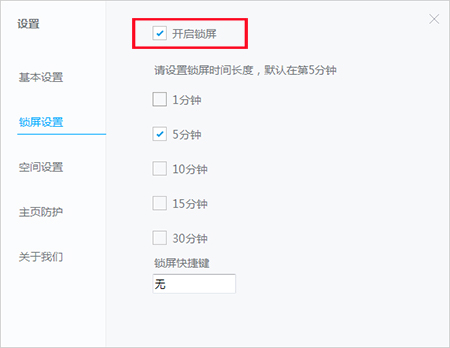
2. Where can I turn off the automatic lock screen function of the bird wallpaper if I don’t want to use it?
being clicked on “Lock Screen Settings” in the above settings interface, and you can see the “Turn on Lock Screen” option here, just remove the check mark in front of it.
3. Is Bird Wallpaper rogue software?
Bird Wallpaper is not a rogue software, Bird Wallpaper is a very easy-to-use and beautiful desktop wallpaper software.
Bird wallpaper update log
3.1121.1495.1103 Update date: 2021-11-05
1.Permission function optimization
3.1121.1490.1031 Update date: 2021-11-01
1. Optimize the installation interface
2.Adjust the personal center UI
3.1121.1480.1015 Update date: 2021-10-18
1.Fix related issues when closing the client
2. Optimize user experience
3.1121.1475.1008 Update date: 2021-10-11
1.Adjust the mobile terminal entrance
2.Fix known issues
Huajun editor recommends:
In addition to bird wallpaper, a very convenient desktop assistant, there are alsoSticky Memo,Daystar win7 desktop weather forecast software,AcerGridVista desktop split screen tool,Hide windows with one click,Desktop Notes for Kids Latest VersionRelated software is available for download. If you need it, please click to download and use it.

















Useful
Useful
Useful