




Software features
1. Innovative desktop switching mode
Personal/office desktop separation: Through preset shortcut keys (such as Ctrl+Alt+arrow keys), users can quickly switch to an encrypted personal desktop or office desktop to achieve complete isolation between work and privacy.
Improved security: Avoid the loopholes of traditional hidden windows and ensure the switching process is seamless and safe.
2. Core functions of privacy protection
Personal encryption disk: Create an encrypted disk partition, support any file storage, and prevent others from accessing sensitive data.
Screen camouflage: Modify the window title and attributes to make the window transparent or hide the content to achieve the "hidden" effect.
Privacy Cleanup: Completely clear Internet access records and office traces to protect user privacy from being leaked.
3. System Protection Trio
Virus protection: Kill hundreds of common Trojan viruses to ensure system security.
System Cleanup: Automatically clear system junk files to free up storage space without opening other cleaning software.
Memory optimization: Completely release the memory that has not been released by other software and improve system operating efficiency. It is recommended to replace traditional memory cleaning tools.
4. Security toolset
Desktop lock: Lock the desktop with a password to prevent unauthorized operations and protect work results.
Windows tool integration: Provides dozens of system tools (such as registry editing, service management, etc.) and supports personalized customization of system settings.
5. Compatibility and convenience
Widely compatible: supports Windows XP to Windows 10 systems, adapting to a variety of hardware configurations.
Simplified operations: Integrate shortcut keys and batch processing functions to improve user operation efficiency.
Software function
1. Privacy protection function
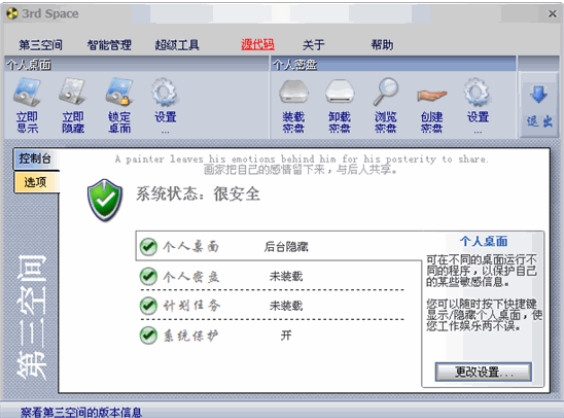
Desktop switching:
After starting the software, the personal desktop is automatically loaded, and you can switch to the office desktop at any time through shortcut keys and vice versa.
Supports custom shortcut key settings to adapt to different user habits.
Personal secret disk:
Create a virtual encrypted partition and automatically encrypt files when storing them. Access requires a password or fingerprint verification (depends on hardware support).
2. System maintenance function
Virus detection:
Scan system files in real time to detect and remove malicious programs such as Trojans and worms.
Supports custom scan scope (such as full scan, specified folder scan).
System cleanup:
Automatically clean temporary files, browser cache, recycle bin garbage, etc.
Provides "deep cleaning" mode to completely delete redundant registry entries and invalid shortcuts.
Memory optimization:
Monitor and release memory occupied by other programs to improve multitasking capabilities.
Display memory usage statistics chart to help users intuitively understand the status of system resources.
3. Security Tools
Screen disguise:
Modify the window title to "System Process" or custom text to hide the real content.
Supports window transparency adjustment to make sensitive operations "invisible".
Privacy Cleanup:
Clear browser history, cookies, input history, etc.
Supports trace cleaning of mainstream browsers (Chrome, Firefox, Edge, etc.) and office software (Office, WPS).
Desktop lock:
Lock the desktop with one click when you leave the computer, and you need to enter a password to unlock it when you return.
Supports automatic locking function (such as automatic locking 5 minutes after detecting that the user has left).
4. Customized functions
Windows tool integration:
Provides quick access to system tools such as the Registry Editor, Service Manager, and Task Scheduler.
Supports the creation of custom tool groups to centrally manage commonly used functions.
Theme and interface customization:
Change the software interface skin to adapt to different aesthetic needs.
Adjust font size and color to improve visualization experience.
Decompression password: www.downza.cn
FAQ
How to switch desktop?
The default shortcut key is Ctrl+Alt+left/right arrow keys, and users can customize the shortcut key combination in the settings.
Supports mouse gesture switching (needs to be enabled in settings).
Third space update log:
1: Optimized performance
2: We are serious about solving bug problems
Huajun editor recommends:
Third Space is a good desktop auxiliary software. If you are interested, please download it and use it. I believe you will like it.Sticky Memo,Daystar win7 desktop weather forecast software,AcerGridVista desktop split screen tool,Hide windows with one click,Desktop Notes for Kids Latest VersionIt is also a good software and is recommended for students to download and use.




Your comment needs to be reviewed before it can be displayed