





- Green versionView
- Green versionView
- Green versionView
- Green versionView

One-click repair of IE expert software function
【1】Repair function: It can repair the IE title bar, home page, right-click menu, toolbar button, toolbar menu, OutLook title, etc.; comprehensively repair various Internet options, including general, security, connection, content, advanced and other option settings; and provide a "one-click repair" function, which can automatically repair all settings with a single click.
【2】Automatic protection function: Real-time protection of IE homepage, right-click, toolbar, menu, OutLook title, Internet options, startup items and more than ten related settings, so that your IE can be safely protected and no longer attacked by malicious websites.
【3】Automatically intercept pop-up advertisements (supports interception of "Messenger Service" windows): The biggest feature is the intelligent identification of advertising windows. It only intercepts advertising windows and will not accidentally kill normal pop-up windows; it intercepts advertising windows before they pop up, effectively intercepting 99.9% of pop-up advertising windows, saving system resources and accelerating Internet browsing.
1). Provide the "friendly URL" function: When you visit the "friendly URL", IE repair experts will not intercept any pop-up web page windows. Supports adding, modifying, and deleting "friendly URLs" at will.
2). Provide "blocking log" records: all blocked advertising URLs are recorded, and you can directly add URLs that you do not want to be blocked to the "friendly URLs".
3). Provide "blocking prompts": when the advertising window is blocked, there will be floating window prompts, sound effect prompts, system tray icon flashing and other prompts, so that you can see the blocked ads at a glance.
【4】"IE Repair Expert Toolbar": integrated in the IE toolbar, providing a series of convenient and practical functions. Includes:
1). Search function: including GOOGLE search, Baidu search, MP3 search, software search, movie search, news search, etc.
2). Save webpage: You can download and save the current webpage with one click.
3). Other option settings: including multimedia option settings, ad blocking switch, automatic locking of IE window size and position, new IE window and other settings.
【5】Website organization function: including IE favorites URL here, and historical URL organization in the IE address bar drop-down box;
【6】Startup project management function: It is very convenient to manage programs that run automatically at startup; including adding, deleting, backing up, restoring and other functions.
【7】Process management function: can terminate any running program, including hidden running malicious programs;
【8】Privacy and security settings: including security restrictions, history, temporary files, cookies and other settings;
【9】Other settings: IE appearance personality settings, IE automatic search order settings, input method order settings, related system path settings, tray area time bar settings, etc.
【10】Supports automatic online upgrade of software: it can automatically detect the latest version, and fully automatically upgrade, download and install it. The software upgrade can be completed without manual intervention.
Features of one-click repair IE expert software
1. Restore the Host file to its default state.
2. Restore the protocol association.
3. Restore the protocol icon.
4. Restore file associations to their default state.
5. Restore the IE homepage.
6. Restore the IE proxy server to its default state.
7. Restore the network service agreement.
8. Restore the network protocol.
9. Remove the small shortcut arrow.
10. Restore the desktop cleaning wizard.
11. Restore IE shortcuts.
12. All IE auxiliary tools have been deleted.
13. Fixed the IE default searcher.
14. Restored IE title.
15. Delete the malicious IE icon and display the real IE icon.
16. Restore Internet options.
17. Restore favorites.
18. Recover web page video, sound, and pictures.
19. Restore IE right-click association.
20. Restore IE default toolbar.
21. The Registry Editor has been restored.
One-click repair of IE expert installation steps
1. Download the one-click repair IE expert from the Huajun Software Park and unzip it to the current folder. Click on the 1273035712.exe application to enter the installation wizard interface and select the software installation location interface. The editor of Huajun recommends that users install it in the D drive, select the installation location and click to install.

2. One-click repair IE expert is being installed, please wait patiently for a while.
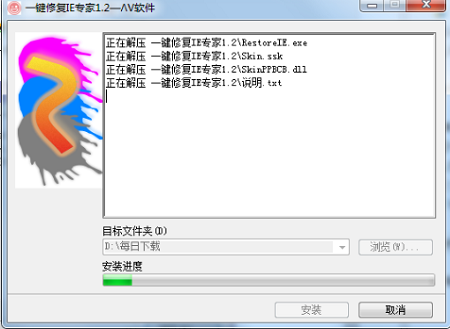
3. One-click repair IE expert is installed and you can click to use it.

Comparison of similar software
IE Repair MasterThe official version is a professional and powerful IE browser repair and protection software. The latest version of IE Repair Master supports IE repair, IE protection, ad blocking, URL filtering, privacy protection, process management and other functions, bringing comprehensive protection to users' browsers. IE Repair Master will protect users' network security, allowing you to surf the Internet to your heart's content.
Windows 11 one-click repair IE11 toolThe official version is a professional and easy-to-use system repair software. The latest version of Windows 11 one-click repair IE11 tool can help users deal with Windows The problem that IE browser cannot be used under the 11 system can be fixed with one click. The one-click IE11 repair tool for Windows 11 retains the IE11 kernel, and users can perform system repairs offline, which is convenient and practical.
Huajun editor recommends:
One-click repair IE expertThe latest version can detect rogue plug-ins related to computer IE and website navigation for users, and can help repair IE title bar, home page, menu, toolbar button, and toolbar menu with one click. One-click repair IE expert software is simple to operate, powerful, and easy to use. You can download it and try it. Everyone is welcome to download it.













Useful
Useful
Useful