




- Green versionView
- Green versionView
- Green versionView
- Green versionView
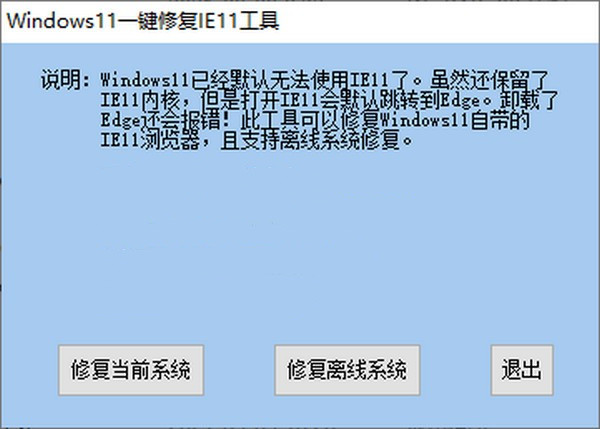
Windows 11 one-click repair IE11 tool software introduction
Microsoft has launched a preview version of Windows 11, but Windows 11 can no longer use IE11 by default. Although the IE11 kernel is still retained, opening IE11 will jump to the Edge browser by default. Even if the Edge browser is uninstalled or streamlined, an error will still be reported! This tool can repair the IE11 browser that comes with Windows 11, and supports offline system repair and PE-based target system repair. And IE11 desktop icons can be created in the case of desktop repair.
Windows 11 system highlights
New start menu
Windows 11 The start menu inherits the appearance attributes of rounded corners and frosted glass, and adds a search bar. Live Tiles were removed entirely, replaced by simplified “icons” and algorithm-driven recommendation lists. At the same time, the centered taskbar is nailed on, and it will appear by default regardless of new installations or upgrades. A switch will be provided to restore previous usage habits.
Search panel
The search panel is similar to Windows 10 and can provide search results for local, network, OneDrive and other locations. But since it is no longer separated from the start menu, the actual effect looks more uniform. .
settings panel
The settings panel has received a major overhaul, with a columnar layout replacing the previous menu options. It can ensure that users can jump to the required module at any time (the left navigation bar does not move).
Microsoft designed settings to be beautiful and easy to use. A left navigation bar has been added to Settings, and breadcrumbs have been added to allow users to navigate deeper into Settings to help users understand the path they are on. There are new controls at the top of the settings page that highlight key information and commonly used settings for users to adjust as needed. New controls span multiple category pages. Added expandable box for pages with lots of settings. The top tab bar also has a jump function .
New day/night theme
Windows 11 adds a new day and night theme, and the rounded corners + suspended frosted glass design makes the entire interface look brand new. Thanks to Fluent Design 3.0 With the addition of
Lock screen
The new version of the lock screen is similar to a mobile phone, with the time and date displayed in the center, no longer like Windows 10 The one in the lower left corner of the screen. The font is not Microsoft Yahei, but replaced with a brand new arc text. The schedule alarm clock is still displayed on the lock screen, but it cannot be opened by clicking on it like on the mobile phone.
File Explorer
Microsoft is modernizing File Explorer with a clean look and a new command bar, and app developers will be able to extend it with new context menus. File Explorer launches a new design and removes the pinned Ribbon Panel, commonly used commands are fixed on the toolbar in the form of icons. When different objects are selected, the corresponding icons will light up to remind the user which operations are valid. The new version of File Explorer replaces all previous functions with icons, and uncommon functions are hidden in “…”. Supports two styles: loose/compact, corresponding to tablet users and keyboard and mouse users respectively.
Windows 11 one-click repair IE11 tool update log
1. Repair [General] homepage settings, startup and other options.
2. Repair the [Privacy] InPrivate option.
3. Repair [Program] to open Internet Explorer, HTML editing and other options.
4. Repair the [Advanced] Reset Internet Explorer settings option.
Huajun editor recommends:
Windows 11 one-click repair IE11 tool software feels really good! The editor specially tested it for this purpose, and it works really well.Batch Butler,Cloud Machine Manager,Hard drive serial number reader,Quickly hide taskbar icon tool,Android Emulator MasterThese are all very good software tested by the editor, come and choose the one that suits you!




Useful
Useful
Useful