




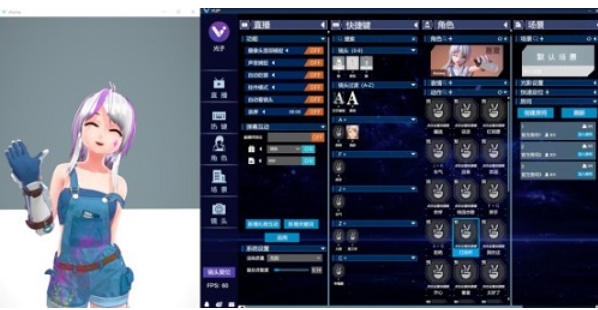
Software features
1. Precise capture technology
VUP software has excellent capture technology and can meet the needs of different users. It supports face capture using ordinary cameras, which means users don’t need to buy expensive professional equipment to achieve basic face tracking effects. In addition, for users with iPhone X or newer versions, VUP also provides targeted facial capture functions, further improving the accuracy and smoothness of capture.
In addition to facial capture, VUP also supports Noitom full-body motion capture and Hi5 finger capture. These technologies allow users to more precisely control the movements of virtual characters. Whether it is large-scale movements of limbs or subtle movements of fingers, they can be accurately captured and presented. In addition, VUP also has a high-precision sound capture function, which can capture and restore the user's voice, enhancing the interactivity and realism of virtual characters.
2. Resource customization and cloudization
VUP software provides rich resource customization functions. Users can customize and upload character models, actions, scenes and other resources according to their own preferences and needs. Not only can these resources be edited and adjusted locally, but they can also be uploaded to the cloud for storage and sharing. This means users can access their resources anytime, anywhere and share and communicate with other users.
In addition, VUP also allows users to edit resource parameters, such as adjusting the appearance of the character model, the speed of action, the lighting of the scene, etc. This flexibility allows users to create unique and personalized virtual characters and scenes to meet the needs of different scenarios.
3. Multiple people on the same screen/online
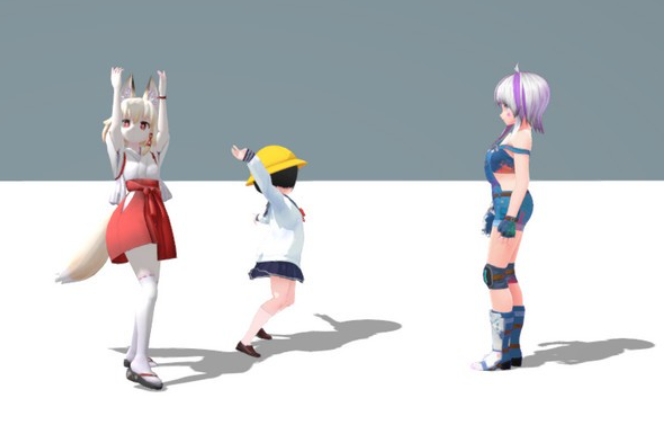
VUP software introduces the room concept and supports users to create and join rooms. Users can customize room parameters according to their own needs, such as room size, layout, lighting, etc. This allows multiple people to interact and entertain in the same virtual space, enhancing the fun and interactivity of virtual social interaction.
In multi-player mode, users can see the virtual characters and actions of other users and communicate and interact in real time. This multi-player online function is not only suitable for virtual live broadcasts, virtual meetings and other scenarios, but can also be used in virtual reality games, virtual social networking and other fields.
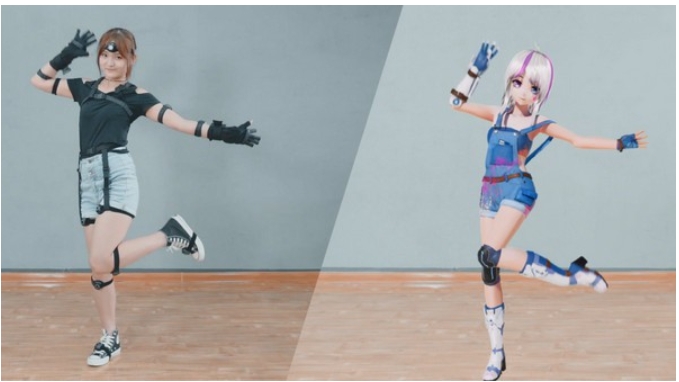
Software function
1. Virtual interaction
VUP software relies on its precise capture technology to provide users with the function of virtual interaction between multiple people on the same stage across platforms. This means that users on different platforms can interact and communicate in real time in the same virtual space. Whether it is facial expressions, body movements or sounds, they can be accurately captured and presented, thereby enhancing the immersion and realism of virtual interactions. This function is especially suitable for virtual live broadcasts, virtual meetings, virtual reality games and other scenarios, allowing users to experience richer social interactions in the virtual world.
2. Animation production
The official version of VUP allows users to edit actions, expressions, scenes, characters, shots, audio and other data on the timeline to generate animated videos. This feature provides users with great creative freedom, allowing them to finely adjust and edit each element according to their creativity and needs. Whether it is producing a simple animated short film or a complex virtual character performance, VUP can meet the needs of users. In addition, users can also export the produced animated videos to multiple formats to facilitate sharing and dissemination on different platforms.
3. Social entertainment
The VUP software also supports users to create and join rooms to enable multi-person online entertainment. This feature provides users with a virtual social entertainment space where they can meet new friends and participate in various interesting interactive activities. Whether it's a teamwork game challenge or a casual chat, it can all be realized in this virtual space. This social entertainment function not only enriches users’ leisure life, but also helps improve users’ social skills and teamwork capabilities.
FAQ
Can't capture the face with the camera?
Check whether the "Camera Face Capture" button is turned on.
Check whether the input device under face capture of the VUP camera is selected correctly.
Confirm that the camera can be used normally and that multiple programs are not being used at the same time.
Face expressionless, missing expression, abnormal expression?
Confirm whether the character model itself has an expression.
Check whether the expression channel has been matched to the model in VUP, and the face capture channel is correctly matched.
Character unable to turn or move?
Confirm whether you have clicked on any area of the display window to focus.
Check whether the direction keys and shortcut keys are set correctly and try to set them again.
VUP update log:
1. Fixed several bugs;
2. Optimize details;
Huajun editor recommends:
VUP is a software that does not require learning to use. It is a very simple tool. Users in need can download and use it in the Huajun Software Park. You are guaranteed to be satisfied. In addition, there are many similar software of the same type available for download, such as:Magic Show Live Companion,Paracraft creative space,MP3 automatic player timing editing software,Hanbang Hi-Tech Player,Yijie competition party random question setting softwareWait.




Your comment needs to be reviewed before it can be displayed