





Features of Kugou Live Companion Software
In-depth integration of Kugou music resources: built-in tens of millions of genuine music libraries, covering all categories of music such as pop, classical, folk, etc., anchors can search and play background music in real time to avoid copyright risks.
Intelligent playlist management: Supports the creation of exclusive playlists, quick switching of live broadcast background music, and improved live broadcast fluency.
Real-time sound effect adjustment: Provides parameter customization such as reverberation, equalizer, and noise reduction, and supports interesting sound effects such as electronic music and voice change to meet the needs of different live broadcast scenarios.
Virtual sound card technology: Through virtual audio channels, the microphone and background music are processed independently to ensure perfect integration of vocals and accompaniment.
Smart beauty filter: supports real-time beauty effects such as skin resurfacing, face slimming, and eye enlargement, and can adjust the intensity to adapt to different light environments.
3D avatar: Provides animation, cartoon and other style avatars, supports motion capture and expression synchronization, reduces the pressure of real people appearing on camera, and increases interactive fun.
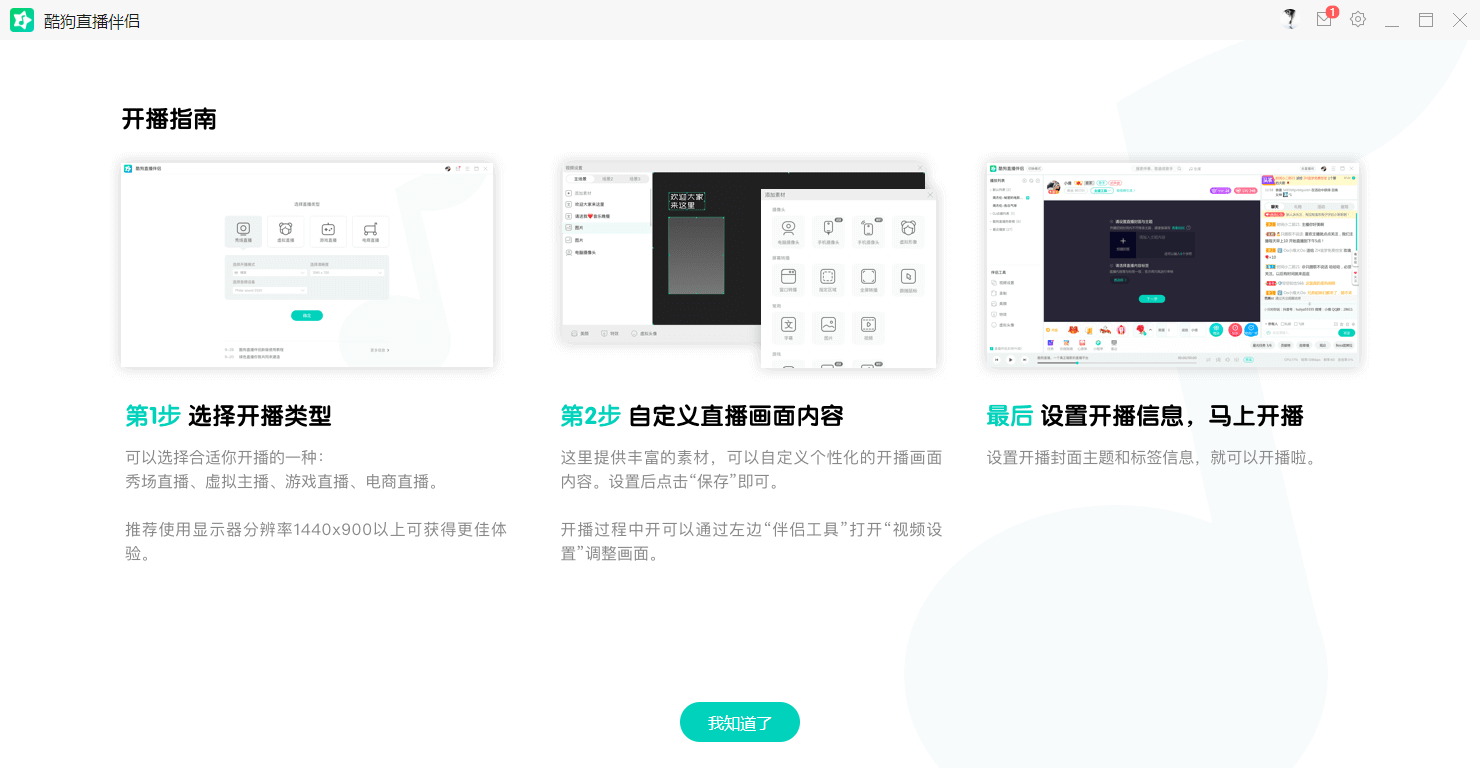
Features of Kugou Live Companion
Direct connection to genuine music library
Connected to the Kugou Music platform, it provides a library of tens of millions of genuine songs that anchors can search and play with one click to avoid copyright risks.
Supports filtering songs by language, style, age and other tags to quickly match live broadcast themes.
Intelligent accompaniment processing
Vocal separation technology: The original singer and accompaniment of the song are automatically separated by AI algorithm. The anchor can freely choose to sing a cappella, sing along or switch accompaniment versions.
Variable speed and pitch: Adjust the song speed (such as speeding up the singing practice rhythm) or pitch (such as adapting to the host's voice) without re-recording.
Professional mixer
Real-time sound effect adjustment: built-in 10-band EQ equalizer, compressor, reverb, echo and other plug-ins, supporting custom parameters (such as reverberation time, compression threshold).
Preset sound effect templates: Provide scene-based sound effect templates such as "concert", "recording studio" and "KTV", and switch styles with one click.
Multi-channel management: Independently control the volume of microphones, accompaniments, game sound effects and other sound sources to avoid sound conflicts.
Dynamic lyrics display
Synchronized scrolling of lyrics: Display lyrics in real time in the live broadcast screen, supporting adjustment of font, color, size and animation effects (such as gradient, flashing).
Bilingual lyrics switching: Chinese translations of foreign-language songs can be displayed simultaneously to enhance the audience's singing-along experience.

Highlights of Kugou Live Companion Software
4K ultra-clear push streaming
Supports the highest 4K resolution (3840×2160) output, with 60 frames smooth picture, meeting the needs of large-scale performance live broadcasts.
Hardware-accelerated encoding: Use NVIDIA NVENC or Intel Quick Sync technology to reduce CPU usage and ensure smooth multitasking.
Lossless audio transmission
Using AAC-LC audio encoding, the sampling rate supports up to 48kHz/24bit, retaining music details and avoiding sound quality loss.
Low-latency mode: Optimize the audio transmission link and control the delay within 1 second, suitable for real-time interactive scenarios.
Intelligent noise reduction and echo cancellation
AI noise reduction algorithm: Automatically filters out environmental noise such as keyboard sound and air conditioner sound to highlight the clarity of human voices.
Acoustic Echo Cancellation (AEC): Eliminates feedback echo between the microphone and speaker to avoid howling during live broadcast.

FAQ:
Screencasting problem
Wireless screencasting failed:
Make sure your phone and computer are on the same Wi-Fi.
Try setting the number of projection frames to 30, the projection resolution to the same phone screen, and adjust the decoding method (such as hard decoding shared memory, hard decoding shared texture, soft decoding).
Manually turn off Windows Firewall and cast the screen again.
If the problem persists, try connecting to the mobile hotspot to cast the screen to determine whether it is a router problem.
Restart your phone and computer and try mirroring again.
Uninstall Live Companion, delete related files, reinstall it, and try screencasting again.
Wired screencasting failed:
Make sure the USB data cable you use is an original or MFI-certified USB fast-charging data cable.
When connecting your phone to your computer, check to see if there is a prompt to install the driver and allow the installation.
Wait for the driver installation to complete, then replug and unplug the data cable.
Make sure that the live broadcast companion has added the corresponding screen casting materials and correctly selected the screen casting method.
Kugou Live Companion Update Log
1. Sweep the bug out and carry it out to the end
2. The most stable version ever
Huajun editor recommends:
Kugou Live Companion is a software that does not require learning to use. It is a very simple tool. Users in need can download and use it in the Huajun Software Park. You are guaranteed to be satisfied. In addition, there are many similar software of the same type available for download, such as:Magic Show Live Companion,Paracraft creative space,MP3 automatic player timing editing software,Hanbang Hi-Tech Player,Yijie competition party random question setting softwareWait.



















Useful
Useful
Useful