




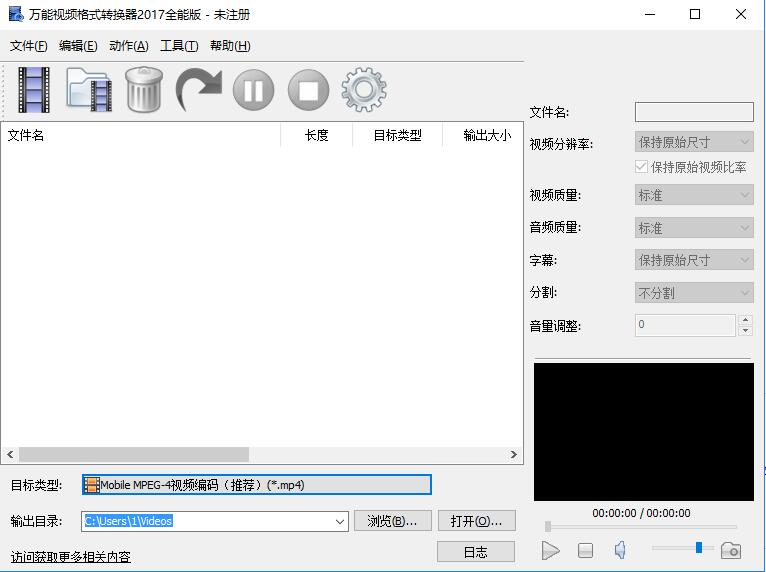
Universal video format converter software introduction
It is a comprehensive and easy-to-use video format conversion tool that uses the most advanced technology to support multiple video format conversions. You can use it to convert between almost all popular video formats. Such as: rm, rmvb, avi, avi, wmv, mpg , mpeg, flv, 3gp, mp4, swf, asf, divx, xvid, 3gp2, flv1, mpeg1, mpeg2, mpeg3, mpeg4, h264 and other video files are edited and converted into audio and video formats supported by mobile phones, mp4 machines and other mobile devices.
Features of Universal Video Format Converter Software
The software uses the most advanced encoding and decoding technology, with fast conversion speed and high definition. You can arbitrarily set the parameters of the output video, such as video size, video quality, frame rate, audio sampling rate, audio quality, etc., to control the output file size and clarity. It has the characteristics of simple, fast and high-quality conversion.
Mobile playback devices have also been supplemented, such as iPhone, iPod, PSP, Meizu, mobile phone, etc., so that you don’t need to study the playback formats corresponding to different devices. Instead, you can directly select the device model in your hand from the list of format factory, and you can easily start the conversion, meeting the needs of the majority of mobile users faster and more conveniently.
It is a software for professional video conversion and compression. It adopts the latest international first-class coding and decoding technology. The conversion quality and speed are among the leading domestic technologies. It has fast conversion speed, supports batch conversion, and can pause the conversion at any time during the conversion process. It is easy to get started and easy to operate. It is an essential video conversion tool commonly used on computers.
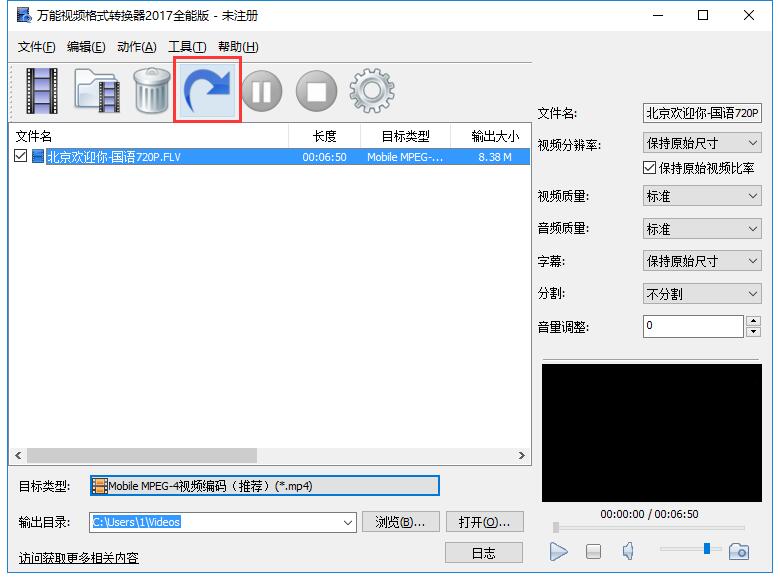
When using it, you only need to add the audio and video files to be converted to the software window, select the target type to be converted and output, and click the button to start the conversion. The progress status will be displayed during the conversion process. For users with special requirements, you can set video resolution, video quality, audio quality, split size, volume adjustment, etc.
Highlights of Universal Video Format Converter Software
Convert multiple video formats
Supports the conversion of rm, rmvb, mpeg, avi, mp4, 3gp, flv, wmv, swf, mpg, 3gp2, asf, mpeg1, mpeg2, mpeg3, mpeg4, h264, flv1 and other videos to 3gp format, 3gpp2 format, mp4 format, avi format, flv format and other commonly used video formats.
iphone video converter
Specially designed for Apple iPhone series mobile phones, supporting iphone6(plus), iphone5(s), iphone4(s), iphone Video format conversion for mobile phones such as 3gs can quickly convert avi, mkv, rmvb, dvd, mts and other video formats into iphone video files, and fully supports iphone high-definition movie format conversion.
ipad video converter
Support for apple ipad/iphone/ipod video conversion tool, it can help you convert almost all popular video formats, such as: rm, rmvb, vob, dat, vcd, dvd, svcd, asf, mov, qt, mpeg, wmv, Convert mp4, 3gp, divx, xvid, avi, flv and other video files to video formats supported by apple ipad/iphone/ipod.
Fast and stable conversion
It is a comprehensive and easy-to-use video format conversion tool that uses the most advanced technology to support multiple video format conversions. You can use it to convert between almost all popular video formats.
Support all video formats
Supports mp4 format, mov format, mkv format, avi format, wmv format, m4v format, mpeg format, ogv format, 3gp format, flv format, f4v format, swf format
Support all audio formats
Supports mp3 format, ac3 format, wav format, m4v format, m4a format, wma format, aac format, ape format, swk format
Easy, convenient, simple and easy to use
It’s easy to use, just add or drag and drop the video and audio files that need to be converted into the software, and perform batch conversion with one click.
Support devices
The converted video is adapted to: oppo, vivo, Xiaomi, Huawei, Samsung and other Android phones; converted to video formats supported by apple ipad/iphone/ipod.
Universal video format converter installation steps
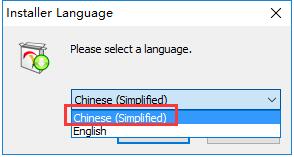
1. Download the official version installation package of Universal Video Format Converter from Huajun Software Park. After unzipping, double-click the "exe" file, select the language, and click OK
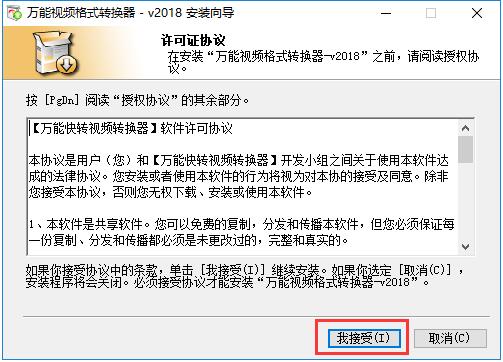
2. Read the license agreement and click I accept
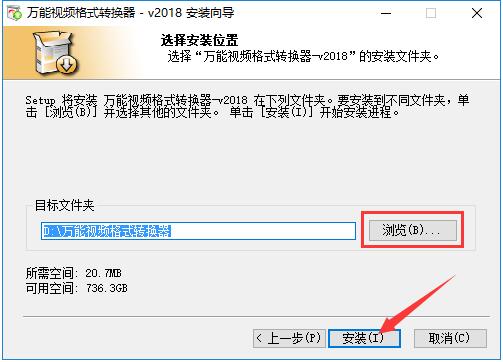
3. Click "Browse" to select the installation location. Generally, it defaults to the C drive. It is recommended to install on the D drive. Click Install.
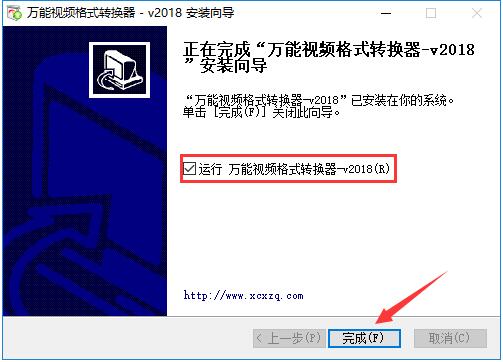
4. The installation of the universal video format converter is completed, click Finish to exit the installation wizard
How to use universal video format converter
How does Universal Video Format Converter convert qlv format videos?
1. The method of converting qlv format video and other video files with Universal Video Format Converter is the same. First, we open the installed universal video format converter and click the button in the upper left corner as shown in the picture.

2. A window for adding files will open. We find the video file that needs to be converted, use the left mouse button to click on the file, and then click the "Open" button at the bottom right of the window to add it to the list.

3. Then click to open the selection box after the "Target Type" below to select the file format that needs to be converted. Then click the "Browse" button behind "Output Directory" to modify the converted video file storage directory.

4. Then set the converted file name and video-related attributes on the right side, and there is a video preview window below where you can browse the video.

5. Then click the button as shown in the picture to start the conversion. The conversion speed varies according to the size of the video file, please wait patiently.
Universal video format converter update log
The developer of GG said that there are really no bugs this time~
Huajun editor recommends:
Universal Video Format Converter is very simple to use, and the optimized interface allows you to easily find the functions you want. Come and download it. The editor has also carefully prepared for youSummit FLV Video Converter,Format Factory Green Edition,Haoyi MP4 format converter,Yijie AVCHD HD Video Converter,Hurricane Video Conversion Tool




Useful
Useful
Useful