





iStonsoft iOS ManagerFunction introduction
Transfer or edit up to 10 types of files from your video device to your computer;
Import contacts, calendars, and bookmarks from PC to iPhone, iPad and iPod.
iStonsoft iOS ManagerSoftware features
1. Effectively transfer data between iDevices and computers
During daily use of iPhone, iPad or iPod, you may need to move data space between the device and computer or other issues, but we all know that Apple does not allow its users to achieve this with a simple USB cable. Now, after having this iOS, Manager program, you will never feel troubled. With it you can:
1. Supports more than 10 types of files on iDevice, including contacts, messages, photos, music, videos, call logs, notes, travel bookmarks, books, purchased items, etc.
2. Export contacts and save them in CSV, VCF and XML formats on your computer.
3. Transmit and save output text messages into HTML, text, CSV and DB formats.
4. Import data, such as contacts, calendars, bookmarks, etc. from computer to iPhone, iPad or iPod.
2. Freely manage, create, edit, delete or view data
As a professional management tool, iStonsoft, iOS, Manager allows users to easily organize, create, delete, and edit files on iDevices.
1. Create, edit or delete iPad, /, iPhone, /, iPod contacts, messages, call records, playlists, etc. according to your preferences.
2. Import, export, add albums, delete and other media files with just a few clicks.
3. Directly access and view all iPhone, iPad or iPod data on your desktop computer.
3. Manage various applications directly on your PC
Apps on your iPhone, iPad or iPod sometimes seem to be a mess, right? Sometimes you may want to view them in a specific order so that you can manage them efficiently? Therefore, this iOS manager will be the best solution for you. With it you can:
1. Access and view all apps on your iPhone, iPad or iPod in list mode.
2. Uninstall or delete any unwanted apps from iDevice with just one click.
3. Back up apps from iDevice to desktop computer without hassle.
iStonsoft iOS ManagerInstallation steps
1. Download the software, unzip it, double-click the installation file, enter the installation interface, and click Next

2. Read the installation agreement and click I accept.

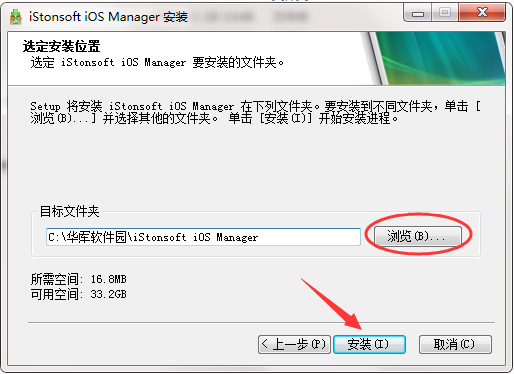
3. Click to browse, select the installation location, and click to install
4. The software is installed successfully, click Next

5. Click Finish

iStonsoft iOS Manager update log
1. Modify user-submitted bugs
2.Add new features
Huajun editor recommends:
iStonsoft iOS Manager is a widely used and powerful free mobile phone management. The latest version of iStonsoft iOS Manager has received unanimous praise from many netizens. It is highly recommended that everyone download and use it. In addition, there areCloud instant mobile assistant,EaseUS iPhone data migration software Mac version,Crazy Apple Repair Master (iMyFone Fixppo),Xixinding mobile phone positioning software (Windows version),Cloud Control MasterIt is recommended for everyone to download and use.




Useful
Useful
Useful