



- Green versionView
- Green versionView
- Green versionView
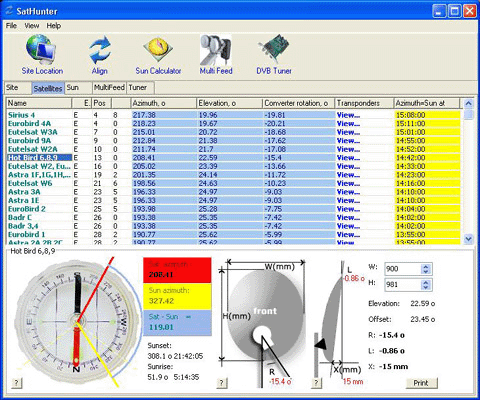
High latitudes are specified by "N" characters, low latitudes are specified by "S" characters. Likewise, east longitude has an "E" character, while west longitude has a "W" character. After all the coordinates have been entered, you will see a calculation sheet for all satellites once left. Their azimuth and elevation angles are calculated. Azimuth is the direction of the satellite from north in a clockwise direction. Elevation angle is the angle (in degrees) between the direction of the satellite signal, its position on the Earth's surface, and the tangential plane. If the altitude is negative and the satellite is below the horizon, receiving a signal is in principle impossible. Therefore, a satellite whose elevation is a positive value is theoretically visible from your location. If you know the azimuth, you can quickly find the direction of the satellite and see what obstacles (neighboring houses, trees) are there from the satellite signal in the way to your dish.
As this is mentioned above, this program uses absolute values and formulas to calculate everything. Therefore, the calculated bearing is from true north and from that your compass may not show the angle, especially in a city because a compass is a very unstable thing. It is better to east, the sun)
Furthermore, the program has a mechanism for calculating the orientation of the sun and you can now do everything without a compass! Azimuth calculated coordinates calculate the azimuth angle of a satellite for a specified position. You can specify a date (the current date is the default) and calculate the movement of the sun in one minute of discontinuous motion. The calculation results are shown in the table on the left. Calculate the position and altitude of the sun at the current moment in time. Therefore, you can install a satellite dish without a compass at all. First, find the azimuth of the satellite you need. Then calculate the direction of the sun for the day for the dish you want to install. Find the azimuth of the satellite that is closest to the sun, and you will see the time (and date) when the sun will be in the same direction as the satellite's azimuth. When the dish sun is turned on at a specified time, the azimuth of the sun is exactly the azimuth of the satellite at this time. Or just note this direction and install the disk later. Remember to specify your time zone for calculation (Moscow: 3GMT). The program also calculates the azimuth of sunrise and sunset, as well as the time and altitude when the sun is directly in the south.
The program utilizes a simple diagram representing the four directions. The yellow sector is daytime, and its eastern portion is sunrise and sunset to the west. The same diagram can be used, with the schematic representing the direction of the satellite you need. Selecting a satellite and red line from the drop-down list will display the direction (azimuth). If the altitude is negative, no red line is drawn (the satellite is not visible).
Offset satellite dishes are now widely circulated. When such a dish is completely vertical, it already has a certain altitude (about 20-25 degrees). You can enter the size (height and width) of your offset dish and the program will calculate the exact altitude of this dish. The calculation is made only for dishes whose height is greater than their width. Enter the size of the disk in millimeters. Here you will see the altitude and angle of the selected satellite where you should actually mount your dish (degrees from the earth's surface).










Useful
Useful
Useful