If you are looking for software to use, go to Huajun Software Park! software release AI product list

Hello, if there is a need for software inclusion, please package the software and attach the software name, software introduction, software-related screenshots, software icon, soft copy, business license (if you do not have a business license, please provide the front and back of the corresponding developer ID card and a photo of yourself holding the ID card), and send it to email http://softwaredownload4.com/sbdm/user/login

Close >>

Send to email:news@onlinedown.net

Close >>

Location: Home pagePC softwareNetwork softwarenetwork sharing Yeye wifi sharing wizard
Yeye wifi sharing wizard

Yeye wifi sharing wizard 1.0.2 green version

QR code
  • Software licensing: free software
  • Software size: 0.42MB
  • Software rating:
  • Software type: Domestic software
  • Update time: 2024-12-26
  • Application platform: WinAll
  • Software language: Simplified Chinese
  • Edition: 1.0.2 Green version

Network sharing word-of-mouth rankings

Download the service agreement at the bottom of the page

Software introduction Related topics FAQ Download address

Basic introduction
Yeye wifi sharing elf segment first LOGO
Yeye wifi sharing wizardIt is a network sharing software. As long as your computer has a wireless network card, you can use Yeye WiFi Sharing Wizard to turn your computer into a WiFi hotspot and let other wireless devices share the Internet.

Instructions for use
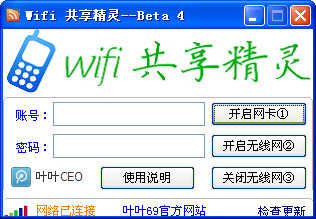
Screenshot of Yeye wifi sharing wizard

Things to note:YeYe WiFi Sharing Wizard only supports WIN7 operating system. Please make sure the wireless network card driver is the latest version before using it.

The account is not allowed to use Chinese characters!
Please use more than 8 characters of English and letters for your password!
Please right-click to run this software as administrator!

1. NAME: The name of the wireless AP to be turned on
2. PASS: Password of the wireless AP to be turned on
3. LINE: The name of the network card you are currently using to access the Internet is local connection or wireless network connection. Please modify it yourself! My current wireless network connection
4. DUMMY: The network card name of the enabled wireless AP. My current one is Wireless Network Connection 2 (there is a space in front of 2!

 

FAQ

Yeye wifi sharing wizard

Yeye wifi sharing wizard 1.0.2 green version

close